File Size: 1.53 MB
Downloads: 577
Rating: 5.0 (7 votes)
Description
This is the newest test element of the Aperture Laboratories after an idea of Moth. This is not just a ball, it's a bumbleball. This means it jumps, bounces and even moves... if you don't watch it! In this pack there are 4 instances: -A normal sphere button specialized for the bumbleballs, not useable with other objects. -the single bumbleball -droppers for bumbleballs, dirty and clean If the bumbleball is outside of the players view it will bounce around every 2. second. It will make a distinctive sound when bouncing so the player can hear it. When on a button, the ball won't bounce, move or whatever. The .PSD file for custom textures is added. You can make up to 16 skins (value 15 in Hammer Editor). If you want to paint it, it will get colored but wont jump or glide. Thats because its a normal prop_physics. Prop_physics_paintable is not recommended because it will get the paint settings, but wont get any visible paint color. To dissolve the ball, for example in water, FireUser4 on it.

Comments
Sign in to comment.

https://developer.valvesoftware.com/wiki/Bumbleball
Please give us your vote!
We've been having fun with this for weeks already: it's mischievous - as long as you keep it in sight, it won't move. Tests involving LOS-blocking walls, narrow walkways and water/fizzler hazards are hilarious fun!
Before anyone tries to compare this to a regular sphere, they're very different - we also worked hard to ensure they don't just behave the same way as blue painted cubes - they feel organic and 'alive' - very Aperturey!
Rather than provide an introductory map, we thought we would leave it to the community mappers to introduce the bumbleball in interesting ways to new players. We also need multiple bright plastic skin variations - like this:


We're hoping to feature the bumbleball extensively throughout The Citruz Project.
Also important to note that all this is implemented with NO SCRIPTING REQUIRED!
Just drop an instance into your map, and you're good to go!
This is impressive!
I would like to have a check this afternoon! The potential for puzzles is HUGE! That feature about bouncing if the player stops from keeping an eye on it is AWESOME!
Even without having tried yet...
CONGRATULATIONS!
Hey there.
Just tried that thing out and really like it.
The sound is kind of funny, because if you don't have a clue, it's moving you
would probably wonder where the sound comes from - then turn around and be
surprised how far away you placed that ball. 
It's definitely a very nice idea and instances are working very well.
I was looking how you build up this cube and also into the Outputs and have to say: well done!
Thanks for sharing - would love to see this idea in some maps.
Regards
PortalCombat
Couldn't you use the other skins for when it's painted? I know the cubes do something like that, in the code.
This looks like a great mod! I'm imagining some tests with it now.
We reserve two skins for paint effects, so yes this would be perfectly acceptable, since it's how valve props work when they're painted:
If -> ball is painted blue -> change to skin 1 (blue paint)
If -> ball is painted orange -> change to skin 2 (orange paint)
This is pretty cool. are you aware that if you watch them through portals they still move?
Spam Nugget wrote:
This is pretty cool. are you aware that if you watch them through portals they still move?
Yes they should move if you watch them through Portals. I can't solve this problem.
Painting would be possible, but there is no input or entity that recognizes the type of paint the ball has, so the skin can't get chosen right.
Skotty wrote:
Spam Nugget wrote:This is pretty cool. are you aware that if you watch them through portals they still move?
Yes they should move if you watch them through Portals. I can't solve this problem.
Painting would be possible, but there is no input or entity that recognizes the type of paint the ball has, so the skin can't get chosen right.
You could however cheat: make it that you can only hold the cube under the dropper then use a math_counter or something to know which paint is in that area, then use the onpainted output on the bumbleball?
Edit: or be a bit more tricky, make it so that you can infact make a portal, but use a portal detector to see if it can be painted that way? I dunno... just my two cents 
If you want to do this, make it. I won't do it because I got a "simple" explaination: Because of the spikes and the bouncy material the sphere cant accept paints because they wont affect it 
Skotty wrote:
If you want to do this, make it. I won't do it because I got a "simple" explaination: Because of the spikes and the bouncy material the sphere cant accept paints because they wont affect it
Fair enough 
Can you give me information on how this works? Once you download what do you need to do?
Thanks!
You put the models and materials to your Portal2 folder.
The VMFs are instances, so put them anywhere in your maps/instances folder.
After that just integrate the instances via func_instance to your map.
note the correct paths for the materials and models are:
portal2/portal2/materials
portal2/portal2/models
Don't forget the 'valve double folders' or it won't work.
I really like it, maybe it will be placed in a map in our upcoming mod. Not sure though
An alternate bumble ball instance is available here:
http://www.mothdesigns.co.uk/citruz/wp- ... _bouncy.7z
(credit goes to Chicken Mobile)
This version uses an env_physexplosion instead of a env_shake, so the bumbleball will now actually bounce around rather than just quiver on the ground or simply roll.
Further information and variations of the bumbleball can be found on the Team Citruz wiki 'Bumbleball' page.
For the paintlessness, to make it even cooler, put the water splash particle system on it and trigger it when it's painted. That way, it's not a bug, it's a feature!
This looks brilliant, but is there anyway to make the detection work through portals? Perhaps use some sort of object parented to the portal?
How did you make the template spawn where the maker is now instead of just where it started?
it looks great, but i dont know how to use Hammer (even though i have it installed) and only thing i can do is open a world to edit. so, is there any way to spawn it with Console Command in-game?
How do I configure the button?
I dont know how and I'm trying to open the door with the bumbleball.
I typed in next to the "$onpressed" is "exit_door/open" and I know this isnt correct!
cheers!
portal30001 wrote:
How do I configure the button?
I dont know how and I'm trying to open the door with the bumbleball.
I typed in next to the "$onpressed" is "exit_door/open" and I know this isnt correct!
cheers!
Moderator note: I've deleted your double post. Just wait a little bit longer next time before pressing the post button again
portal30001 wrote:
How do I operate the button though?
- Add the bumbleball dropper to your map
- Give it a name (bbdropper)
-
Add a button; Give it OnPressed; bbdropper; "instance:Spawn;Trigger"
-
Add the bumbleball button.
- Create a relay with the outputs that should be done when the button is pressed (bb_pressed_relay)
- Do the same thing for bb_unpressed_relay.
- Go to the bumbleball button again
- Go to Replace, $OnPressedRelay and replace ??? with bb_pressed_relay
- Replace $OnUnPressedRelay's ??? with bb_unpressed relay.
That should do it.
lpfreaky90 wrote:
portal30001 wrote:How do I operate the button though?
- Add the bumbleball dropper to your map
- Give it a name (bbdropper)
Add a button; Give it OnPressed; bbdropper; "instance:Spawn;Trigger"
Add the bumbleball button.
- Create a relay with the outputs that should be done when the button is pressed (bb_pressed_relay)
- Do the same thing for bb_unpressed_relay.
- Go to the bumbleball button again
- Go to Replace, $OnPressedRelay and replace ??? with bb_pressed_relay
- Replace $OnUnPressedRelay's ??? with bb_unpressed relay.
That should do it.
Thanks for the Help!

So, quite on accident I've believe I've discovered what the issue is with BumbleBalls - where the dropper seems to randomly fail to work. They have an AddOutput command to change the classname for easy filtering, which is a very neat feature. However, this makes save files break - when saving they're written in as a prop_bumbleball, then the game fails to recreate the entity while loading. That'd cause the dropper to lose its contents, jamming it.
Anyone using this should remember to put autosaves in your map and disable quicksaving. Quciksaving bugs the bumbleball droppers.
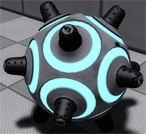
This is the newest test element of the Aperture Laboratories after an idea of Moth.
This is not just a ball, it's a bumbleball. This means it jumps, bounces and even moves... if you don't watch it!
In this pack there are 4 instances:
-A normal sphere button specialized for the bumbleballs, not useable with other objects.
-the single bumbleball
-droppers for bumbleballs, dirty and clean
If the bumbleball is outside of the players view it will bounce around every 2. second. It will make a distinctive sound when bouncing so the player can hear it.
When on a button, the ball won't bounce, move or whatever.
The .PSD file for custom textures is added. You can make up to 16 skins (value 15 in Hammer Editor).
If you want to paint it, it will get colored but wont jump or glide. Thats because its a normal prop_physics. Prop_physics_paintable is not recommended because it will get the paint settings, but wont get any visible paint color.
To dissolve the ball, for example in water, FireUser4 on it.
File Name: Bumbleball.7z
File Size: 1.53 MiB
Click here to download Bumbleball - 'living' test element