File Size: 0.02 MB
Downloads: 211
Rating: 0.0 (0 votes)
Description
Portalable piston for PTI, made by LPChip, who doesn't have an account here. I take no credit, nor responsibility, for it.

Comments
Sign in to comment.
Actually, do you mind if I add this to the FGEMOD? I've been looking for a piston lift model that I can put a portal-wall on for a while now.
FelixGriffin wrote:
Actually, do you mind if I add this to the FGEMOD? I've been looking for a piston lift model that I can put a portal-wall on for a while now.
You should ask LPChip on Steam/Steam Forums, as he made it. I'm sure he'd be cool with it though.
I'm experiencing a 404 error on the download website. Looks cool though, once I can download it I'll edit the editoritems.txt to have both pistons.
It says File Not Found.
Test Subject #54067 wrote:
I'm experiencing a 404 error on the download website. Looks cool though, once I can download it I'll edit the editoritems.txt to have both pistons.
It says File Not Found.
I re-uploaded it to MediaFire: http://www.mediafire.com/?2vof7iyinsnbwzt
I've also updated the link in the file info.
FelixGriffin wrote:
Why not just upload the file itself into the DLDB?
Yeah, I guess I might as well do that. It didn't really matter at first because I was just linking LPChip's link, but if that's causing a 404 I'll upload it proper.
So I was able to download it. I edited my editoritems.txt file so that I could use both a regular piston and this one, but it seems that both choices are the regular piston. I'll have to look into that.
EDIT: When I removed the regular piston, it worked. Strange.
You need to give them individual item IDs. If they're the same the game sees them as the same object, even if it's listed twice.
FelixGriffin wrote:
You need to give them individual item IDs. If they're the same the game sees them as the same object, even if it's listed twice.
Thanks!
Nice.
If you want to include this in puzzlemaker separately from the existing piston platform, here's the instructions:
- Save the vmf file that you downloaded, lift_standalone.vmf, as sdk_content/maps/instances/p2editor/lift_standalone_portalable.vmf
- Add this into your editoritems.txt (edit the Palette entry as necessary, this one is mapped to "3 2 0"). "Item"<br /> {<br /> "Type" "ITEM_PORTALABLE_PISTON_PLATFORM"<br /> "ItemClass" "ItemPistonPlatform"<br /> "Editor"<br /> {<br /> "SubType"<br /> {<br /> "Name" "PORTALABLE PISTON PLATFORM"<br /> "Model"<br /> {<br /> "ModelName" "piston_lift_grate.3ds"<br /> "TextureName" "pistonlift.png"<br /> }<br /> "Model"<br /> {<br /> "ModelName" "piston_lift_section01.3ds"<br /> "TextureName" "pistonlift.png"<br /> }<br /> "Model"<br /> {<br /> "ModelName" "piston_lift_section02.3ds"<br /> "TextureName" "pistonlift.png"<br /> }<br /> "Model"<br /> {<br /> "ModelName" "piston_lift_section03.3ds"<br /> "TextureName" "pistonlift.png"<br /> }<br /> "Model"<br /> {<br /> "ModelName" "piston_lift_top.3ds"<br /> "TextureName" "motionplatform.png"<br /> }<br /> "Model"<br /> {<br /> "ModelName" "destination_target_outline.3ds"<br /> "TextureName" "arm_4panel.png"<br /> }<br /> "Model"<br /> {<br /> "ModelName" "piston_lift_tube.3ds"<br /> "TextureName" "motionplatform.png"<br /> }<br /> "Palette"<br /> {<br /> "Tooltip" "PORTALABLE PISTON PLATFORM"<br /> "Image" "palette/arm_paneltop.png"<br /> "Position" "3 2 0"<br /> }<br /> "Sounds"<br /> {<br /> "SOUND_CREATED" "P2Editor.PlaceOther"<br /> "SOUND_EDITING_ACTIVATE" "P2Editor.ExpandOther"<br /> "SOUND_EDITING_DEACTIVATE" "P2Editor.CollapseOther"<br /> "SOUND_DELETED" "P2Editor.RemoveOther"<br /> }<br /> }<br /> "MovementHandle" "HANDLE_NONE"<br /> }<br /> "Properties"<br /> {<br /> "BottomLevel"<br /> {<br /> "DefaultValue" "0"<br /> "Index" "1"<br /> }<br /> "TopLevel"<br /> {<br /> "DefaultValue" "1"<br /> "Index" "2"<br /> }<br /> "StartUp"<br /> {<br /> "DefaultValue" "0"<br /> "Index" "3"<br /> }<br /> "ConnectionCount"<br /> {<br /> "DefaultValue" "0"<br /> "Index" "4"<br /> }<br /> "AutoTrigger"<br /> {<br /> "DefaultValue" "1"<br /> "Index" "5"<br /> }<br /> }<br /> "Exporting"<br /> {<br /> "Instances"<br /> {<br /> "0"<br /> {<br /> "Name" "instances/p2editor/lift_standalone_portalable.vmf"<br /> "EntityCount" "46"<br /> "BrushCount" "15"<br /> "BrushSideCount" "106"<br /> }<br /> }<br /><br /> "TargetName" "pl"<br /> "Inputs"<br /> {<br /> "CONNECTION_STANDARD"<br /> {<br /> "Activate" "instance:counter;Add"<br /> "Deactivate" "instance:counter;Subtract"<br /> }<br /> }<br /> "Offset" "64 64 64"<br /> "EmbeddedVoxels"<br /> {<br /> "Voxel"<br /> {<br /> "Pos" "0 0 0"<br /> }<br /> "Voxel"<br /> {<br /> "Pos" "0 0 -1"<br /> }<br /> }<br /> "ConnectionPoints"<br /> {<br /> // left<br /> "Point"<br /> {<br /> "Dir" "1 0 0"<br /> "Pos" "-1 3 0"<br /> "SignageOffset" "-2 2 0"<br /> "Priority" "0"<br /> }<br /> "Point"<br /> {<br /> "Dir" "1 0 0"<br /> "Pos" "-1 4 0"<br /> "SignageOffset" "-2 5 0"<br /> "Priority" "0"<br /> }<br /><br /> // right<br /> "Point"<br /> {<br /> "Dir" "-1 0 0"<br /> "Pos" "8 3 0"<br /> "SignageOffset" "9 2 0"<br /> "Priority" "0"<br /> }<br /> "Point"<br /> {<br /> "Dir" "-1 0 0"<br /> "Pos" "8 4 0"<br /> "SignageOffset" "9 5 0"<br /> "Priority" "0"<br /> }<br /><br /> // up<br /> "Point"<br /> {<br /> "Dir" "0 1 0"<br /> "Pos" "3 -1 0"<br /> "SignageOffset" "2 -2 0"<br /> "Priority" "0"<br /> }<br /> "Point"<br /> {<br /> "Dir" "0 1 0"<br /> "Pos" "4 -1 0"<br /> "SignageOffset" "5 -2 0"<br /> "Priority" "0"<br /> }<br /><br /> // down<br /> "Point"<br /> {<br /> "Dir" "0 -1 0"<br /> "Pos" "3 8 0"<br /> "SignageOffset" "2 9 0"<br /> "Priority" "0"<br /> }<br /> "Point"<br /> {<br /> "Dir" "0 -1 0"<br /> "Pos" "4 8 0"<br /> "SignageOffset" "5 9 0"<br /> "Priority" "0"<br /> }<br /> }<br /> }<br /> }<br /> "Item"<br /> {<br /> "Type" "ITEM_PORTALABLE_PISTON_PLATFORM_EXTENT"<br /> "ItemClass" "ItemPistonPlatformExtent"<br /> "Editor"<br /> {<br /> "SubType"<br /> {<br /> "Model"<br /> {<br /> "ModelName" "handle_grip_sphere.3ds"<br /> "TextureName" "buttonweight.png"<br /> }<br /> "Model"<br /> {<br /> "ModelName" "destination_arrow.3ds"<br /> "TextureName" "black_white_unlit.png"<br /> }<br /> }<br /> "MovementHandle" "HANDLE_NONE"<br /> "OccupiesVoxel" "0"<br /> "Deletable" "0"<br /> "Copyable" "0"<br /> "PseudoHandle" "1"<br /> }<br /> }
I also hastily created a palette icon for the lift, but it defies me why it does not work in the game. It can be found here: http://bisqwit.iki.fi/kala/ptal2/arm_pa ... alable.png
When I tried to use it, in the console, I am getting an error <"materials/models/handles_map_editor/palette/arm_paneltop_portalable.vtf": can't be found on disk>, and in the palette I get a magenta-black grid patter, but I don't really know what are VTF files and what I can do about it.
So, while the regular piston platform and the portalable one can be used in the same map, they are both denoted by the same icon and graphics in the puzzlemaker. Perhaps someone could fix this?

You're a bit late, I already added it to the FGEMOD (although not the release version yet). 
VTF files are textures that the game can use, the ones for the palette are hidden in the VPK (those PNGs aren't used for anything).
FelixGriffin wrote:
You're a bit late, I already added it to the FGEMOD (although not the release version yet).
Well, to me, unreleased = doesn't exist.
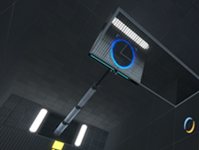
Portalable piston for PTI, made by LPChip, who doesn't have an account here.
I take no credit, nor responsibility, for it.
File Name: lift_standalone_portable.zip
File Size: 16.75 KiB
Click here to download Portalable Piston Instance for PTI