Portal 2 (Other files)
Miscellaneous Portal 2 mods, assets, tools, and non-map downloads.
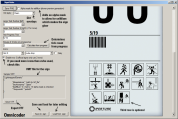
Chamber Sign Maker
Microsoft .NET Framework 2 required It was used to create the signs for Retrospective so you can play that if you want an example of them in-game.

Bumbleball - 'living' test element
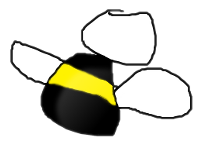
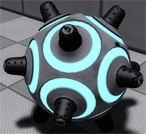
This is the newest test element of the Aperture Laboratories after an idea of Moth. This is not just a ball, it's a bumbleball. This means it jumps, bounces and even moves... if you don't watch it! In this pack there are 4 instances: -A normal sphere button specialized for the bumbleballs, not useable with other objects. -the single bumbleball -droppers for bumbleballs, dirty and clean If the bumbleball is outside of the players view it will bounce around every 2. second. It will make a distinctive sound when bouncing so the player can hear it. When on a button, the ball won't bounce, move or whatever. The .PSD file for custom textures is added. You can make up to 16 skins (value 15 in Hammer Editor). If you want to paint it, it will get colored but wont jump or glide. Thats because its a normal prop_physics. Prop_physics_paintable is not recommended because it will get the paint settings, but wont get any visible paint color. To dissolve the ball, for example in water, FireUser4 on it.
TWP Advertisements
These are a number of advertisements which have been made by TWP members for the advertisement of our site in game! Well done to everyone who made some awesome stuff. Files included are: Ratman TWP scrawl by zivi7 TWP logo model by Skotty Elevator Animation by PixeledFace http://www.youtube.com/watch?v=SKUdo14NXZM&feature=player_embedded Elevator Animation by Habzs http://www.youtube.com/watch?feature=player_embedded&v=WlIJv7eUie0 Lab monitors by greyKarel Aperture Posters by Brainstone Elevator instance and script by ChickenMobile For further instructions on how to use these advertisements and place it in your map, look at the relevant ReadMe.txt included inside the download. Make us proud TWP, advertise us!

Custom "pedestal button" with 4 skins + Example Instances
This is a custom model based on the stock "pedestal button" but with 4 skins: I just decompiled the stock model and edited the .QC file to recompile it again with more textures. This was requested to me by Srs Bsnss and I thought somebody else in the community could be interested in it as well. This is a pack that includes the following: 1. A custom model based in the stock "pedestal button" (switch.MDL) with 4 skins instead of 2: - Skin 0 = Clean button OFF (blue lines) - Skin 1 = Dirty button OFF (blue lines) - Skin 2 = Clean button ON (yellow lines) - Skin 3 = Dirty button ON (yellow lines) 2. A custom animated texture with 4 frames to match the button type and state. These are: Clean ON and OFF, and Dirty ON and OFF. 3. An instance called "custom_prop_button.vmf" emulating the prop_button Portal2 entity, where you can select the value of the following variables: - Button_reset_delay = you can enter whatever float value (a number with decimals) or integers. This value determines the time for the button to reset and go back to the initial state. - Button_type = "0" is the clean one while "1" is the dirty model. Note that the pedestal skins will change as well accordingly in this instance - Play_timer_sound = "0" means not to play it, while "1" means to do. It will play or not the classical "tick-tack" sound. - Prevent_fast_reset = "0" means no, and "1" means yes. This will prevent the player from pressing the button again while it's still into the "reset_delay" time set before. 4. An example map in the case you need help with setting the button up into hammer. 5. The decompiled files (the .QC file and the .SMD files) for anyone interested in changing something in the model or adding even more skins and whatnot... INSTRUCTIONS - There's a folder inside the zipped file you downloaded called "portal 2", this folder and its structure inside is exactly as the one you have in your computer, so just copy the folder "portal 2" on the "Steam/SteamApps/Common" folder, and everything will go to its right place. - The custom button model is named "switch_4skins.mdl" and it is located under /models/props/ folder - The model's textures are located into /materials/models/props/ folder - The custom texture jose_button_frame_alpha(.VMT and .VTF) for the pedestal base goes into /materials/josepezdj/detail/ folder - The instance with the example button is into sdk_content/maps/instances/josepezdj/ folder - The example map (.VMF and .BSP) into sdk_content/maps/ folder NOTE Don't forget to give it a NAME to your func_instance into hammer when you use the custom instance "custom_prop_button.vmf" for its I/O to work properly Do not hesitate to ask me anything related to this content. Cheers! jose ChangeLog v1.1 - I improved the button textures tweaking a bit the alpha channel in order to get the right self-illumination - I added the corresponding (multi-framed) texture for the button's pedestal itself including the 4 skins/frames (clean-dirty / on-off) v1.2 - I added 2 more variables to the button instance: the "prevent fast reset" feature, and the possibility to play the timer sound.
Lp's Fizzlers
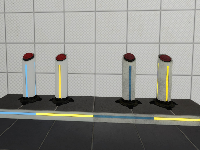
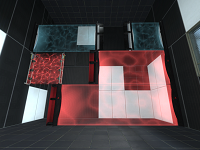
This pack contains multiple instances for fizzlers. It also includes textures and instances for death fizzlers. They are combined laserfields and fizzlers! The instances should be self-explanatory Have fun with them! NOTE: if you want to use these textures in your map, make sure you include them in your bsp! Fixed in v2: * An issue with the antique fizzler.
Coop Transition Script and Level Choosers
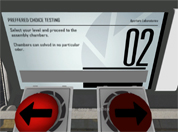
This Transition script and custom level choosers can be used to transition to different maps and courses through a hub map (like Valves). The level choosers can choose from any map in the course and it can display what map you are choosing with a message appearing on the screen. You can have 'infinite' courses inside your script, however both players need the same maps in order for the map to transition to it. If anyone wants to make a coop mass mack-pack (from everyone's coop maps), go ahead. It is definitely possible. Refer to the README.txt included with the download for installation instructions and common problems with fixes. If you have a problem and you cannot find an answer to it: put a post in this thread or PM me so we can get it working. One thing I don't know how to do (yet) is to save a player's progress and make the courses 'unlockable', even if the player has ended the game and then goes back to it (with the same or different partner). If anyone can tell me how to read and write to a file, I would gladly edit this and put this function in. If you are to use my instances/script/materials make sure you credit me within your map download or in your credits! Anyway, enjoy! ChickenMobile EDIT: From a very nice person I found out that there are a few errors with this: - The map doesn't transition without a point_servercommand called @command in your map - I forgot a major script that opens the chooser panel - Updated the Readme file to account for a new problem found - You don't have to use my coop spawner instance (your welcome to use your own) Guaranteed all things are now fixed! EDIT: Sorry guys for uploading the wrong file. Fixed in double time.
Scientific Precision
This file contains a number of loops of music in the style of Portal 2, for people to use with the game's "dynamic music" system.
Moth's Useful Instances
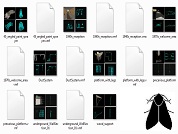
Some useful instances I made, that can serve two purposes: * Quickly add nice things to your map * Deconstruct, use bits, make new bits, gain UNDERSTANDING My plan is to expand this as I make more stuff. Each instance has an accompanying screenshot of all 4 Hammer views, so you can see what it looks like without launchiing any tools. Click 'show' below for a full list of contents: [spoiler]*** ApSigns (1 instance) aperture_1970s_gantry ----------------------------------- 1970s style Aperture logo, suspended from solid metal beams, with ambient spotlamps *** Destroyed (2 instances) DestroyedWall ----------------------------------- Off-grid deformed black tiled wall DestroyedWall2 ----------------------------------- Black tiled wall with missing pieces and bts back panels *** Dynamic (2 instances) glass_platform ----------------------------------- template for a telescopic moveable plat. supports players, turrets, cubes, etc Huge_Fan ----------------------------------- complete wall assembly that casts epic shadows. Starts on at map spawn. *** Factory (6 instances) dlc1_RoobotArms ----------------------------------- very small lab section with arms on a shelf, from dlc1 Freight_Boxes ----------------------------------- Motorized railed transport filled with metal containers glass_partition_01 ----------------------------------- A 3x3 detailed glass-panel wall section glass_partition_withDoor ----------------------------------- As above, with a doorway tubular_elevator ----------------------------------- Quick and dirty elevator. Scenery only but easily converted to a func_movelinear turret_storage ----------------------------------- Very tall storage area for turrets, with accompanying machinery. *** Gameplay (2 instances) RampArms_static ----------------------------------- Ramp made from panel arms. Some destroyed or missing. RampArms_static_collision ----------------------------------- Clip brush to exactly fit the above *** Lighting (6 instances) old_wall_light_300 ----------------------------------- underground-style lamp with sitably coloured light entity (300br) trussbox_curvedLights ----------------------------------- many very-wide underground-style floodlights, angled towards a central point underground_array_tower ----------------------------------- Used extensively throughout underground maps underground_array_towerLightArm ----------------------------------- Extra arms for the above underground_array_tower_leaning ----------------------------------- Alternative underground_array_tower with no arms *** Office (8 instances) big_empty_office_1970s ----------------------------------- complete 1970s style office building with one doorway. Just add furniture! chair_and_desk_1980s_XX ----------------------------------- 1980s style desk, chair, desk lamp, telephone, computer - 4 variations lab_furniture_01 ----------------------------------- Block of machines and a whiteboard observation_office ----------------------------------- Small 'control room' with glass windows, houseplant office_cube_3sided ----------------------------------- Template for making custom-sized offices/control rooms *** Spawns (1 instance) PlayerSpawn_in_DropTube ----------------------------------- Player spawn, with full portalgun-- falling intro, with a tube that auto-opens. *** Underground (8 instances) 45_angled_paint_sprayer ----------------------------------- Paint-pipe gusher, angled 45 degrees - as seen in a4_portal_intro map 1940s_reception ----------------------------------- Complete relaxation area in a 1940s style. 1970s_welcome_area ----------------------------------- underground-style elevator reception DuctSystem ----------------------------------- Miscellaneous hanging system of ducts platform_with_legs ----------------------------------- metal scaffolding with chipboard panels precarious_platform ----------------------------------- Hanging underground cube_dropper with suspended platform. underground_WallSection_01 ----------------------------------- Various brushes & models, stuck together to make an interesting underground wall[/spoiler] Feedback is welcome, please rate this and post your comments. I'll post when I update. --------------------------------------- New in r2: --------------------------------------- * Huge Fan that casts epic moving shadows * Tons of bts office stuff * Underground lighting * Factory stuff! File Name: Moth_instances_r2.rar File Size: 6.39?MiB Moth's Useful Instances
Portal2JAEP
Portal2JAEP Portal2 - Just Another Extras Patcher Portal2JAEP is an easy-to-use Portal2 Extras-Manager with many features to manage your Portal2-Custommaps. Extras-Patcher, Map-Installer and Map-Downloader in one tool. Add Maps directly from bsp, vpk, zip, rar or 7z files, automatic extraxt and install, Maplist to manage new and alreday played maps, download and install maps directly from thinkingwithportals.com and many more. For more Informations, Feature-List, Help-Informations and Bug-Reports see the Thread of this Download, following this Link: topic4409.html # Changelog # * 2011-08-22, v1.00 - First Release