Portal 2 (Other files)
Miscellaneous Portal 2 mods, assets, tools, and non-map downloads.

BEE2 Addons
My collection of items for the BEE2. These items mainly are rearranged or special versions of existing items. Some help is available in the right-click info panel, but consult the Readme for full instructions. All non-logic items are fully styled for all the default styles. It is compatible with Radelite's addons, providing styled versions for the Ratman Style. This includes my Refurbished Style, a hybrid of Clean and 1950s style similar to the Coop Course 5. I also have a modified version of 1980s style, with a damaged Enrichment Sphere showing the surrounding Test Shaft. I now have an Overgrown Style, replicating the dilapidated Aperture seen in the first few levels of the singleplayer campaign. There is also a debug Unlocked style to allow adding or deleting the mandatory entry/exits and observation rooms. Be careful with this! Thanks to Skotty (High Energy Pellets, Bumbleballs and Catapult Cubes), Moth(Bumbleballs), SoundLogic(Catapult Cubes) and PortalCombat (Sphere Cannon) for creating the original versions of some items, which I have made PTI compatible and restyled. You'll need 7-zip to extract the archive. See the GitHub repository for WIP items, styles and changes. I don't advise using these files unless you are willing to have your maps break. Styles: - Refurbished Style - Overgrown Style - Open 1980s Style - Unlocked Clean Style items [spoiler]- Retractable Pedestal button - Worldportal Door - Diagonal Laser and High Energy Pellet launcher - Quarter wall - Dropper version of PortalCombat's Sphere Cannon - Antline Router - Antline Magnet - Angled Block - Music - Laser Music - Conveyor Belt - Large Faith Plate - Global Cube Dropper - Paint Cleaner - Double Grated Panel - Futbol - Ditch - Caged Turret - Caged Reflection Cube - Wheatley Monitor - Portalable Stair - Portalable Piston Platform - Turret Dropper - Toggleable Faith Plate - Static Panel - Static Piston Platform - Half/Half Wall - Coop Checkpoints - Recessed Fizzlers - Crusher Plates - Sideways Light Bridges - Shredders - Static Glass Panels - Half Panels - BumbleBalls - Catapult Cubes - Bomb Droppers - Rotating Faith Plates - Glass With Hole - Glass Doors - Slow Crushers - Piston Relays - SR Latches - Angled Light Bridge - Separation Coop Checkpoint - Cube Transmuters - Ceiling Lights - Autoportal Pistons - Timeout Portals - Clamped Cubes - Global Cube Triggers - Override - Neurotoxin - Chamberlock - Retractable Floor Button[/spoiler] Changelog [spoiler]* v45: - Fix hovering debris in Overgrown Entrance Elevator - Prevent ball lines from playing in Clean - Quiet - Fix Warm Lights in Clean Style - Make Clean Fizzler models animate correctly - Remove the old documentation from the archive * v44: - Brand new Portal 1 Style Coop entrances and exits, using lifts to transport players to and from the level. - New P1 Style Angled and Clear Panels that use pistons instead of robot arms. - Change: Caged Turrets will no longer have the grating explode, this should make it less likely the turret will not be able to shoot through the grating. - New Caged Turret model. - Fixed Overgrown Quiet Style. - Retractable Pedestal Buttons use the correct Overgrown instances instead of Art Therapy ones. (Typo!) - Fixed crash in P1 Coop if cubes are present in the map. - Clean Style Fizzlers should now retract properly if they didn't before. - Black texture added behind fizzler, so they look nicer on white walls. * v43: - Improved Overgrown style observation rooms, the sound should be quieter and the flickering can be completely disabled by turning off "start enabled" in the large observation room. - The overgrown style elevator screens are less random, they match Cave's PTI dialogue (If you heard them all, the video screens will be random). - Overgrown Turrets are twitchy now. - Changed style of Refurbished lights. - Fixed bug with Overgrown track platform rails. * v42: - Fixed Overgrown reflection cube packing. - Fixed floating cubes on Overgrown piston platforms. - Added custom model for P1 styled storage cubes, companion cubes, spheres, pedestal buttons and laserfields. - New custom Overgrown style glass. - Better P1 style crusher, piston platform and buttons. - Custom indicator lights for P1 style, to make them appear smaller. * v41: - All Valve+BEE1+HMW items finished for Overgrown Style. - Coop exits done. * v40: - Added first version of Overgrown Style, featuring a heavily damaged Aperture overgrown with plants. This is not finished, some items remain clean styled, and Coop exit corridors haven't been styled yet. - A quote list has been added to describe how the extra quotes in the various styles are picked. - Neurotoxin vents have been modified to be cheaper; the activation radius is now only visible in the editor. - Neurotoxin will permanently shut off when players get inside the exit door. - Added update checker to the readme. When the next update is released, the readme will show a message (only when actually open). * v39: - Added files for some checkpoint instances. - Adjusted lighting in P1 Style Checkpoint, and changed droppers to use P1 style versions (both checkpoints). - Added the second door for P1 Style Chamberlocks (Whoops.) - Checkpoints will not close their front door if an object is placed between it and the fizzler. - Players will slide off of the camera in Refurbished Small Observation Rooms. (Prevents cheating puzzles). - Changed something with Companion Cubes[/spoiler] Earlier changelogs
Chamber Sign Maker
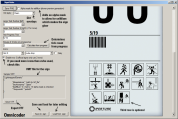
Microsoft .NET Framework 2 required It was used to create the signs for Retrospective so you can play that if you want an example of them in-game.
RB-TAM update 23
RADELITES BEE 2 ADDON MOD What is Rb-tam? Rb-tam is a mod made to add many of the more unique testing elements you might have seen over the past few years in custom maps. From paint guns to portal detectors and many more amazing elements that I have found created by fellow users like yourself I have collected them and worked with many awesome mappers to give you a mod that lets you use their amazing items in your very own peti editor(with quite a few of my own items of course. How do you use this mod you might ask? Its very simple, all you do is install bee 2(it can be found on this website) Then download this and follow the embedded instructions Have fun, also thanks to all you awesome people who were kind enough to share your creations to be incorporated in this mod. When you create an AWESOME map with this mod make sure to copy this hashtag inside your description of your map #RB-TAM link to a collection of simple maps made with my mod for bee2http://steamcommunity.com/sharedfiles/filedetails/?id=202463960 -planned updates- While I cannot update items in the mod at this time I do plan to make a webpage for the mod and maybe add an eh little treasure hunt eheh. Also plan to create new icon for mod.

Felix Griffin's Editor Mod (FGEMOD)
An editor for the editor, which allows you to choose your test elements. Includes at least as many new ones as there are originals. Includes HMW's mod and the BEEMOD elements. Note: There's currently an error unless you have this package installed: http://dl.dropbox.com/u/51831059/Portal ... _v5_src.7z . Sorry about that.
Portal 2 Theme
This is my first theme "Portal 2". ? 138 portal wallpapers ? Windows sounds replaced by turrets ? Trash icon is replaced I also recommend an excellent screen saver, you can find here : http://imgur.com/gallery/DbXgL ( Is the .exe in the .zip, virus scan : http://goo.gl/XYkKf3 ) -----ChangeLog----- 2.1 -Added some wallpaper. -Added a readme. -Clenest -Removing wallpaper of low quality 2.0 -Added some wallpaper. -Changing sounds: set in English -Color change of the bar -Changing the icons of the trash

Companion Cube Screensaver
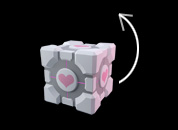
Cube rotates and bounces around your screen. Has the original Campanion Cube and a couple other color variations. You can edit the Image files in Photoshop if you wish. Just install, then right-click on Desktop, select ScreenSever / CubeShow and click "Settings". Then select the folder with the Cube that you want to display.
Crusher Instances (many custom options)
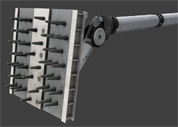
These crusher instances are aviable for 1 side and 2 sides (opposite). You can do the following: Use a Reset Timer for auto-reset after crushing. Use a Solved-Relay that brings the crusher to "de-crushes" state (even if moving). Use single relays just to crush or uncrush without any automatic reset. Use the Status value - set a name of a math_counter and the crusher will add 1 if crushing and subtract 1 if uncrushing. (For multiple crushers). Just don't forget to kill/deactivate the not used features with a logic_auto at mapspawn. Use this well-thought-out crusher system to create crushers in all variants easily.
Portal 2 Gel Types Example
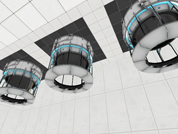
Example map demonstrating the basics of gel (propulsion gel, repulsion gel, conversion gel, water) in Portal 2. Includes both source vmf and compiled bsp
Portal 2 Map Launcher
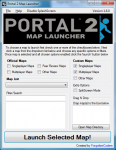
Portal 2 Map Launcher v1.6 + SOURCECODE @ http://github.com/forgottencoders/p2map VERSION 1.6 UPLOADED 05/05/12 Portal 2 map launcher is a simple but effective GUI for loading custom and stock portal 2 maps. It doesn?t matter if you want to load them as solo, splitscreen, or online/lan, portal 2 map launcher will launch it. It has many advanced features such as changing map when ingame and skipping the intro of the game. As of version 1.1 you can now also filter/search the maps to allow finding the maps even easier. Now with this version (1.2) you can now even load the new map ingame without having to minimize the game. by using the F10 key As of version 1.4 you can now drag .bsp files to a area on the form to copy it to your map location. aswell as many buttons for quick console commands. --------------------------------------------------------------------------------------------------- Click For ScreenShot Homepage - http://forgottencoders.co.uk Project Homepage - http://forgottencoders.co.uk/p2map Issue tracker - http://tracker.forgottencoders.co.uk s0AEErcYx5A New Youtube Video Coming Soon Version 1.6 --------------------------------------------------------------------------------------------------- Usage: Code: Select allLoading a new map 1. Install "Portal 2" (if not installed). 2. Select checkboxes that you want to use. 3. Click the Dropdown list or filter the list. 4. Click the "Launch" button Changing map 1. Press "F10" or minimize the game. 2. Select checkboxes that you want to use. 3. Click the Dropdown list or filter the list. 4. Click the "Launch" button --------------------------------------------------------------------------------------------------- Changelog: Code: Select allV1.6.0 * Added a function to prevent re-generating the list when checkbox not changed * Changed the detection of Solo and Mp Maps. * Some behind the scenes changes v1.5.1 Bug fix. (never released) * Fixed Splitscreen Bug * Prevented filtering the maps unless atleast 3 characters are entered * First GitHub release. * Changed layout of the checkboxes * Added 2 more checkboxes (Other Maps) * Changed Tooltips Slightly * Now Using a three numbered version system (X.X.X rather than X.X) * Issue Tracker is now on GitHub. v1.5 * Changed Hotkey From F2 to F10 * New Maps Are Added To List When Added To Map Folder * Admin Priveleges Not Required Any More * Added Automatic Settings (Checkbox States Are Remembered) * Added More Robust Detection System & Manual Option * Added Quick Instructions To Main Form * Removed Quick Commands (Were Pointless) * Reorganized The UI * Completly Recreated The Filter/Search System (Much Better Now) * Cleaned The Code Alot * Added Tooltips To Every Button/Label/Checkbox * Added Built In Changelog (Click Version Number At Top Right) * Fixed Even More Problems v1.4 * Added Drag n Drop Map Area (To Quickly Install Maps) * Added Many Buttons For Quick Console Commands * Added Option To Disable Splash * Added Option To Manually Choose Portal2.exe Location (if not found) * Added Button To Browse Map Directory * Added Button To Go To Issue Tracker Page * Fixed Many Issues * Fixed Registry Issue V1.3 * Added hotkey to switch map even easier * Added homepage url * Added Splashscreen * Added About Page * Changed Splitscreen/Solo/Lan System * Cleaned Code * Changed GUI * Fixed Bugs * And More! V1.2 * Fixed startup bug * Wasn't Released Publicly V1.1 * Added Filter system * Added -Hijack Command * Added Splitscreen/solo and MP buttons * Added changelevel command * Added File checking * Added Other things * Changed GUI layout * Changed Loading Method * Fixed DLC map bug v1.0 - Initial Release fixed version just uploaded. PLEASE NOTE IF THE FILE WONT DOWNLOAD FROM HERE PLEASE DOWNLOAD THE LATEST VERSION FROM HTTP://FORGOTTENCODERS.CO.UK/P2MAP AS I AM HAVING SOME ISSUES WITH THE TWP UPLOADER.