Portal 2 (Other files)
Miscellaneous Portal 2 mods, assets, tools, and non-map downloads.
Glass Light Instance (No leaking light)
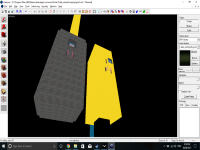
This glass light instance works with 8 thick walls by default, but is easy to modify for whatever thickness walls you want. You can also change the intensity and warmth/coolness inside the instance to fit your needs, as it is currently a neutral light. The point of this glass light instance is to avoid light leaking through and around brushes when using glass lights.


512 size Geodomes
Have you ever wanted a geodome in a map, but there wasnt any that were small enough for your use? well, thats what these are for. 512 units in size, there are 3 models: dharmadome_interior (the interior walls) _exterior (the exterior walls) *_frame (the frame. should accompany the other 2 wherever they are used.) To install: drag both folders into steam/steamapps/portal2/portal2 ==Please note== These models all have collision, however, the inside is solid. if you intend to have anything inside of these, turn the collisions off. Also, the reason these are called "dharma domes" is because of the TV show "LOST", where survivors of a plane crash find an underground test facility owned by something called "the DHARMA initiative" that features a geodome ceiling roughly the same size as this one. ==Please also note== If you use this in a map,mod,or SFM/Gmod video, Please not only credit me but let me know you used it. I like it when i see something i made used in sombody else's work! Contact me at: http://www.moddb.com/members/tile http://steamcommunity.com/id/notsoregular/ http://notsoregularfox.deviantart.com/ Thanks for using my stuff! -Tile (also, if you can take pics that would be apreciated!)
Kyleprotec's Slider Doors
Hello. These are the slider doors i made. They are just doors surrounded by trigger. And each door has 2 Logic_relay's The two logic_relays are used to open and close the door manually. To open the door with the realy trigger @slider_door_open To close it trigger @slider_door_close. Thanks
re-colorable plasticwall002a psd 2
Have you ever wanted a different color to the nice plasticwall002a texture? Did you find the old version of my psd, and realized that you didnt have photoshop or simply couldnt get the desired effect with the hue slider alone? well, that's what this is for! Now it includes several pre-made colors, as well as an example .vmt that allows for custom coloring without photoshop via the $color parameter. ============================================================== To use: 1.open the psd. change the hue setting on the "color hue/sat" layer (not the saturation setting!) 1b. Optionally, you can have more control over the exact color you want by disabling the hue/sat layer, enabling the manual color layer, and filling the manual color layer with a solid color of your choice. 2.save it as a .tga file 3.open your .tga file with vtfedit and save it into portal2/portal2/materials/props/ as "plasticwall002a_YOURCOLOR.vtf" 4.Create a .vmt for it by copying the provided "plasticwall_002a_YOURCOLOR.vmt" and renaming the copy with your color. ==Please note== the part of the example vmt that says $color "[0 0 0]" is meant for people who dont have photoshop or any other program that opens .psd. do not use it unless you need to. Also, you'll notice that there are layer masks on the color layers- this is because in valve's textures, these areas stay consistant across different versions of this same texture. for best results, dont delete these. ==Please also note== If you use this in a map,mod,or SFM/Gmod video, Please not only credit me but let me know you used it. I like it when i see something i made used in sombody else's work! Contact me at: http://www.moddb.com/members/tile http://steamcommunity.com/id/notsoregular/ http://notsoregularfox.deviantart.com/ Thanks for using my stuff! -Tile
Opposite linkage instance
Opposite linkage is a special mode for Portal 2 Cooperation game, in which players' portals are switched, i.e. ATLAS primary portal is connected to P-body's secondary, and vice versa. Because I don't have time to create maps and I don't want to abandon my hard work I decided to release an instance which I created for this project community-releases/mp-coop-opposite-linkage-first-map-t5873.html . You can modify this file and reupload it, but please credit me (DerpVulpes, a.k. arek_91) as an author.
Brighter Wall Lights Instances
Just brighter versions of normal wall lights. Put into your instances folder.
Portals on Panels, Issue Clarification
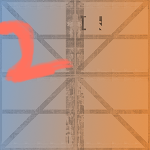
I'm having an issue where portals placed on my rotating panels will only be oriented one specific way relative to the prop_dynamic (panel) inside of them. Here is a big, simple version of the problem I'm facing.
Aperture Science IBM 5150 3D model
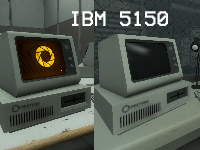
This is a model of an IMB 5150 for anyone who wants to enforce that 80's theme of old aperture.
(Instances) Extra Elevator Instances
This is my first time uploading a file to thinkingwithportals. If I forgot anything, let me know. You ever look inside the turbine_elevator folder in the instances folder and browse through the elevator vmfs. To find that for the departure elevators, Valve only has the fixed one going up and the destructed one going down? What if you are making an overgrown style map but want your exit elevator to go up? This is where this comes in. Supplied in the zip archive, you will find 2 extra elevator bases. One that is destructed and goes up and one that is fixed and goes down.