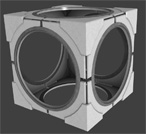
Portal 2 (Other files)
Miscellaneous Portal 2 mods, assets, tools, and non-map downloads.
Feline Portal Gun
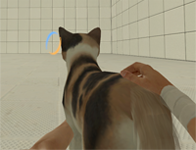
A feline Portal Gun! Yes, the animations are glitchy, Its supposed to be a joke model. Anyway, pack the "models" and "materials" folders into your addon pak_01_dir.vpk file, in your portal2_dlc3 or portal2_dlc4 folder. https://www.youtube.com/watch?v=cuiML2g7raM&feature=youtu.be

Departure Elevator with Debris
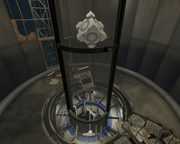
This is a departure turbine elevator with several options: The ability to toggle junk to fall down the elevator tube before the elevator arrives. The ability to trigger the lights in the bottom of the elevator tube to flicker on and off as seen in some official maps. The ability to toggle the PTI vote screen. The ability to toggle the game to go to the main menu. If you use this instance I would appreciate you crediting me for the use of it .
PDMOD
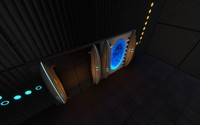
THIS IS A PORTAL DETECTOR MOD FOR THE PeTI EDITOR Created by Me (radelite) and BOB74j aka (brainstatic) This is not yet compatible with any-other mods but it is fun here is a link to one of the maps made with the earlier form of this mod http://steamcommunity.com/sharedfiles/f ... =178598821 The new form has better placement then the older one Have fun mapping
RB-TAM update 23
RADELITES BEE 2 ADDON MOD What is Rb-tam? Rb-tam is a mod made to add many of the more unique testing elements you might have seen over the past few years in custom maps. From paint guns to portal detectors and many more amazing elements that I have found created by fellow users like yourself I have collected them and worked with many awesome mappers to give you a mod that lets you use their amazing items in your very own peti editor(with quite a few of my own items of course. How do you use this mod you might ask? Its very simple, all you do is install bee 2(it can be found on this website) Then download this and follow the embedded instructions Have fun, also thanks to all you awesome people who were kind enough to share your creations to be incorporated in this mod. When you create an AWESOME map with this mod make sure to copy this hashtag inside your description of your map #RB-TAM link to a collection of simple maps made with my mod for bee2http://steamcommunity.com/sharedfiles/filedetails/?id=202463960 -planned updates- While I cannot update items in the mod at this time I do plan to make a webpage for the mod and maybe add an eh little treasure hunt eheh. Also plan to create new icon for mod.

The 3D skybox models thread
So you wanted to make a 3D skybox for your Portal 2 map, browsed for skybox models but didn't find any and now you are disppointed. Don't be! This zip-file contains some skybox models that could get you started. Copy the contained folders into the model folder. You can create your own skybox models from the existing models in the game without any modelling experience when you follow these tutorials: 1. Decompile the model you want, as explained by Skotty here. 2. Rescale the model as explained in this tutorial on interlopers.net 3. Compile the new model following Josepezdj's tutorial here. If you do so, let me know via PM or upload the file attached to a reply in this thread and I'll add your models to the zip-file.

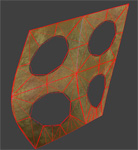
Wall_Dest_Section03 With Collisions
Sprowl requested models/props_destruction/wall_dest_section03.mdl with physical model. So here it is, for everyone of course.
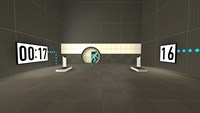
Portal 2 Timers example
=================== Portal 2 timer examples =================== This is just an example map that includes the basics of 2 working timers (a countdown and a countup) that uses custom materials (numbers). The intention is to show the required entities and their inputs/outputs to understand the logic behind a timer made in the hammer editor. Also this method allows you the posibility to use your own custom typo/numbers to fit your map's aesthetics... For this example I used the typo "DIN Next LT Pro Condensed", because I think it's pretty much similar to the typo used by Valve for the signage lightboard; so if you are too lazy to make your own material and want to use it in a normal Portal2 map, it'll look good. So the purpose for this could be considered as merely didactic The basic idea under this method is to make an overlay with 10 frames (the ten numbers, from 0-9) and go changing its textureindex with the entity "env_texturetoggle". HOW TO MAKE YOUR OWN CUSTOM NUMBERS ---------------------------------------------------------------- 1. Open an image editor of your choice, take the font that you like and make 10 separate images, one per number (from 0 to 9), and REMEMBER to always give the image a size which values are a power of 2 (like 128x256 that I gave in this case). I prefer making .png files... you can do .tga as well... Whatever format that allows you recording an alpha channel (transparency) because this way, our numbers overlays would be stickable on whatever texture 2. Name each of them with a name followed by a suffix like "_0", "_1", "_2", and so on... Obviously, try to make that suffix coincides with the number into the image... lol. 3. Now open VTFEdit (http://nemesis.thewavelength.net/index.php?c=178) and go to File > Import. Now select at the same time (holding Ctrl or Shift keys down) all the ten image files. Do not resize the images. You can check into the "info" tab how the file contains 10 frames (each of them is a different number). I also made a cutie dots (":") to separate the seconds from the minutes and make them flicker: for this you need to make 2 textures, one with the dots and other completely empty but with the same size, then do the same as for the numbers, import them with VTFEdit selecting both at the same time. 4. Then save this file as .vtf into your "materials" folder (you can create whatever folder of your choice into /materials of course) giving it a whatever name. 5. Now you should create the .vmt file for the above .vtf file. Both names must be the same, only their extensions change... In this example, my .vmt file contains the following: UnlitGeneric { $baseTexture "josepezdj/numbers/black_numbers" $surfaceprop glass $translucent 1 "%keywords" portal $decal 1 Proxies { ToggleTexture { toggleTextureVar $baseTexture toggleTextureFrameNumVar $frame toggleTextureShouldWrap 0 } } } You can simply copy all that only replacing the path "josepezdj/numbers/black_numbers" by the one where your .vtf file is located and the name of your file. I guess it's clear. However, do not hesitate to ask whatever question or doubt Once created your custom texture for the ten numbers, check inside the attached .vmf in your hammer editor to see how you can set the timers up easily. Read the Readme.txt file for instructions info. A further post with an explanation in detail about how the timer system works is in the topic of this download, for those who doesn't really extract much info from the vmf file... josepezdj
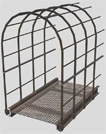
Underground Walkway 128 Caged
This is a caged walkway used for underground areas with a length of 128 units. You can use it for different purposes. It has full physics. Additional there is a end-model to close its open end if necessary. Requested by Moth.
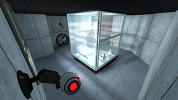
Relaxation vault.
This is an instance I made which is basically the relaxation vault from portal 1, but made in Portal 2. So now you can wake up in your favorite room! If you have any comments or want to see new functionality's? Let me know! ~Lp
Boxframe (Reflectorcube)
This was made by me after an request of lpfreaky90. I remodeled the whole boxframe of the reflector cube and made a new skin. If needed I got a 1024x1024 texture version and I can rescale the cube to whatever you want. This model has full concave physics.