Portal 2 (Other files)
Miscellaneous Portal 2 mods, assets, tools, and non-map downloads.
Portal 2 Map Launcher
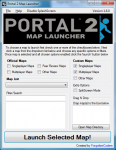
Portal 2 Map Launcher v1.6 + SOURCECODE @ http://github.com/forgottencoders/p2map VERSION 1.6 UPLOADED 05/05/12 Portal 2 map launcher is a simple but effective GUI for loading custom and stock portal 2 maps. It doesn?t matter if you want to load them as solo, splitscreen, or online/lan, portal 2 map launcher will launch it. It has many advanced features such as changing map when ingame and skipping the intro of the game. As of version 1.1 you can now also filter/search the maps to allow finding the maps even easier. Now with this version (1.2) you can now even load the new map ingame without having to minimize the game. by using the F10 key As of version 1.4 you can now drag .bsp files to a area on the form to copy it to your map location. aswell as many buttons for quick console commands. --------------------------------------------------------------------------------------------------- Click For ScreenShot Homepage - http://forgottencoders.co.uk Project Homepage - http://forgottencoders.co.uk/p2map Issue tracker - http://tracker.forgottencoders.co.uk s0AEErcYx5A New Youtube Video Coming Soon Version 1.6 --------------------------------------------------------------------------------------------------- Usage: Code: Select allLoading a new map 1. Install "Portal 2" (if not installed). 2. Select checkboxes that you want to use. 3. Click the Dropdown list or filter the list. 4. Click the "Launch" button Changing map 1. Press "F10" or minimize the game. 2. Select checkboxes that you want to use. 3. Click the Dropdown list or filter the list. 4. Click the "Launch" button --------------------------------------------------------------------------------------------------- Changelog: Code: Select allV1.6.0 * Added a function to prevent re-generating the list when checkbox not changed * Changed the detection of Solo and Mp Maps. * Some behind the scenes changes v1.5.1 Bug fix. (never released) * Fixed Splitscreen Bug * Prevented filtering the maps unless atleast 3 characters are entered * First GitHub release. * Changed layout of the checkboxes * Added 2 more checkboxes (Other Maps) * Changed Tooltips Slightly * Now Using a three numbered version system (X.X.X rather than X.X) * Issue Tracker is now on GitHub. v1.5 * Changed Hotkey From F2 to F10 * New Maps Are Added To List When Added To Map Folder * Admin Priveleges Not Required Any More * Added Automatic Settings (Checkbox States Are Remembered) * Added More Robust Detection System & Manual Option * Added Quick Instructions To Main Form * Removed Quick Commands (Were Pointless) * Reorganized The UI * Completly Recreated The Filter/Search System (Much Better Now) * Cleaned The Code Alot * Added Tooltips To Every Button/Label/Checkbox * Added Built In Changelog (Click Version Number At Top Right) * Fixed Even More Problems v1.4 * Added Drag n Drop Map Area (To Quickly Install Maps) * Added Many Buttons For Quick Console Commands * Added Option To Disable Splash * Added Option To Manually Choose Portal2.exe Location (if not found) * Added Button To Browse Map Directory * Added Button To Go To Issue Tracker Page * Fixed Many Issues * Fixed Registry Issue V1.3 * Added hotkey to switch map even easier * Added homepage url * Added Splashscreen * Added About Page * Changed Splitscreen/Solo/Lan System * Cleaned Code * Changed GUI * Fixed Bugs * And More! V1.2 * Fixed startup bug * Wasn't Released Publicly V1.1 * Added Filter system * Added -Hijack Command * Added Splitscreen/solo and MP buttons * Added changelevel command * Added File checking * Added Other things * Changed GUI layout * Changed Loading Method * Fixed DLC map bug v1.0 - Initial Release fixed version just uploaded. PLEASE NOTE IF THE FILE WONT DOWNLOAD FROM HERE PLEASE DOWNLOAD THE LATEST VERSION FROM HTTP://FORGOTTENCODERS.CO.UK/P2MAP AS I AM HAVING SOME ISSUES WITH THE TWP UPLOADER.

Faith-Plate-Cube
This is a Faith Plate in a Aperture Cube, requested by Soundlogic. In this pack you got the model (uses already existing materials) and an instance for good use. The model itself has 4 animations and normal physics (I recommend to use the instance/use it as parent to a normal cube). The animations are: idle sprung (jump, up and down in one animation) -> sound included hoch (up) -> sound included runter (down) The instance itself allows you to set the distance of the target point from the cube center (because it uses a trigger_catapult), the physics and player speed. Inputs are Autofire enable and disable, means autocatapult enable and disable. You can use, while being disabled, the Fire input to let it catapult.

Advanced Conveyor Belt (Portal2)
This is how Valve made proper conveyor belts in the game section 'turret manufacturing' It consists of eighteen func_tracktrains, with individually attached prop_dynamic belt sections which move the player and objects. VMF and BSP are included for you to examine and edit any way you see fit. Hopefully this will help to explain how it was done, and how you can do it for yourself

fixed Rocket Turret
Maybe you missed the Portal 1 rocket turrets, discovered them in your game but saw "Oh, they are bugged!". In this pack, there are the models, materials and sounds you need for the rocket turret. 2 instances are delivered for using it in Hammer. The missing sounds are just hearable if you put them in a VPK file in your addons folder. How to create a VPK: https://developer.valvesoftware.com/wik ... rtal_2_Map The $MissileSpeed has a default of 450. If you keep ??? it will use this speed. Never rotate the instance! Always keep it's angles 0 0 0! Make sure ALWAYS to place ONE "rocket_turret_missile.vmf" in the CENTER (coordinate 0 0 0) in your map! Extra missiles are needed because the original NPC fires missiles with a speed of 0 (thats the bug they have). Make sure to release the materials, models and sounds together with your map!
Logical Gate's: "OR" "AND" & "OR-Exclusive"
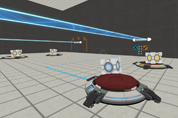
Logical Gate's: "OR" "AND" & "OR-Exclusive" By CaRLyMx STEAM: http://steamcommunity.com/id/carlymx ------------------------------------------------ DESCRIPTION: This little test shows two different ways to use the function "MATH_COUNTER." Logic gate "OR" having 2 buttons, using any of them will activate the door, the funnel or whatever you say. Logic gate "AND" exactly the same as above but have to press two buttons to activate. Logic Gate Or_Exclusive: system where 2 of 3 buttons must be pressed but it can be any 2 of them while pressing all 3 has a different purpose.
Co-op airlock instance.
This is an instance of the coop airlock. Since I cannot find where Valve has put this instance (or if they have included this instance with the Portal Authoring Tools at all), I decided to copy it, and make it into one for ease of use. Please note: That this is a Prefab of an instance and you have to keep all the files in the correct folders in the zip. To use this: click the entity tool, in the drop down menu to the Right, choose Prefabs and in the drop down menu below it, choose airlock The reason I made it into a Prefab is so then the instances automatically get named if you place another airlock prefab in. The only entity outside the main instance (straight in the prefab) is a logic_auto, that opens the front airlock door. - This will automatically change the airlock spawns to be the 'Active spawn'. - It comes with the parameter $airlock_success_relay which triggers when both players are in the airlock - It comes with the parameter $door1_hasOpened_relay which triggers when the first door in the airlock has opened. - It does not automatically call the script to make Glados speak when you taunt to the camera (This should be done in the coop_spawn instance). Feel free to download and put in your map!
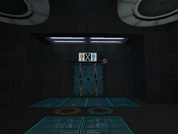
Bomb Launcher concept
Its a bomb launcher based off the one Wheatley uses but modified to be be compact and to be used in test chambers, maybe as a replacement for the rocket turret. Right now its just a concept, but if I ever get the chance I might try to model it. Changes will be made as time goes on. Watch the demo of it here: http://www.youtube.com/watch?v=mqdoif7YCVM Other info: The prefab contains only the launcher and its relays, so you will need to add in things you want to add. For coop maps, though I haven't tested it yet; a target has been supplied so you will need to ungroup the prefab and change the lasers target to the the target, as the beam is glitchy in coop, so it will act like the rocket turrets.
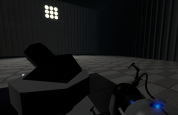
Marlow's Coop Airlock Spawn Instance example
I've spent the last few days remaking the coop airlock/checkpoint spawn. I've tested that this works with the stock coop spawn. If any bugs are found let me know. This is made to be dropped right between two chambers. The default door state is closed/locked. You can use a simple logic_auto to open the entrance or exit(debug), or use a relay after a puzzle. Included files: Demo .bsp and .vmf instances- airlock entrance door airlock exit door (requires entrance door) entire check point (requires all other .vmf) Feel free to edit the instances to fit your needs.
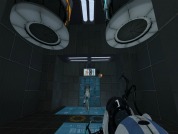
Animal King - WIP
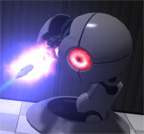
A work-in-progress Animal King model adapted from a stock turret. It's partially animated, but doesn't quite work as a normal Portal 2 turret yet. Looks great as a static model though. This model works in both Portal 2 and Team Fortress 2.
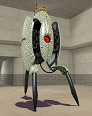
Underground Themed Aerial Faith Plates
I put together a prefab for an underground themed aerial faith plate. Simply drop it in your map and name it whatever. Place a trigger_catapult over it and set it to "OnCatapult" "prefabname" "instance:catapult_relay;Trigger" and you're good to go. I included the .vmf for both the compiled map and the instance.