Portal 2 (Other files)
Miscellaneous Portal 2 mods, assets, tools, and non-map downloads.
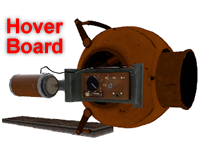
Hover Board V.9
This is my latest update to Blappeture Science Hover Board. The design is notably different as it features a core chasse instead of a beheaded Glados as before. The control setup has been modified from before to allow the user to carry the device without needing to use it. Unfortunately the machine gun was removed for this feature to work. The missile launcher however remains intact. The overall functionality has been stabilized and it can now actually float in water. This should make it less difficult to lose in a bog of ooze. Additionally it will not dissolve under normal Weighted Cube conventions. The New Control Interface goes as follows: Engage and disengage engine: (spacebar) Forward throttle: (W) Nitro Booster: (right Mouse button) Missile Launcher: (left Mouse button) Steering: (Mouse Movement)

[TOOL] A Propper MOD
This is a very useful tool for mappers, mainly if you haven't got any modelling knowledge. This tool will allow you to make models out of brushes; create whatever thing into your Hammer editor by means of only brushes and then turn it quick and easily into a custom model usable in game! Propper is not new at all, many of you know about it already. I even wrote a tutorial some time ago... But since I know many of you are having trouble in making it to work out after some Valve updates and the new SteamPipe file system, I've decided to share this little mod I managed to prepare some time ago mounted in the Alien Swarm game and as a mod. I borrowed TopHatWaffle's batch file altogether with the required binary files from his awesome tutorial some time ago, and edited it a bit for my purposes. So credit goes to him before anything.
![[TOOL] A Propper MOD](/downloads/screenshot/thumbnails/3171_Thumbnail.jpg)
Flip-Disc Displays
Those models are provided in different sizes. Changing their display works by changing their body group value. The green panels are glowing in the dark. Bodygroup - Symbol: 1 1 2 2 3 3 4 4 5 5 6 6 7 7 8 8 9 9 10 A 11 B 12 C 13 D 14 E 15 F 16 G 17 H 18 I 19 J 20 K 21 L 22 M 23 N 24 O 25 P 26 Q 27 R 28 S 29 T 30 U 31 V 32 W 33 X 34 Y 35 Z 36 . 37 ! 38 ? 39 : 40 - 41 + 42 _ 43 ( 44 ) 45

New Door
Door from reepblue's betapack as a seperate model.

Hammer Addons
Various modifications to the game's files to improve mapmaking in general. FGD Changes: - Skotty's FGD stuff (With some tweaks) - New icons for point_templates, point_server/clientcommands, point_teleport, etc - Credit to :The TF2 Ultimate Mapping Resource Pack, ZPS: Supplemental Hammer Icons and ts2do's HL2 FGDs for the various icons. - Fake keyvalues for turrets, cubes and funnels that let you choose the model that will be displayed in hammer. - Rendermode, EnableDraw/DisableDraw commands, Parenting properties etc added to many items if they can use them. - Custom editor model for prop_indicator_panel, making it easy to ensure perfect alignment and correct orientation for both modes. - Custom model for prop_portals and placement_helpers to show the orientation easier (arrow points upward) - More Auto Visgroups to categorise basically everything (test element only visgroup, antlines, buttons, instances visgroup, basically anything I could think of) Vscript changes: - Choose a random elevator video in unpublished maps (video_splitter.nut) - In unpublished maps, play a random Cave DLC2 quote. (dlc2_vo.nut) - Onscreen notification when the vote screen is triggered (voting_dialog.nut) - Script to change models to custom versions for prop_buttons, prop_weighted_cube (ts_model_change.nut) Models: (these are mostly reskins/recompiles of Valve models and originally made for PTI styles, but they could be useful for pure Hammer maps.) They're all in props_ingame/, excluding the underground companion cube which is in props_underground/. - [p1_button()] P1 button modified to work correctly with prop_buttons - [under_ccube()] Old Aperture Companion Cube (set the cube to the antique type) - [rusty_reflect()] Rusty reflection cube with correct gel skins (Use on a cube that was set to the clean variant) - [rusty_box()] Version of the normal cube with rusty skins in place of the normal one (Allows having a rusty cube show gel skins) - [p1_cube()] P1 Storage/Companion cube (with additional skins to match the P2 metal_box model) - [p1_ball()] P1 sphere (with gel skins) - P1-inspired laserfield emitter (Black exterior with red "lights") - Variations of the PeTI arm_4panel, arm_4panel_glass and arm_8panel models with the other arm64 skins (dirty, red lights, etc) To use the cubes or button, set "ts_change_model.nut" as the entity script and RunScriptCode the appropriate function. For the other models set as prop_dynamic. Instances: - A P1 pedestal button which uses the custom model as well as the more mechanical P1 tick-tock sound (tspen/p1_button). - A nodraw room to precache the custom cubes, and p1 pedestal button.
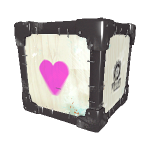
The Portivity Gun (Portals+Gravity)
Thanks to the unholy union of Black Mesa and Aperture Science, the fusion of their most coveted creations has spawned the Portivity Gun. It functions just like both devices in every way. However to toggle the device between modes, one must only tap down on the crouch button. To implement the device into your personal test chamber, simply drop the tool directly where the test participant begins their journey. But if you wish place the tool elsewhere, attach the gun_collision to it's assigned pedastal
Custom soundscapes
Using the ambient sounds in new ways, I present you with more than 40 soundscapes for all kinds of themes. Enjoy, and happy mapping. * If you are using or plan to use any of these soundscapes in a map, please credit me as p0rtalmaster. I'll be looking out for you on the Steam workshop. **
re-colorable plasticwall002a psd 2
Have you ever wanted a different color to the nice plasticwall002a texture? Did you find the old version of my psd, and realized that you didnt have photoshop or simply couldnt get the desired effect with the hue slider alone? well, that's what this is for! Now it includes several pre-made colors, as well as an example .vmt that allows for custom coloring without photoshop via the $color parameter. ============================================================== To use: 1.open the psd. change the hue setting on the "color hue/sat" layer (not the saturation setting!) 1b. Optionally, you can have more control over the exact color you want by disabling the hue/sat layer, enabling the manual color layer, and filling the manual color layer with a solid color of your choice. 2.save it as a .tga file 3.open your .tga file with vtfedit and save it into portal2/portal2/materials/props/ as "plasticwall002a_YOURCOLOR.vtf" 4.Create a .vmt for it by copying the provided "plasticwall_002a_YOURCOLOR.vmt" and renaming the copy with your color. ==Please note== the part of the example vmt that says $color "[0 0 0]" is meant for people who dont have photoshop or any other program that opens .psd. do not use it unless you need to. Also, you'll notice that there are layer masks on the color layers- this is because in valve's textures, these areas stay consistant across different versions of this same texture. for best results, dont delete these. ==Please also note== If you use this in a map,mod,or SFM/Gmod video, Please not only credit me but let me know you used it. I like it when i see something i made used in sombody else's work! Contact me at: http://www.moddb.com/members/tile http://steamcommunity.com/id/notsoregular/ http://notsoregularfox.deviantart.com/ Thanks for using my stuff! -Tile
TWTM Textured Portalgun Skin
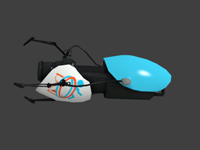
This is a portalgun skin based off the new thinking with time machine game Pic of gun http://steamcommunity.com/sharedfiles/f ... =255412240 (Note once installed for portal 2 it should also show up in Thinking With Time Machine) Have fun
512 size Geodomes
Have you ever wanted a geodome in a map, but there wasnt any that were small enough for your use? well, thats what these are for. 512 units in size, there are 3 models: dharmadome_interior (the interior walls) _exterior (the exterior walls) *_frame (the frame. should accompany the other 2 wherever they are used.) To install: drag both folders into steam/steamapps/portal2/portal2 ==Please note== These models all have collision, however, the inside is solid. if you intend to have anything inside of these, turn the collisions off. Also, the reason these are called "dharma domes" is because of the TV show "LOST", where survivors of a plane crash find an underground test facility owned by something called "the DHARMA initiative" that features a geodome ceiling roughly the same size as this one. ==Please also note== If you use this in a map,mod,or SFM/Gmod video, Please not only credit me but let me know you used it. I like it when i see something i made used in sombody else's work! Contact me at: http://www.moddb.com/members/tile http://steamcommunity.com/id/notsoregular/ http://notsoregularfox.deviantart.com/ Thanks for using my stuff! -Tile (also, if you can take pics that would be apreciated!)