Cubemaps not showing up
169 Posts
Posted Dec 27, 2011
I have mat_specular set to 1, all the graphics settings on highest, but cubemaps still aren't showing up on my system. What do I do?

Registered users don’t see ads!
Register now!
219 Posts
Posted Dec 27, 2011
Replied
2 minutes
later
Is it using the default cubemap or none at all? Also, is this in all maps or just yours?
169 Posts
Posted Dec 27, 2011
Replied
2 minutes
later
None at all. For any maps.
219 Posts
Posted Dec 27, 2011
Replied
9 minutes
later
Try verifying the integrity of the game cache. If that doesn't work, I have no idea what's going on. Sorry.
169 Posts
Posted Dec 27, 2011
Replied
1 minutes
later
Tried that.
7 Posts
Posted Dec 27, 2011
Replied
5 hours
later
Did you build the cubemaps?
169 Posts
Posted Dec 27, 2011
Replied
1 hour
later
With built cubemaps they don't show up, and with unbuilt cubemaps they don't show up.
Thank you,
Sound logic
Thank you,
Sound logic
2,460 Posts
Posted Dec 28, 2011
Replied
1 day
later
Try testing you map by putting it in the dlc folder THEN building cubemaps THEN restarting Portal 2.
169 Posts
Posted Dec 28, 2011
Replied
38 minutes
later
I have tried it both in and out of the dlc folder, but it isn't just that I can't build cubemaps, but I can't see them even on the highest settings
Thank you,
Sound Logic
Thank you,
Sound Logic
944 Posts
Posted Dec 29, 2011
Replied
50 minutes
later
You need to find the folder that portal 2 loads first.
Then put the map in that folder.
I build cube maps by making a source mod using portal 2 content.
Then put the map in that folder.
I build cube maps by making a source mod using portal 2 content.
169 Posts
Posted Dec 29, 2011
Replied
19 hours
later
Once again, the cubemaps don't show up or work at all in either the dlc or the standard folder, with mat_specular 1 or 0, with the cache confirmed, standard portal 2 nor tools portal 2.
Thank you,
Sound Logic
Thank you,
Sound Logic
169 Posts
Posted Jan 09, 2012
Replied
10 days
later
Does anyone have any idea how to fix this?
Thank you,
Sound Logic
Thank you,
Sound Logic
205 Posts
Posted Jan 09, 2012
Replied
17 minutes
later
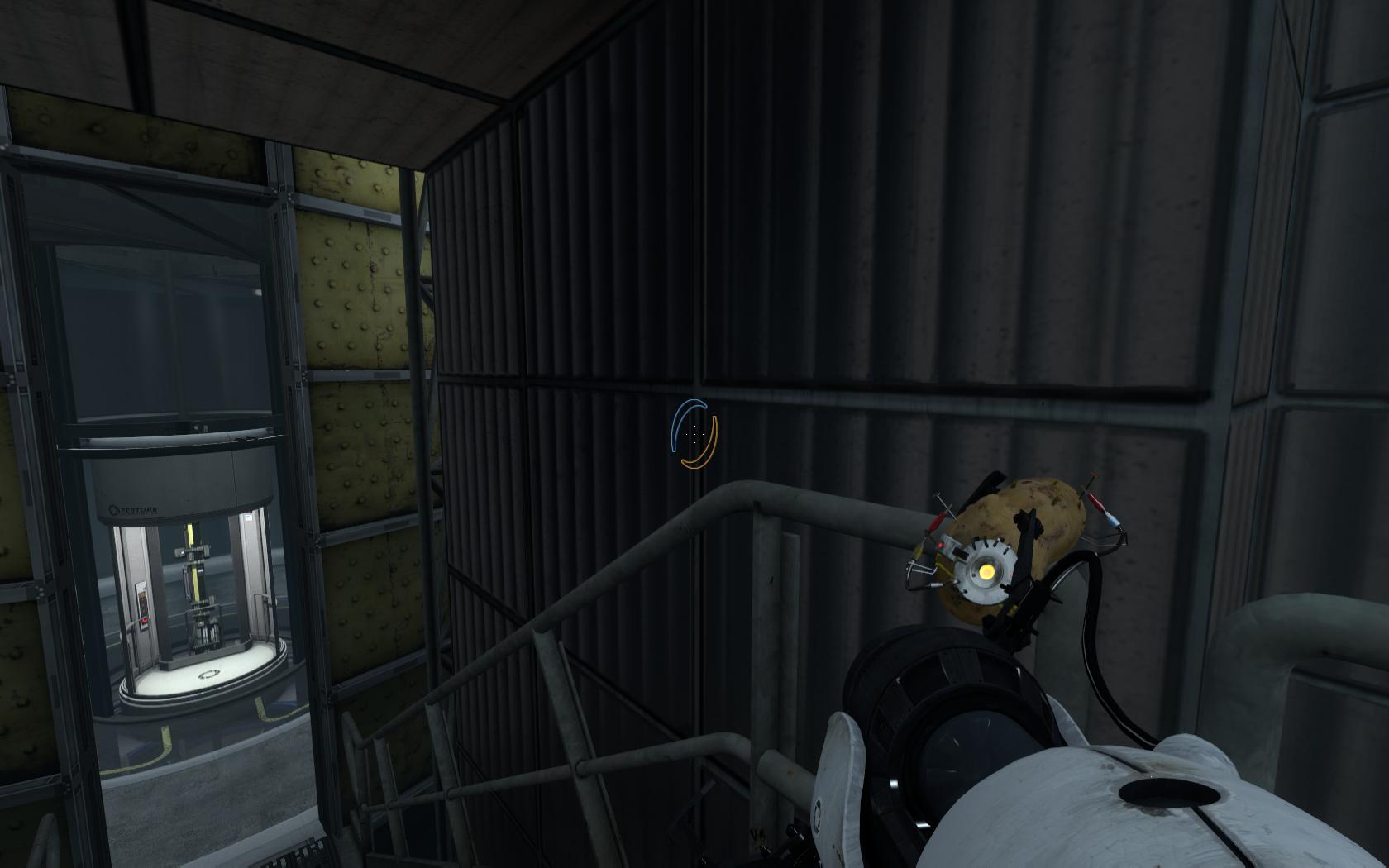
It would help if you provide a screenshot of the problem, ideally even a shot of working cubemaps (possibly from a friend's computer or a screenshot posted on this site) side by side with a screenshot from your computer. There are a few ways that cubemaps can "not work" (pink checkerboard, too bright, etc.) and a screenshot would help debug.
169 Posts
Posted Jan 10, 2012
Replied
1 day
later
This is a picture of a elevator. It is from my map, and is a fairly simple thing. As you can see, I don't get pink checkerboards, nor default cubemaps, nor working cubemaps.
Images
1
2,460 Posts
Posted Jan 11, 2012
Replied
6 hours
later
Try assigning cubenmaps to certain faces of your walls. Sometimes restarting portal or the map makes cubemaps show up.
944 Posts
Posted Jan 11, 2012
Replied
7 hours
later
You can buildcubemaps by using the method Kennkong did with custom maps, by making a source mod.
169 Posts
Posted Jan 11, 2012
Replied
3 hours
later
The problem isn't just with building cubemaps, the problem is no cubemaps at all
Thank you,
Soundlogic
Thank you,
Soundlogic
942 Posts
Posted Jan 11, 2012
Replied
51 minutes
later
Forgive me for posting something I haven't tested, but just FYI:
The order in which Portal 2 searches folders post DLC1 is:
All the following are relative to steeamapps
- sourcemods/modname (if you're running a mod)- common/portal 2/update- common/portal 2/portal2_dlc1- common/portal 2/portal2- common/portal 2/platformIt will also search any pak01_dir.vpk file in those folders, however I'm not sure about whether the .vpk or the files in the folder take precedence.
The order in which Portal 2 searches folders post DLC1 is:
All the following are relative to steeamapps
- sourcemods/modname (if you're running a mod)- common/portal 2/update- common/portal 2/portal2_dlc1- common/portal 2/portal2- common/portal 2/platformIt will also search any pak01_dir.vpk file in those folders, however I'm not sure about whether the .vpk or the files in the folder take precedence.
Now comes the part I haven't tested:
If you're not running a mod, you should be able to buildcubemaps by putting the map in the update/maps folder.
Please correct me if I am wrong about any of this, it might explain some problems I'm having with my mod.
169 Posts
Posted Jan 11, 2012
Replied
47 minutes
later
Putting it in the dlc folder will fix the cannot find map bug, but my problem isn't that.
My problem is that cubemaps will neither get displayed nor built. I suspect that these problems are related.
Thank you,
Sound Logic
My problem is that cubemaps will neither get displayed nor built. I suspect that these problems are related.
Thank you,
Sound Logic
Registered users don’t see ads!
Register now!
671 Posts
Posted Jan 11, 2012
Replied
3 hours
later
Cubemaps in Portal 2 are sometimes, mainly in testchambers, nearly imperceptible. Maybe you already built cubemaps on the right way, but they just look very similar like the walls are already.
I hope you removed the BSP file from Portal 2 if you built it in Portal 2 DLC1.