Portal 2
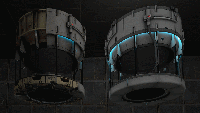
ML's Angry Hover Turret
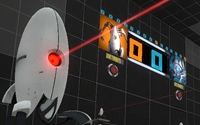
This is my personal version of the scrapped Hover Turret that didn't make it in Portal 2. It floats in the air while tracking the player with a laser and has two turrets equipped that remain motionless (except when firing). The only way to destroy the turrets is to burn them with the laser, picking up the turrets will NOT work. To activate the Angry Hover Turret properly, trigger the logic_relay with a trigger or something. It is best to copy and paste the Angry Hover Turret rather than loading it as an instance. Known issues: 1)While trying to rotate the Angry Hover Turret, the func_tank that tracks the player may end up firing the laser in another direction. When this happens, simply rotate the func_tank (the clip box) 90, 180, 270, etc degrees until it lines up properly. This takes some trial and error testing but it's not a big deal. 2) When using the reflection cube with the Angry Hover Turrets laser beam, sometime the laser will not reflect in it's current position.

Character Selection Room
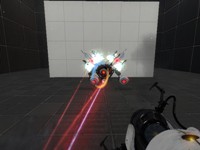
A Character Select instance to allow the player to pick which character they play with

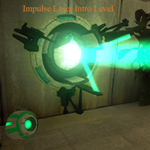
Impulse Laser Intro
A simple puzzle made to introduce a new testing element, The Impulse Laser. It acts similarly to a laser and a combine ball combined. (hehe, pun intended.) The ball must be activated by the laser. The ball will lose charge over approx. 7 seconds. When it is charged, It can be placed inside a receptacle, and only retrieved from the receptacle using a button or another activator. (My First released map!) The test is not hard, but I feel it is sufficient to explain how it can be used. I will (possibly) be releasing another map containing this element, except much more advanced.
Reflection Gel Particles
Modified particles for reflection gel splats. Must be added into the particles manifest like so: Copy, then put two slashes in front of, the lines for the old paintsplat particle files: //"precache" "paint_bomb_fx.pcf" //"precache" "paint_splats_fx.pcf" Paste, and add _new to the ends of, and ! to the fronts of, the new filenames. You need to have a fixed reflection gel blob texture for this to work!
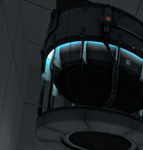
Customizable Box Droppers
These box droppers reduce all of the box dropper stuff in instances/gameplay into just a handful of instances. Place a dropper instance, give it the name of a special cube instance, and you're good to go! Note: there's a vscript involved, so using FudgePacker with this is a good idea. The Faith Cube also will glitch unless you have Skotty's Catapult Cube model.
FudgePacker 0.4 - With Hammer Intergration.
FudgePacker lets you create a list (or several lists) of files to add to your map, and automatically packs the files you want for each map while it builds. You can now choose which lists to load from inside hammer itsself.
DISMANTLED (taken down for serious reconstruction for undetermined date
This map is broken, dont bother playing it
Felix's WIP Uploads
I'm uploading stuff here while it's tested out. EDIT: Current download has a bad VMT, which I'm not going to re-upload until next release. For now, put this into the materials/models/props glass vmt: Code: Select all"Refract" { "$alphatest" "1" "$model" "1" "$surfaceprop" "water" "Refract_dx90" { "$refractamount" "0.2" "$normalmap" "dev/water_normal" "$bluramount" "2" "$refracttint" "[1 0.5 0.5]" } "Refract_dx80" { "$refractamount" "0.1" "$dudvmap" "dev/water_dudv" "$refracttint" "[1 0.5 0.5]" } "Proxies" { "AnimatedTexture" { "animatedtexturevar" "$normalmap" "animatedtextureframenumvar" "$bumpframe" "animatedtextureframerate" "30.00" } "Sine" { "resultVar" "$alpha" "sineperiod" "8" "sinemin" "0.01" "sinemax" "0.8" } } "UnlitGeneric_dx6" { "Proxies" { "Sine" { "resultVar" "$alpha" "sineperiod" "8" "sinemin" "0.0" "sinemax" "0.05" } Empty{ "Comments" "Follow:" "Thank you to whoever made" " the Liquid Portal Gun mod," "I borrowed a lot of the params" "from it." } } } }
Test Element - Animal King
This test element, for Hammer or the Editor, will throw bombs if it sees you. It needs to be activated by something to start. This also includes breakable walls for the Editor, which the bombs will shatter. Enjoy!
TSL Dropper AnnyCube v1.4 (FIXED)
This are 2 droppers, a new one and a wrecked one, who can drop anny cube you choice, used with the "func_instance" This Rar file contains also an explanation/installation html, and a document that explains the settings you have to set in the func_instance If someone made this kind of droppers already, i make my appolegies to you now, becouse i did not know. NOTE: FOR thus who have Downloaded the v1.3, please update your files with this one, and recompile your maps that are using the v1.3. Regards Teddybeer Fixed: Cube that did not drop when you shoot first a portal and dropping the cube with a Button Trigger.