Portal 2
Pneumatic Diversity Vent Trailer Fake
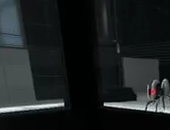
I reconstructed the Pneumatic Diversity Vent Trailer in Hammer and added a bonus level. I have a YouTube video faking the trailer ( http://www.youtube.com/watch?v=KzIyRTXT8Ow ). Hope you like this fake

[Coop] The Amazing Race
I have uploaded a final version of the map in the Coop Section.
![[Coop] The Amazing Race](/downloads/screenshot/thumbnails/1411_racingpic.jpg)
Portal 2 Theme
This is my first theme "Portal 2". ? 138 portal wallpapers ? Windows sounds replaced by turrets ? Trash icon is replaced I also recommend an excellent screen saver, you can find here : http://imgur.com/gallery/DbXgL ( Is the .exe in the .zip, virus scan : http://goo.gl/XYkKf3 ) -----ChangeLog----- 2.1 -Added some wallpaper. -Added a readme. -Clenest -Removing wallpaper of low quality 2.0 -Added some wallpaper. -Changing sounds: set in English -Color change of the bar -Changing the icons of the trash

[BETA 7] Aerial Faith Plate Quality Control
An upcoming map for the Team Citruz project. A short atmospheric and explorative map: Updated screenshots of the final mod-submitted version can be seen on the Team Citruz wiki at the following link: http://mothdesigns.co.uk/citruz/wiki/in ... _C01_bts01 ------------------------ BETA 7 Added music track Added Radio Music (just for lpfreaky90) BETA 6 Fixed: Intro Door Clipping Exploit Fixed: Visible pipe debris spawns BETA 5 Now with 100% more VMF file! Detail fixes, further optimisation of brushwork Tweaked Lightmap sizes for more beautiful shadows Tweaked Fog controller 'Suck tube' clipping issues (hopefully) resolved This map wouldn't have been possible without my fellow team members, Chickenmobile, iWork925 and Skotty
![[BETA 7] Aerial Faith Plate Quality Control](/downloads/screenshot/thumbnails/1285_1285_2011-10-03_00001.jpg)
Underground Timer
This is an instance of a robust underground timer. This timer can count up or down from 1 - 99 seconds. underground_timer_counter.vmf The $UnEvent_Relay parameter is the event that is fired when the timer has stopped counting. This event should be triggered in one of the clock instances. This instance is used for both buttons, however the buttons will determine whether it counts up, or down. underground_timer_but_countdown.vmf $time_units is the number of seconds of the unit column $time_tens is the value of the tens column (This is the only way I could figure this out for the countdown timer without adding some sort of script.) The $Event_Relay parameter is the event that is fired when the timer has started counting. This event should be untriggered in the clock instance. Please note: I have added entities that will work out the number of seconds the counter needs to count down from $time_units and $time_tens, hence the large amount of logic_cases underground_timer_but_countup.vmf The $Event_Relay parameter in the 'Timer instance' is the event that is fired when the timer has started counting. This event should be untriggered in the clock instance. The $time parameter should be set to how many seconds it should count up to Known Bugs: Putting both 0 and 0 for the left and right number icons will cause a rip in space, however this shouldn't happen as you wouldn't want a 0 - timed counter How to place in your map: Create a func_instance and change the vmf path to "underground_timer_counter.vmf" Name this instance Create another func_instance and then change the path to one of the button paths (either underground_timer_but_countup.vmf or underground_timer_but_countdown.vmf depending if you want it to count up or down) Set the button's fixup name value to the same of the counter instance If you are using the countup instance, put a number value for the replace value $time to how many seconds you want the counter to count up to If you are using the countdown instance, put the individual values with each a 1 digit number which will represent your double digit number. e.g. "$time_tens 1" and "$time_units 5" will make the timer count down from 15 Using the $Event_Relay replace value in your button, make it point towards a logic_relay which will trigger the event when the counter starts. This must include the name of the prefix PLUS the name of your relay otherwise it will not work. e.g. clock_1-TRIGGERNAME (This is the name of your relay outside the instance) Using the $UnEvent_Relay replace value in your counter instance, make it point towards a logic_relay which will un-trigger the event when the counter stops. Same as the button's relay this MUST INCLUDE the prefix fixupname as well as the name of your relay. e.g. clock_1-UNTRIGGERNAME (This is the name of your relay outside the instance) Enjoy the use of an underground timer... WOOOT If you are having trouble... Please do not hesitate to ask for any help either through a PM to myself or by posting a comment inside the instance thread.
Shootout
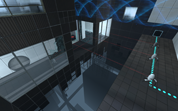
I'm working on a Wheatley map with 3-4 chambers, and I just want this first one to go through a playability test. Please mention ANY comments/suggestions/concerns that might help improve the map. I want this good and ready when it's released.
Squarebeam - Edges, Corners
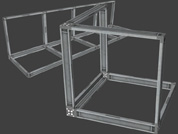
To avoid flickering of corners or edges with squarebeams you can use now these new models. They support all 3 skins for squarebeams. Edges: 64, 128 and 256 units long Corner: 64x64x64 Other formats: 64x48 and 48x48 squarebeam.
Fizzle
Fizzle is a simple map including the brand new Aperture Laboratories, along with the Destroyed Aperture. Have fun! Sorry for the lack of thumbnail...

Ben2 contest entry
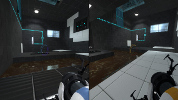
Its my first portal or portal 2 map. although I have made some maps in team fortress 2.