Portal 2 (Other files)
Miscellaneous Portal 2 mods, assets, tools, and non-map downloads.
Gel Dropper instance
Instance of a gel dropper that comes from a standard cube dropper. ============================================== = GEL DROPPER INSTANCE MADE BY CHICKENMOBILE = ============================================== This instance covers every available, working gel in Portal2. It has presets for each gel when you specify the type. Please note: Options are CASE SENSITIVE therefore you will need to type 'Bounce' instead of bounce and 'BigBlob' instead of bigblob etc. Instructions: 1. Place an func_instance inside your map and point towards your gel dropper instance. 2. Name this instance 3. Select your Gel type for $PaintType. Options: 1. Bounce 2. Speed 3. Erase 4. Portal 4. Select if it will spawn as a BigBlob or a constant stream of gel for $BigBlobOrConstant Options: 1. BigBlob 2. Constant 5. If it is 'BigBlob', set $TimeBetweenBigBlobs as a number for time BigBlobs spawn after each other (2 seconds is a good time) Notes: 1. BigBlobs are treated like physics objects which can be catapulted by faith plates and explodes when in contact with other BigBlobs 2. BigBlobs cannot press buttons 6. If you set $DropperInitiallyDisabled to 1, you will need to manually turn the gel spawner on using an output. Create an output from your activator (i.e. a button etc.) and then point it towards your gel spawner, then select from the 'Target Input' drop down menu: 'instance:StartGel;Trigger'. If you want to stop the gel from spawning choose: 'instance:StopGel;Trigger' 7. Profit?!?! P.S. I cbf uploading a thumbnail its nearly 4am. Good day


Light Beam Platform (from Portal 1)
Just because Portal 2 is a newer game there is no reason to waste old testing elements. A good example besides the Energy Balls (Working Energy Balls + Clean models + Instances) are the Light Beam Platforms. They can be used everywhere because they don't need any fixed points with walls like Portal 2's moving platforms. In this pack you have 5 instances: BeamPlatform_Beam: Here you have a preset env_beam where you have to set the start and endpoint of its beam. BeamPlatform_Corner: Thats the corner for a Light Beam Platform track. BeamPlatform_End: Thats the end platform for a Light Beam Platform track. BeamPlatform_Wall: This is a wall emitter for the Light Beam. For the first two instances the func_instance center is the point where you have to put your path_tracks to. The wall emitter needs to have the path_track on the same layer but of course a bit futher from the wall. BeamPlatform_Platform: Thats the platform itself with some settings. It's moving from MapSpawn on. Make sure to give all instances/parts that belong to the same Light Beam the same fixup name! For multiple platforms per track you have to use of course different ones. This just causes that the toggle won't work. In this pack there are also the missing models and textures for all the parts of the Light Beam Track. I recompiled the corner model and made it to a static prop. Please make sure to use the light_rail_endcap2.mdl and not the light_rail_endcap.mdl. I hexed that model because Valve made some texture tries on the original one in Portal 2's VPKs and it looks unfinished.

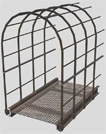
Underground Walkway 128 Caged
This is a caged walkway used for underground areas with a length of 128 units. You can use it for different purposes. It has full physics. Additional there is a end-model to close its open end if necessary. Requested by Moth.
Time Machine Instances
here are time Machines, two themes modern and antique.
Basic mod for playing .vpk files
You can play games distributed as .vpk files by installing them in the addons folder of a mod. This is a bare bones mod you can install if you don't know how to make your own. You can't use the in-game menu to start a remote coop game. Apparently, the Steam servers have a problem connecting mods. You can do it from the console, using the following commands: On the host machine: map
Portal 2 Map Launcher
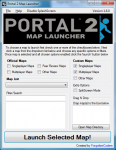
Portal 2 Map Launcher v1.6 + SOURCECODE @ http://github.com/forgottencoders/p2map VERSION 1.6 UPLOADED 05/05/12 Portal 2 map launcher is a simple but effective GUI for loading custom and stock portal 2 maps. It doesn?t matter if you want to load them as solo, splitscreen, or online/lan, portal 2 map launcher will launch it. It has many advanced features such as changing map when ingame and skipping the intro of the game. As of version 1.1 you can now also filter/search the maps to allow finding the maps even easier. Now with this version (1.2) you can now even load the new map ingame without having to minimize the game. by using the F10 key As of version 1.4 you can now drag .bsp files to a area on the form to copy it to your map location. aswell as many buttons for quick console commands. --------------------------------------------------------------------------------------------------- Click For ScreenShot Homepage - http://forgottencoders.co.uk Project Homepage - http://forgottencoders.co.uk/p2map Issue tracker - http://tracker.forgottencoders.co.uk s0AEErcYx5A New Youtube Video Coming Soon Version 1.6 --------------------------------------------------------------------------------------------------- Usage: Code: Select allLoading a new map 1. Install "Portal 2" (if not installed). 2. Select checkboxes that you want to use. 3. Click the Dropdown list or filter the list. 4. Click the "Launch" button Changing map 1. Press "F10" or minimize the game. 2. Select checkboxes that you want to use. 3. Click the Dropdown list or filter the list. 4. Click the "Launch" button --------------------------------------------------------------------------------------------------- Changelog: Code: Select allV1.6.0 * Added a function to prevent re-generating the list when checkbox not changed * Changed the detection of Solo and Mp Maps. * Some behind the scenes changes v1.5.1 Bug fix. (never released) * Fixed Splitscreen Bug * Prevented filtering the maps unless atleast 3 characters are entered * First GitHub release. * Changed layout of the checkboxes * Added 2 more checkboxes (Other Maps) * Changed Tooltips Slightly * Now Using a three numbered version system (X.X.X rather than X.X) * Issue Tracker is now on GitHub. v1.5 * Changed Hotkey From F2 to F10 * New Maps Are Added To List When Added To Map Folder * Admin Priveleges Not Required Any More * Added Automatic Settings (Checkbox States Are Remembered) * Added More Robust Detection System & Manual Option * Added Quick Instructions To Main Form * Removed Quick Commands (Were Pointless) * Reorganized The UI * Completly Recreated The Filter/Search System (Much Better Now) * Cleaned The Code Alot * Added Tooltips To Every Button/Label/Checkbox * Added Built In Changelog (Click Version Number At Top Right) * Fixed Even More Problems v1.4 * Added Drag n Drop Map Area (To Quickly Install Maps) * Added Many Buttons For Quick Console Commands * Added Option To Disable Splash * Added Option To Manually Choose Portal2.exe Location (if not found) * Added Button To Browse Map Directory * Added Button To Go To Issue Tracker Page * Fixed Many Issues * Fixed Registry Issue V1.3 * Added hotkey to switch map even easier * Added homepage url * Added Splashscreen * Added About Page * Changed Splitscreen/Solo/Lan System * Cleaned Code * Changed GUI * Fixed Bugs * And More! V1.2 * Fixed startup bug * Wasn't Released Publicly V1.1 * Added Filter system * Added -Hijack Command * Added Splitscreen/solo and MP buttons * Added changelevel command * Added File checking * Added Other things * Changed GUI layout * Changed Loading Method * Fixed DLC map bug v1.0 - Initial Release fixed version just uploaded. PLEASE NOTE IF THE FILE WONT DOWNLOAD FROM HERE PLEASE DOWNLOAD THE LATEST VERSION FROM HTTP://FORGOTTENCODERS.CO.UK/P2MAP AS I AM HAVING SOME ISSUES WITH THE TWP UPLOADER.
Pneumatic Diversity Vent Trailer Fake
I reconstructed the Pneumatic Diversity Vent Trailer in Hammer and added a bonus level. I have a YouTube video faking the trailer ( http://www.youtube.com/watch?v=KzIyRTXT8Ow ). Hope you like this fake
Relaxation vault.
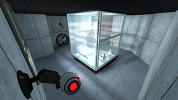
This is an instance I made which is basically the relaxation vault from portal 1, but made in Portal 2. So now you can wake up in your favorite room! If you have any comments or want to see new functionality's? Let me know! ~Lp
Diversity Vent help V2
i NEED help to get it working now with hammer files
Dynamic Breaker-box
I saw a request on the forums for how to make a circuit breaker box with a lever, so here's a quick and dirty version. a logic_relay is pre-set to toggle on and off with USE on the lever. Red and Green sprites included (for on and off signalling)
