Portal 2 (Other files)
Miscellaneous Portal 2 mods, assets, tools, and non-map downloads.
The 3D skybox models thread
So you wanted to make a 3D skybox for your Portal 2 map, browsed for skybox models but didn't find any and now you are disppointed. Don't be! This zip-file contains some skybox models that could get you started. Copy the contained folders into the model folder. You can create your own skybox models from the existing models in the game without any modelling experience when you follow these tutorials: 1. Decompile the model you want, as explained by Skotty here. 2. Rescale the model as explained in this tutorial on interlopers.net 3. Compile the new model following Josepezdj's tutorial here. If you do so, let me know via PM or upload the file attached to a reply in this thread and I'll add your models to the zip-file.


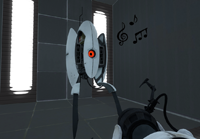
Singing Turrets PTI Instance
These instances replace the PTI turrets so when they deploy, they will sing to you! This can be ideal if you want to put a little easter egg into a PTI map, or just for fun. The turrets can be repositioned from behind, but once they see you, they cannot be moved. Readme included for installation help. Anyway, I originally made this as a fun little thing to mess around with, but a few friends requested a download, so I decide to upload it here if any of you guys want to use it.
Portalable Piston Instance for PTI
Portalable piston for PTI, made by LPChip, who doesn't have an account here. I take no credit, nor responsibility, for it.
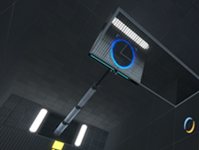
Portal 2 Beta styled vac tubes.
These are hexed vactube alternate models that have the un-textured frames, much like they did in the april 2010 game informer and valve's original meet wheatley trailer for portal 2. You may use these in any map that you want to look more like p2's beta, but please give me (tile) credit in your map (and let me know you made a map with my stuff in it, too, because i love seeing my work put to good use!)

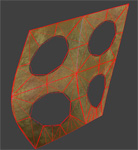
Panel models 32 & 64
A request by ChickenMobile. She wanted 32322 and 64648 panels with ceiling/wall textures. The 32-panels have ceiling textures. Skin 0 - observation room ceiling Skin 1 to 8 - underground ceiling tiles, different variations Skin 9 to 16 - white dirty ceiling tiles, different variations The 64-panels have wall textures. Skin 0 - black metal wall Skin 1 to 16 - destroyed metal wall, different variations If you want to have other skins, ask me.
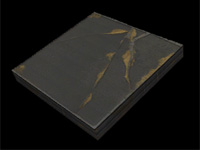
PUNT Gravity Cubes
As seen in Reepblue's previews for the mod PUNT! The example map isn't very good, and I'm not actually sure it doesn't leak, but it shows the triggers you need. Copy-paste them into a plain box and it'll look better. Used with permission, but you need to attribute PUNT to Reepblue if you make something big with this.

SinglePlayer P-Body Respawning Script
This is a script and few instances in order to mimick the way you die and respawn in multiplayer in singleplayer. P-Body robot only. This was made for TeamCitruz's unfinished mod "Catch 131" which was about an adventure of p-body. I thought it would be a waste to let it just sit there so I'm giving it to you community! Download comes with a script, a couple of instances and an example map you can copy from. I won't go too much into how it works because there is a in-depth ReadMe included in the download. But do include me in your credits if you are going to use this! Happy mapping TWP!

Wall Tile Randomizer
Ever get tired of cutting up your walls to create tile variation? Wish there was a way to automatically generate randomized walls? Now there is! Just extract the 7z, run WallRandomizer.exe, and either copy the contents of the output vmf or use it as an instance. --NOTICE-- You WILL need to install Python 3.3, available at http://www.python.org. The WTR will NOT work without the dlls from it, which I cannot distribute. Features: -Customizable size -Either white or black wall -Clean or dirty variants -Enable/disable of certain tile sizes -Automatic texture alignment Please note that this is in very early testing - just something I whipped up in an afternoon. The algorithm is also a tad slow and can lead to some odd results. Please leave feedback about any bugs you may encounter. Changelog: v1.1 -Fixed texture alignment -Added clean/dirty variants -Added input checks (no more putting "fish" as the width ) -Improved and optimized randomizer algorithm -Added texture arrays, making it possible in future versions to add a text file to change textures -Other miscellaneous bugfixes v1.1.1 -Fixed clean wall bug (thanks protoborg and tile) v1.2 (A day late and a dollar short, sorry) -Fixed side alignment issues -Upgraded from Python 2.7 to Python 3.3 -Replaced crappy 15-minute-implemented brush writer with PyVMF
Mho' Power Conductive Plate Instances
This is a collection of the instances used for the custom testing element in the "Mho' Power" series. Two variants are included, a black and a white clean variation. ----------------- Instructions to use the instance are in the readme, included in the archive. ------------------ The instances and material are distributed under a Creative Commons Attribution-Share Alike 3.0 Unported license. If the instance and/or I/O setup is used, you MUST credit me, WrathOfMobius. If the material is used, you MUST credit the creator of the material, Vordwann.
Wall_Dest_Section03 With Collisions
Sprowl requested models/props_destruction/wall_dest_section03.mdl with physical model. So here it is, for everyone of course.