Portal 2 (Other files)

Miscellaneous Portal 2 mods, assets, tools, and non-map downloads.

Relaxation vault.
Uploaded by Lpfreaky90 · Dec 18, 2011
36 comments · 5.0 (2)

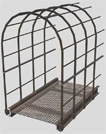
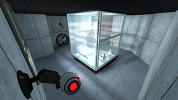
This is an instance I made which is basically the relaxation vault from portal 1, but made in Portal 2. So now you can wake up in your favorite room! If you have any comments or want to see new functionality's? Let me know! ~Lp

Relaxation vault.
Advertisement
Registered users don’t see ads! Register now!
Diversity Vent help V2
Uploaded by GLaDOS CUBE · Dec 16, 2011
6 comments · 0.0 (2)

i NEED help to get it working now with hammer files

Diversity Vent help V2
Dynamic Breaker-box
Uploaded by Moth · Dec 16, 2011
1 comments · 5.0 (1)

I saw a request on the forums for how to make a circuit breaker box with a lever, so here's a quick and dirty version. a logic_relay is pre-set to toggle on and off with USE on the lever. Red and Green sprites included (for on and off signalling)

Dynamic Breaker-box
Light Beam Platform (from Portal 1)
Uploaded by Skotty · Feb 06, 2012
10 comments · (No ratings)

Just because Portal 2 is a newer game there is no reason to waste old testing elements. A good example besides the Energy Balls (Working Energy Balls + Clean models + Instances) are the Light Beam Platforms. They can be used everywhere because they don't need any fixed points with walls like Portal 2's moving platforms. In this pack you have 5 instances: BeamPlatform_Beam: Here you have a preset env_beam where you have to set the start and endpoint of its beam. BeamPlatform_Corner: Thats the corner for a Light Beam Platform track. BeamPlatform_End: Thats the end platform for a Light Beam Platform track. BeamPlatform_Wall: This is a wall emitter for the Light Beam. For the first two instances the func_instance center is the point where you have to put your path_tracks to. The wall emitter needs to have the path_track on the same layer but of course a bit futher from the wall. BeamPlatform_Platform: Thats the platform itself with some settings. It's moving from MapSpawn on. Make sure to give all instances/parts that belong to the same Light Beam the same fixup name! For multiple platforms per track you have to use of course different ones. This just causes that the toggle won't work. In this pack there are also the missing models and textures for all the parts of the Light Beam Track. I recompiled the corner model and made it to a static prop. Please make sure to use the light_rail_endcap2.mdl and not the light_rail_endcap.mdl. I hexed that model because Valve made some texture tries on the original one in Portal 2's VPKs and it looks unfinished.

Light Beam Platform (from Portal 1)
Portal 2 Map Launcher
Uploaded by fma965 · Jan 03, 2012
33 comments · 5.0 (2)

Portal 2 Map Launcher v1.6 + SOURCECODE @ http://github.com/forgottencoders/p2map VERSION 1.6 UPLOADED 05/05/12 Portal 2 map launcher is a simple but effective GUI for loading custom and stock portal 2 maps. It doesn?t matter if you want to load them as solo, splitscreen, or online/lan, portal 2 map launcher will launch it. It has many advanced features such as changing map when ingame and skipping the intro of the game. As of version 1.1 you can now also filter/search the maps to allow finding the maps even easier. Now with this version (1.2) you can now even load the new map ingame without having to minimize the game. by using the F10 key As of version 1.4 you can now drag .bsp files to a area on the form to copy it to your map location. aswell as many buttons for quick console commands. --------------------------------------------------------------------------------------------------- Click For ScreenShot Homepage - http://forgottencoders.co.uk Project Homepage - http://forgottencoders.co.uk/p2map Issue tracker - http://tracker.forgottencoders.co.uk s0AEErcYx5A New Youtube Video Coming Soon Version 1.6 --------------------------------------------------------------------------------------------------- Usage: Code: Select allLoading a new map 1. Install "Portal 2" (if not installed). 2. Select checkboxes that you want to use. 3. Click the Dropdown list or filter the list. 4. Click the "Launch" button Changing map 1. Press "F10" or minimize the game. 2. Select checkboxes that you want to use. 3. Click the Dropdown list or filter the list. 4. Click the "Launch" button --------------------------------------------------------------------------------------------------- Changelog: Code: Select allV1.6.0 * Added a function to prevent re-generating the list when checkbox not changed * Changed the detection of Solo and Mp Maps. * Some behind the scenes changes v1.5.1 Bug fix. (never released) * Fixed Splitscreen Bug * Prevented filtering the maps unless atleast 3 characters are entered * First GitHub release. * Changed layout of the checkboxes * Added 2 more checkboxes (Other Maps) * Changed Tooltips Slightly * Now Using a three numbered version system (X.X.X rather than X.X) * Issue Tracker is now on GitHub. v1.5 * Changed Hotkey From F2 to F10 * New Maps Are Added To List When Added To Map Folder * Admin Priveleges Not Required Any More * Added Automatic Settings (Checkbox States Are Remembered) * Added More Robust Detection System & Manual Option * Added Quick Instructions To Main Form * Removed Quick Commands (Were Pointless) * Reorganized The UI * Completly Recreated The Filter/Search System (Much Better Now) * Cleaned The Code Alot * Added Tooltips To Every Button/Label/Checkbox * Added Built In Changelog (Click Version Number At Top Right) * Fixed Even More Problems v1.4 * Added Drag n Drop Map Area (To Quickly Install Maps) * Added Many Buttons For Quick Console Commands * Added Option To Disable Splash * Added Option To Manually Choose Portal2.exe Location (if not found) * Added Button To Browse Map Directory * Added Button To Go To Issue Tracker Page * Fixed Many Issues * Fixed Registry Issue V1.3 * Added hotkey to switch map even easier * Added homepage url * Added Splashscreen * Added About Page * Changed Splitscreen/Solo/Lan System * Cleaned Code * Changed GUI * Fixed Bugs * And More! V1.2 * Fixed startup bug * Wasn't Released Publicly V1.1 * Added Filter system * Added -Hijack Command * Added Splitscreen/solo and MP buttons * Added changelevel command * Added File checking * Added Other things * Changed GUI layout * Changed Loading Method * Fixed DLC map bug v1.0 - Initial Release fixed version just uploaded. PLEASE NOTE IF THE FILE WONT DOWNLOAD FROM HERE PLEASE DOWNLOAD THE LATEST VERSION FROM HTTP://FORGOTTENCODERS.CO.UK/P2MAP AS I AM HAVING SOME ISSUES WITH THE TWP UPLOADER.

Portal 2 Map Launcher
Underground giant door transition
Uploaded by Moth · Dec 16, 2011
1 comments · (No ratings)

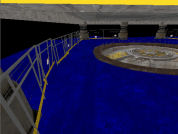
My attempt at an underground transition seal, trying to re-create a4_end without copy-pasting. I was going to include it in my 'useful instances' - but it's too big and doesn't really fit into a category. Gaps have been left for you to plug doorways in to the North and South sides, as well as a gap for a descending elevator. Triggering the massive door to open is easy with just a few entities, but is beyond the scope of this text and will not be explained here. Check the forums!
Underground giant door transition
Cube Inductance
Uploaded by protoborg · Dec 08, 2011
2 comments · 5.0 (1)

This was an idea I had after seeing the "shake flashlight". This is a generator which uses the "infinite fall" technique with a cube or sphere to activate an object, i.e. open a door. The instance requires a fairly tall room as it is 512 high by 128 wide by 128 deep. Try it out and let me know what you think of it.

Cube Inductance
Holoemitter
Uploaded by Skotty · Dec 05, 2011
4 comments · 5.0 (1)

This is a hologram emitter, requested by Soundlogic. The model has a footprint of 32x32. It has 4 skins, on and off in blue and orange (just illumination turned on or off). There are 2 models. The first model (holoemitter.mdl) got 3 animations: idle auf (open) zu (close) The second model (holoemitter_statisch.mdl) is a static prop. I recommend to use the static one, because of its small size the animations are just a small detail. If somebody needs a bigger version, I can rescale it. Texture resolutions in original are double sized. Because of the size of THIS model, they are downsized.

Holoemitter
Moth's Useful Instances
Uploaded by Moth · Dec 13, 2011
14 comments · 5.0 (4)

Some useful instances I made, that can serve two purposes: * Quickly add nice things to your map * Deconstruct, use bits, make new bits, gain UNDERSTANDING My plan is to expand this as I make more stuff. Each instance has an accompanying screenshot of all 4 Hammer views, so you can see what it looks like without launchiing any tools. Click 'show' below for a full list of contents: [spoiler]*** ApSigns (1 instance) aperture_1970s_gantry ----------------------------------- 1970s style Aperture logo, suspended from solid metal beams, with ambient spotlamps *** Destroyed (2 instances) DestroyedWall ----------------------------------- Off-grid deformed black tiled wall DestroyedWall2 ----------------------------------- Black tiled wall with missing pieces and bts back panels *** Dynamic (2 instances) glass_platform ----------------------------------- template for a telescopic moveable plat. supports players, turrets, cubes, etc Huge_Fan ----------------------------------- complete wall assembly that casts epic shadows. Starts on at map spawn. *** Factory (6 instances) dlc1_RoobotArms ----------------------------------- very small lab section with arms on a shelf, from dlc1 Freight_Boxes ----------------------------------- Motorized railed transport filled with metal containers glass_partition_01 ----------------------------------- A 3x3 detailed glass-panel wall section glass_partition_withDoor ----------------------------------- As above, with a doorway tubular_elevator ----------------------------------- Quick and dirty elevator. Scenery only but easily converted to a func_movelinear turret_storage ----------------------------------- Very tall storage area for turrets, with accompanying machinery. *** Gameplay (2 instances) RampArms_static ----------------------------------- Ramp made from panel arms. Some destroyed or missing. RampArms_static_collision ----------------------------------- Clip brush to exactly fit the above *** Lighting (6 instances) old_wall_light_300 ----------------------------------- underground-style lamp with sitably coloured light entity (300br) trussbox_curvedLights ----------------------------------- many very-wide underground-style floodlights, angled towards a central point underground_array_tower ----------------------------------- Used extensively throughout underground maps underground_array_towerLightArm ----------------------------------- Extra arms for the above underground_array_tower_leaning ----------------------------------- Alternative underground_array_tower with no arms *** Office (8 instances) big_empty_office_1970s ----------------------------------- complete 1970s style office building with one doorway. Just add furniture! chair_and_desk_1980s_XX ----------------------------------- 1980s style desk, chair, desk lamp, telephone, computer - 4 variations lab_furniture_01 ----------------------------------- Block of machines and a whiteboard observation_office ----------------------------------- Small 'control room' with glass windows, houseplant office_cube_3sided ----------------------------------- Template for making custom-sized offices/control rooms *** Spawns (1 instance) PlayerSpawn_in_DropTube ----------------------------------- Player spawn, with full portalgun-- falling intro, with a tube that auto-opens. *** Underground (8 instances) 45_angled_paint_sprayer ----------------------------------- Paint-pipe gusher, angled 45 degrees - as seen in a4_portal_intro map 1940s_reception ----------------------------------- Complete relaxation area in a 1940s style. 1970s_welcome_area ----------------------------------- underground-style elevator reception DuctSystem ----------------------------------- Miscellaneous hanging system of ducts platform_with_legs ----------------------------------- metal scaffolding with chipboard panels precarious_platform ----------------------------------- Hanging underground cube_dropper with suspended platform. underground_WallSection_01 ----------------------------------- Various brushes & models, stuck together to make an interesting underground wall[/spoiler] Feedback is welcome, please rate this and post your comments. I'll post when I update. --------------------------------------- New in r2: --------------------------------------- * Huge Fan that casts epic moving shadows * Tons of bts office stuff * Underground lighting * Factory stuff! File Name: Moth_instances_r2.rar File Size: 6.39?MiB Moth's Useful Instances

Moth's Useful Instances
Advertisement
Registered users don’t see ads! Register now!
ML's Disc and Disc Player
Uploaded by MasterLagger · Dec 08, 2011
5 comments · 5.0 (1)

So I made a Disc and Disc Player in one of my maps. And since I couldn't find anything here (like an instance file or anyone bothering to make one) I decided to stick it up here. Even though this is an instance, you should open this file to copy and paste everything into your map instead of loading this as an instance in your map. The reason being is that if you want to hide your disc (the disc that the player interacts with is near the two purple cube, DON'T TOUCH THE ONE INSIDE THE TRIGGER) you won't be able to hide it if it's part of an instance. The default result of inserting the disc into the player is a message indicating that it works. Be sure to test it first to make sure it works before doing anything else with it. To change whatever result you want, change the logic_relay's Target output to whatever you want to be triggered. Please let me know if you have trouble or need help since this is the first time I have uploaded an instance. Edit: After some more testing, I realize that rotating the grouped objects (disk player, triggers, func_doors etc.) messes with the way the disk gets put in. So don't rotate the grouped objects either. I know that sounds like an inconvenience, but if your really insistent on rotating the device instead of rearranging the area you want the disk player to be located, then un-group the objects, change the "open" direction of the func_door. It's the purple "invisible" brush that touches the disc inside the trigger and goes into the disc player. Please comment if you have any questions or need better instructions.

ML's Disc and Disc Player