Portal 2
Panel Pack
A Panel Pack For All People!


Door Frame Instances
Thought people might appreciate these, in case you ever want a frame for the test chamber doors. They align nice and on-grid, and are 128x128x32. Includes clean and dirty variants of black, white and both (black one side, white on the other). They are func_details so don't forget to seal them. Some are cut down the center in case you want half-black and half-white on each side, in which case Edit Instance > Save As. Just plonk 'door frames' in your instances folder or wherever and you're set.
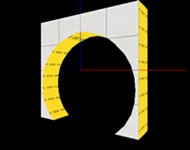
512 size Geodomes
Have you ever wanted a geodome in a map, but there wasnt any that were small enough for your use? well, thats what these are for. 512 units in size, there are 3 models: dharmadome_interior (the interior walls) _exterior (the exterior walls) *_frame (the frame. should accompany the other 2 wherever they are used.) To install: drag both folders into steam/steamapps/portal2/portal2 ==Please note== These models all have collision, however, the inside is solid. if you intend to have anything inside of these, turn the collisions off. Also, the reason these are called "dharma domes" is because of the TV show "LOST", where survivors of a plane crash find an underground test facility owned by something called "the DHARMA initiative" that features a geodome ceiling roughly the same size as this one. ==Please also note== If you use this in a map,mod,or SFM/Gmod video, Please not only credit me but let me know you used it. I like it when i see something i made used in sombody else's work! Contact me at: http://www.moddb.com/members/tile http://steamcommunity.com/id/notsoregular/ http://notsoregularfox.deviantart.com/ Thanks for using my stuff! -Tile (also, if you can take pics that would be apreciated!)

Liquid Coloring Excision Field
This pink field was designed to block portals and paint, but not fizzle portals or cubes. It is essentially a barrier that blocks paint. Credit goes to Josepezdj for taking the time to teach me the basics of retexturing a fizzler, so I'd like to thank him again. Creation: https://developer.valvesoftware.com/wik ... ler_Fields

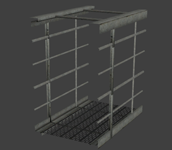
Modern Walkway 128 Caged
This is the modern aperture version of Skotty's 128 model, as seen here: Underground Walkway 128 Caged Full collisions. The hitbox is rotated 90 degrees the wrong way, but the collisions etc are still good so it shouldnt be a problem. please read the readme, and let me know if there are any major problems with this.
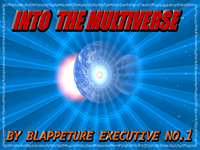
Into the Multiverse (work in progress)
The Into The Multiverse Saga tells of a test volunteer that broke protocol early in the PTI development stage and ripped a hole in time and space, being sent to an unknown parallel universe where they must search for a way home. Encounter new enemies, new technology, and new friends. Along the way you experience more than just an adventure, you experience the Multiverse.
Think Outside the Box (Early alpha) [WIP]
This is just an early alpha test... I thought why not make a map that makes the player think outside the box? I might make this a map-pack if I get good feedback. If I get feedback, I'll probably make the 2nd map...
PHLING
Critical error: Map description not found. An Aperture Science description associate will contact you with the appropriate description when it is found. Difficulty: Medium Length: 30-45 minutes ---------- This is my tribute project to Portal and Portal 2 which bent my mind in so many ways. I wanted to try to do the same for others. It took about 2 months of work because I work slowly, and yes, it is extremely optimized which is why the size is small for the length. I hope you enjoy it. The meaning of the map [spoiler]This takes place after Chell has left Aperture. She dreams about the facility as most of her life had taken place in there. Her memories go from the old Portal 1 facility to the destroyed tests of Portal 2, always haunted by the words of GLaDOS and Wheatley. She has no family and her future is confusing. Eventually she sees the entire history of Aperture Science again from the beginning to the end, and the ending results in her being lost and confused. Her biggest test is finding her true self.[/spoiler] If you like it then please upvote the map on workshop as well: http://steamcommunity.com/sharedfiles/f ... =214699219
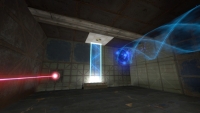
Underground styled test elements
These are instances for underground themed versions of: * laser * light bridge * tractor beam all of which are FULLY underground themed, NOT just the modern stuff re-colored and surrounded with old styled textures, meaning that no modern aperture stuff is visible in any of these outside of hammer. Please give any feedback, and credit me if you use these! thanks. Caden wrote:Screenshots of these instances in action. pics [spoiler] [/spoiler]