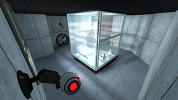
Portal 2
Wall_Dest_Section03 With Collisions
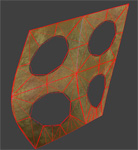
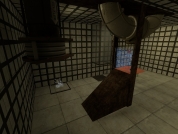
Sprowl requested models/props_destruction/wall_dest_section03.mdl with physical model. So here it is, for everyone of course.

Sunbury Chambers 14
Tricky COOP based on a PeTI map and enhanced in Hammer. Key game play elements: Cubes, Spheres and weight buttons. Some features can only be triggered if both players activate a button each at same time. Steam: http://steamcommunity.com/sharedfiles/f ... =100392918 Packed with 7zip

Portal 2 Timers example
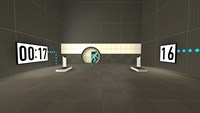
=================== Portal 2 timer examples =================== This is just an example map that includes the basics of 2 working timers (a countdown and a countup) that uses custom materials (numbers). The intention is to show the required entities and their inputs/outputs to understand the logic behind a timer made in the hammer editor. Also this method allows you the posibility to use your own custom typo/numbers to fit your map's aesthetics... For this example I used the typo "DIN Next LT Pro Condensed", because I think it's pretty much similar to the typo used by Valve for the signage lightboard; so if you are too lazy to make your own material and want to use it in a normal Portal2 map, it'll look good. So the purpose for this could be considered as merely didactic The basic idea under this method is to make an overlay with 10 frames (the ten numbers, from 0-9) and go changing its textureindex with the entity "env_texturetoggle". HOW TO MAKE YOUR OWN CUSTOM NUMBERS ---------------------------------------------------------------- 1. Open an image editor of your choice, take the font that you like and make 10 separate images, one per number (from 0 to 9), and REMEMBER to always give the image a size which values are a power of 2 (like 128x256 that I gave in this case). I prefer making .png files... you can do .tga as well... Whatever format that allows you recording an alpha channel (transparency) because this way, our numbers overlays would be stickable on whatever texture 2. Name each of them with a name followed by a suffix like "_0", "_1", "_2", and so on... Obviously, try to make that suffix coincides with the number into the image... lol. 3. Now open VTFEdit (http://nemesis.thewavelength.net/index.php?c=178) and go to File > Import. Now select at the same time (holding Ctrl or Shift keys down) all the ten image files. Do not resize the images. You can check into the "info" tab how the file contains 10 frames (each of them is a different number). I also made a cutie dots (":") to separate the seconds from the minutes and make them flicker: for this you need to make 2 textures, one with the dots and other completely empty but with the same size, then do the same as for the numbers, import them with VTFEdit selecting both at the same time. 4. Then save this file as .vtf into your "materials" folder (you can create whatever folder of your choice into /materials of course) giving it a whatever name. 5. Now you should create the .vmt file for the above .vtf file. Both names must be the same, only their extensions change... In this example, my .vmt file contains the following: UnlitGeneric { $baseTexture "josepezdj/numbers/black_numbers" $surfaceprop glass $translucent 1 "%keywords" portal $decal 1 Proxies { ToggleTexture { toggleTextureVar $baseTexture toggleTextureFrameNumVar $frame toggleTextureShouldWrap 0 } } } You can simply copy all that only replacing the path "josepezdj/numbers/black_numbers" by the one where your .vtf file is located and the name of your file. I guess it's clear. However, do not hesitate to ask whatever question or doubt Once created your custom texture for the ten numbers, check inside the attached .vmf in your hammer editor to see how you can set the timers up easily. Read the Readme.txt file for instructions info. A further post with an explanation in detail about how the timer system works is in the topic of this download, for those who doesn't really extract much info from the vmf file... josepezdj
some new test part 2
video on youtube:http://www.youtube.com/watch?v=y5XZkd0tfXY&lc=1shAtz2FxI4gFMmGgNKhqnPt2QxjP1g6TgfjFuiPb20&feature=inbox
[WIP]12 Angry Tests - Intro Map
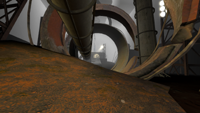
I decided that it was time for an intro map to the 12 Angry Tests map pack. Its kind of a non-puzzle map.(cause we cant have it be 13 angry tests)
![[WIP]12 Angry Tests - Intro Map](/static/img/no_screenshot.png)
KA Level 2
SP KA Level 2 Verison 0.35 This is my second map that is not as normal "Portal 2" maps, but it have some new thinking puzzles some may be better then other (i know of it) Info: Difficulty 2/5 Death-rate 2/5 New thinking 4/5 Included types of moments: A diffrent type of Maze New type of Bridge walking Little speed jumping And some "speedy thing in - speedy thing out" Install and uninstall: copy map to portal 2/portal2/maps (you may delete the old verison if have any "SP_KA_maps_level_2_xxx-bsp"(xxx = verison number) to run map type "map sp_ka_maps_level_1_xxx.bsp" ======Change Log====== V0.36 Bug Fix For metal grid not solid. v0.35 last version ready for WIP release Later Versions Todo List: * Get feedback and fix any bugs or errors.
Underground Walkway 128 Caged
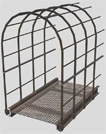
This is a caged walkway used for underground areas with a length of 128 units. You can use it for different purposes. It has full physics. Additional there is a end-model to close its open end if necessary. Requested by Moth.
sp_1984_2_V1
An easy conversion gel themed map. can you find the Easter egg?
Portal 2 Map Launcher
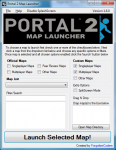
Portal 2 Map Launcher v1.6 + SOURCECODE @ http://github.com/forgottencoders/p2map VERSION 1.6 UPLOADED 05/05/12 Portal 2 map launcher is a simple but effective GUI for loading custom and stock portal 2 maps. It doesn?t matter if you want to load them as solo, splitscreen, or online/lan, portal 2 map launcher will launch it. It has many advanced features such as changing map when ingame and skipping the intro of the game. As of version 1.1 you can now also filter/search the maps to allow finding the maps even easier. Now with this version (1.2) you can now even load the new map ingame without having to minimize the game. by using the F10 key As of version 1.4 you can now drag .bsp files to a area on the form to copy it to your map location. aswell as many buttons for quick console commands. --------------------------------------------------------------------------------------------------- Click For ScreenShot Homepage - http://forgottencoders.co.uk Project Homepage - http://forgottencoders.co.uk/p2map Issue tracker - http://tracker.forgottencoders.co.uk s0AEErcYx5A New Youtube Video Coming Soon Version 1.6 --------------------------------------------------------------------------------------------------- Usage: Code: Select allLoading a new map 1. Install "Portal 2" (if not installed). 2. Select checkboxes that you want to use. 3. Click the Dropdown list or filter the list. 4. Click the "Launch" button Changing map 1. Press "F10" or minimize the game. 2. Select checkboxes that you want to use. 3. Click the Dropdown list or filter the list. 4. Click the "Launch" button --------------------------------------------------------------------------------------------------- Changelog: Code: Select allV1.6.0 * Added a function to prevent re-generating the list when checkbox not changed * Changed the detection of Solo and Mp Maps. * Some behind the scenes changes v1.5.1 Bug fix. (never released) * Fixed Splitscreen Bug * Prevented filtering the maps unless atleast 3 characters are entered * First GitHub release. * Changed layout of the checkboxes * Added 2 more checkboxes (Other Maps) * Changed Tooltips Slightly * Now Using a three numbered version system (X.X.X rather than X.X) * Issue Tracker is now on GitHub. v1.5 * Changed Hotkey From F2 to F10 * New Maps Are Added To List When Added To Map Folder * Admin Priveleges Not Required Any More * Added Automatic Settings (Checkbox States Are Remembered) * Added More Robust Detection System & Manual Option * Added Quick Instructions To Main Form * Removed Quick Commands (Were Pointless) * Reorganized The UI * Completly Recreated The Filter/Search System (Much Better Now) * Cleaned The Code Alot * Added Tooltips To Every Button/Label/Checkbox * Added Built In Changelog (Click Version Number At Top Right) * Fixed Even More Problems v1.4 * Added Drag n Drop Map Area (To Quickly Install Maps) * Added Many Buttons For Quick Console Commands * Added Option To Disable Splash * Added Option To Manually Choose Portal2.exe Location (if not found) * Added Button To Browse Map Directory * Added Button To Go To Issue Tracker Page * Fixed Many Issues * Fixed Registry Issue V1.3 * Added hotkey to switch map even easier * Added homepage url * Added Splashscreen * Added About Page * Changed Splitscreen/Solo/Lan System * Cleaned Code * Changed GUI * Fixed Bugs * And More! V1.2 * Fixed startup bug * Wasn't Released Publicly V1.1 * Added Filter system * Added -Hijack Command * Added Splitscreen/solo and MP buttons * Added changelevel command * Added File checking * Added Other things * Changed GUI layout * Changed Loading Method * Fixed DLC map bug v1.0 - Initial Release fixed version just uploaded. PLEASE NOTE IF THE FILE WONT DOWNLOAD FROM HERE PLEASE DOWNLOAD THE LATEST VERSION FROM HTTP://FORGOTTENCODERS.CO.UK/P2MAP AS I AM HAVING SOME ISSUES WITH THE TWP UPLOADER.
Relaxation vault.
This is an instance I made which is basically the relaxation vault from portal 1, but made in Portal 2. So now you can wake up in your favorite room! If you have any comments or want to see new functionality's? Let me know! ~Lp