Portal 2
Untitled
Two untitled Wheatley's chambers. ===CHANGE LOG OF VERSION 1.5=== + Solved some aesthetics problems + Solved a problem with the funnel + Allow potatos to finish her final line before you reach the elevator
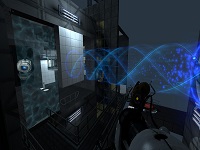

PTI element: Really cold lightstrip
The PTI editor normally comes with a neutral / cool fluorescent lightstrip. Ben's Extended Editor added the warm lightstrip, which casts a pinkish/orange warm light. This patch adds a really cold blue lightstrip, to complete the trio. (I actually wanted to make a stark yellow one instead, but there was no such model in the game that would have fit.) Comparison of the three lights: (All captured with forced constant HDR exposure settings in the game to make a fair comparison.) Three editoritems snippet files are provided, for each of these light panels individually (if you are interested in them), and one snippet that provides a combination element that gives all three in one palette entry (recommended to use instead of the three others). The latter uses the "Button type" to select the type of lightstrip. Weighted=regular, cube=warm, sphere=cold. Note that while the individual lightpanels do block antlines, the combined one does not. It is also immune to changes in level geometry, so you have to move the lightstrip manually when you move walls. As a plus side, the combined lightstrip can be placed in a "middle" position on the wall in addition to the four standard positions. Download here: http://bisqwit.iki.fi/kala/ptal2/bisqwi ... p_cold.zip

Two Broken Chambers
It's my first map mad in Hammer. They are two chambers that are broken, but still functional.
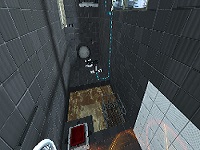
PTI element: Vertical doors, Portal1-style doors
I edited Ben's popular door element, and added two more door options into it: The vertical door, seen in the BTS scenes throughout the single player campaign, and the Portal 1 style door, which unfortunately lacks some color details. Click to zoom. (The Portal 1 wall texture was added in between of those doors to illustrate it fitting that style; it is not part of the door.) Download it here: http://bisqwit.iki.fi/kala/ptal2/doors.zip The two new door types are simply added as ButtonType selections into Ben's existing door. All the three different doors use the same icons in the editor...
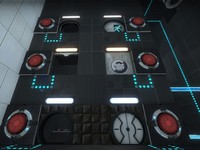
PTI element: Large (4x2x1 / 512x256x128) observation room
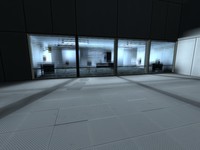
Seeing a screen shot here: http://theportalwiki.com/wiki/File:Port ... ent_02.jpg which has a different observation room from the one featured in the editor, it inspired me to clone the observation room and create a 4-block wide observation room. It is not identical to that screenshot, but it has similar principle: Ligher mood, things (having) happened. The ZIP file contains the observation room, a simplified observation room, and the snippet of text to insert in your editoritems.txt. The room instances will be put in sdk_content/maps/instances/p2editor/ .
Extreme Laser Chamber
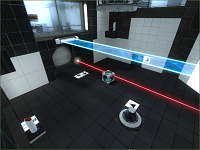
Everyone likes lasers... After long break from Hammer, I finally decided to make my second map. This Time it took me 3 days and a lot of coffee to make it. I think you will like it! Please report any bugs, Thank You! Steam Workshop upload soon
PTI element: Living panels, 64x64 and 128x128
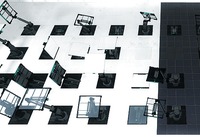
Wacky panels that do stuff. 64x64 and 128x128 sizes are provided. Inputs: * Start deployed -- Inverts the direction of the panel's animation. * Timer & Autodrop & Start Open -- Choose which animation to play, see below. * Button type -- See below Button types (64x64 panel): * Weighted = White or black panel surface, depending on whether it's positioned on a portalable surface or not. * Cube = Glass surface. * Sphere = Intangible skeleton: Just the skeleton of the panel, without surface, also does not clip the player. Button types (128x128 panel): * Weighted = White or black panel surface, depending on whether it's positioned on a portalable surface or not. * Cube = Glass surface. * Sphere = Portal 1 style metal wall surface. Use signal inputs / connections to activate the element. The panels contain a built-in AND gate just like the standard elements do. Of course you don't need to activate the element at all. Just affix it in a particular pose to provide a platform of your choice. There are 68 different animations provided. The animation is selected using the Timer value, the Start Open checkbox and the Autodrop checkbox. The list of animations is detailed in the README file provided in the distribution package. It is rather difficult to try to video-document all the animations that this object can play, but here's a sample picture which should serve to at least pique some curiosity. Unless you choose the "skeleton" type of panel, this panel is fully blocking and can be even used as a lift / piston platform for objects and for the player. The arm of the panel is only partially tangible, and only in some animations. It is a bit difficult to generalise for the set of animations present here, so the tangibility is disabled for most animations where the heuristic method does not work nicely. The object also does not contain a crush kill trigger, a portal fizzler, an object fizzler, nor a portal bumper. This is intentional. But it may lack other things that are wise to have (hint brushes? shrug), because I just began learning to use Hammer a few days ago, and I wouldn't yet know anything about those. Note: These panels have the "adjustment gizmo" which allows them to be placed at an offset much like the laser components -- except that it does not work. Sorry about that! Just use always the center position. If anyone has good ideas of how to fix it, it would be welcome. (This comes from the 5 positions method. The 8 positions method does not work, because the embedding pit would not be relocated correctly together with the element.) However, you can use the adjustment gizmo to rotate the element around. Just point it towards some edge of the voxel, and then place it back to the center. The object will retain the new orientation. Note: The platform may move within the first second when the map loads. Sorry about that. This may be fixed in a future version. The panel contains from 21 to 25 entities depending on version. The skeleton version has the fewest entities, and the large non-glass ones have the most. And finally, the in-editor symbols for this object are currently the laser emitter for the small panel, and the piston top for the large panel. I have not yet developed the skills to change the in-editor graphics. Download here: http://bisqwit.iki.fi/kala/ptal2/livingpanels.zip
Brighter Wall Lights Instances
Just brighter versions of normal wall lights. Put into your instances folder.
IGNORE THIS PAGE
PLEASE DELETE THIS PAGE, ADMINISTRATORS
Re-colorable plasticwall002a psd
You know that nice yellow texture that valve uses in bts areas? well, now it can be any color! if you have photoshop, this psd makes it really easy to start making your own color variations of plasticwall002a for the shockingly low price of 1.00! (seriously. it'll show up on your electrical bill later, just you wait lol.) remember to read the readme file, and give credit to me if you use this template. thanks, and have fun! -tile