Portal 1 (Work in progress)
WIP Portal 1 maps and experiments not yet finalized.
Try Anything Twice laser "SDK"
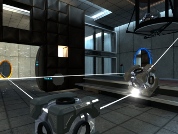
This is a demonstration and prefab collection of the laser mechanism featured in my "Try Anything Twice" map pack. It is similar to Valve's "thermal discouragement beam" in that it will travel through portals and it also includes the redirection (lens) cubes seen in the Portal 2 trailers. It is primarily aimed at map designers who want to include a similar mechanism in their maps. (Adequate mapping experience and familiarity with complex entity I/O setup is required.) Please read the included readme.txt file for usage instructions. You'll need 7-zip to extract this file.

Portal 2 Portal Device Sound Mod
Okay so first off if you downloaded this exact thing off of a place called "Thinkingwithportals.com" by a user under the name of "Wilbo" then he stole this from me! I did not take this from him! I spent quite a bit of time on this so as it says below....DO NOT REUPLOAD WITHOUT PERMISSION! My sounds have distinct difference from any other sounds because of the editing program I use. So don't be a Wilbo and respect the fact I want to keep my work as mine. I will be uploading it to myApertureLabs.com AND Thinkingwithportals.com to avoid any more stealing from happening. Thank you and please enjoy the sound mod. Now to what's inside the sound mod Blue Portal Firing sound Orange Portal Firing sound Portal Opening sounds Going through a Portal sounds Exiting a Portal sounds Original post: http://www.fpsbanana.com/sounds/12530 I will release a final version once valve releases Portal 2 (yes you have to wait a a few months for a perfect sound mod) As I always say: DO NOT REPLOAD WITHOUT PERMISSION! Credit goes to: Valve For the Original sounds and games RubyCarbuncIe For editing the original sounds from the trailer.

Companion Sphere
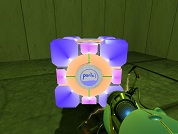
A Sphere reskined with the Companion Cube Heart I reworked the plain Sphere texture, adding the Companion Cube heart to it. Special thanks for Shmitz for compiling it for me, after I tried for a long time and couldn't get it working. Skin 0 is the Standard Sphere Skin 1 is the Companion Sphere
PTI element: Dice Signages
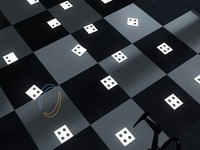
This element adds support for making 1, 2, 3, 4 number annotations on the floors and walls much like existing Portal 1 and 2 maps do. The numbers are indicated with dots. You can see an example screenshot here: http://bisqwit.iki.fi/kala/ptal2/dice_signages.png To use, place the element on ground. Use the "Cube type" option to select the type of sign. Standard = 1 dot Companion = 2 dots Sphere = 3 dots Franken = 4 dots The element can be moved around within the voxel the same way as lightpanels can. Use Reflective, if you want to rotate the dot around (to place it in a diagonal orientation), before assigning it the correct type and place.
Mane 6 Portal gun
Open the zip file and pick a folder. Open the folder and extract to Portal. Simple.
Cutie Mark Cubes
MLP Cutie Marks storage Cubes
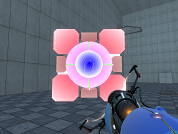
Uber-bright cube
Same thing as my bright cube but darker colors.
Black Portals
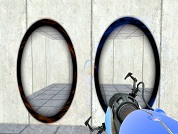
Black Portals. Put in portal>materials>models>portals. Make those folders if you don't have them.
Blue-ish Portal Gun
A portal gun I made. Not sure where I found the original portal gun texture but I changed it to make it blue. This time the folders are included. Just put it in your materials folder in portal>portal.
Cool Room
Just a simple room with simple functions. I'm new to using Hammer, so nothing major goes on.