Portal 2 (Other files)
Miscellaneous Portal 2 mods, assets, tools, and non-map downloads.
Template textures + common prop gallery (vmf)
I usually start my maps with this template: - It contains my favorite Portal 2 textures applied on small cubes (so I can check "display only used textures" in hammer texture browser) - I placed my favorite (most common) props: vegetation, broken ceilings, debris... Its easier and faster to check the props like this (I just copy them from here). I can also see their sizes etc. And for the textures, it makes browsing faster. When I'm done with my map, I just delete the room note: delete the player_start and the trigger_auto that displays the starting text


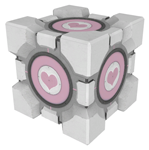
Singing Companion Cube!
One big problem with the PTI - the companion cube DOES NOT SING! This mod fixes that. Just install it in [portal 2]/sdk_content/maps/instances/p2editor and you're good to go!
ML's Angry Hover Turret
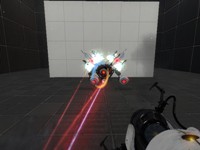
This is my personal version of the scrapped Hover Turret that didn't make it in Portal 2. It floats in the air while tracking the player with a laser and has two turrets equipped that remain motionless (except when firing). The only way to destroy the turrets is to burn them with the laser, picking up the turrets will NOT work. To activate the Angry Hover Turret properly, trigger the logic_relay with a trigger or something. It is best to copy and paste the Angry Hover Turret rather than loading it as an instance. Known issues: 1)While trying to rotate the Angry Hover Turret, the func_tank that tracks the player may end up firing the laser in another direction. When this happens, simply rotate the func_tank (the clip box) 90, 180, 270, etc degrees until it lines up properly. This takes some trial and error testing but it's not a big deal. 2) When using the reflection cube with the Angry Hover Turrets laser beam, sometime the laser will not reflect in it's current position.
Portal 2 prop_portal example
There is a problem in Portal 2 with making prop_portal initially Active: http://forums.steampowered.com/forums/s ... p=22416533 This example map shows how you can workaround that.
arrival_departure_transition_ents
My tweaked version of the stock arrival_departure_transition_ents.vmf instance that lets you change the opening title, subtitle, and end level on-screen text or disable them. After placing this in your map, open the properties of the instance to set the following options: $subtitle_boolean_toggle -Default value is 1 (0 disables) -Determines if the $chapter_subtitle is displayed at the start of a level $endtext_boolean_toggle -Default value is 1 (0 disables) -Determines if the $end_text is displayed at the end of a level $title_boolean_toggle -Default value is 1 (0 disables) -Determines if the $chapter_title is displayed at the start of a level $chapter_title -Default value is(without quotes) "chapter title here" -This is the text that is shown at the beginning of a level $departure_video -Default value is blank -Use this to add video to the exit elevator scene $chapter_subtitle -Default value is(without quotes) "subtitle title here" -This is the text that is shown at the beginning of a level under $chapter_title $end_text -Default value is(without quotes) "You Win Science!" -This is the text that is shown at the end of a level $arrival_video -Default value is blank -Use this to add video to the entry elevator scene
panel_vmf_bsp
The panel vmf and bsp as promissed, better late than never.
Worn out custom signage for destroyed maps
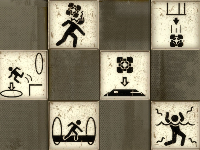
These are the custom symbols I made for my map "White Room (reMiX by josepezdj)". I thought some mappers could like them and maybe want to use them in their maps They are not all the symbols that Portal2 uses, but since I have them all in layers in a PDN file, I can make any of the rest if someone needs it. Just say here and I'll go posting those that ppl need! Default location By default I haave them into my folder materials/josepezdj/signage_wasted, so create a folder like this so your hammer editor load them on the fly. If you prefer any of your folders, just edit the .VMTs changing the line for the $basetexture... for example: - "$basetexture" "josepezdj/signage_wasted/jose_wasted_signage_box_button" by: - "$basetexture" "mysignage/jose_wasted_signage_box_button" Or you can even change the name of the .VTFs themselves and put their new name there in the $basetexture line... Any doubt about this or any help anyone need just let me know! Reference screenshot jose Change Log - v1.1 (2013.10.17) => Lowered the brightness in the alpha channel so that they look less bright in game. - v1.2 (2014.06.29) => Added the "paint_dispenser", "bounce_gel", "laser_catcher" and 4 dots per Tmas98 request
Underground Walkway 128 Caged
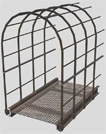
This is a caged walkway used for underground areas with a length of 128 units. You can use it for different purposes. It has full physics. Additional there is a end-model to close its open end if necessary. Requested by Moth.
Underground Timer
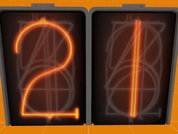
This is an instance of a robust underground timer. This timer can count up or down from 1 - 99 seconds. underground_timer_counter.vmf The $UnEvent_Relay parameter is the event that is fired when the timer has stopped counting. This event should be triggered in one of the clock instances. This instance is used for both buttons, however the buttons will determine whether it counts up, or down. underground_timer_but_countdown.vmf $time_units is the number of seconds of the unit column $time_tens is the value of the tens column (This is the only way I could figure this out for the countdown timer without adding some sort of script.) The $Event_Relay parameter is the event that is fired when the timer has started counting. This event should be untriggered in the clock instance. Please note: I have added entities that will work out the number of seconds the counter needs to count down from $time_units and $time_tens, hence the large amount of logic_cases underground_timer_but_countup.vmf The $Event_Relay parameter in the 'Timer instance' is the event that is fired when the timer has started counting. This event should be untriggered in the clock instance. The $time parameter should be set to how many seconds it should count up to Known Bugs: Putting both 0 and 0 for the left and right number icons will cause a rip in space, however this shouldn't happen as you wouldn't want a 0 - timed counter How to place in your map: Create a func_instance and change the vmf path to "underground_timer_counter.vmf" Name this instance Create another func_instance and then change the path to one of the button paths (either underground_timer_but_countup.vmf or underground_timer_but_countdown.vmf depending if you want it to count up or down) Set the button's fixup name value to the same of the counter instance If you are using the countup instance, put a number value for the replace value $time to how many seconds you want the counter to count up to If you are using the countdown instance, put the individual values with each a 1 digit number which will represent your double digit number. e.g. "$time_tens 1" and "$time_units 5" will make the timer count down from 15 Using the $Event_Relay replace value in your button, make it point towards a logic_relay which will trigger the event when the counter starts. This must include the name of the prefix PLUS the name of your relay otherwise it will not work. e.g. clock_1-TRIGGERNAME (This is the name of your relay outside the instance) Using the $UnEvent_Relay replace value in your counter instance, make it point towards a logic_relay which will un-trigger the event when the counter stops. Same as the button's relay this MUST INCLUDE the prefix fixupname as well as the name of your relay. e.g. clock_1-UNTRIGGERNAME (This is the name of your relay outside the instance) Enjoy the use of an underground timer... WOOOT If you are having trouble... Please do not hesitate to ask for any help either through a PM to myself or by posting a comment inside the instance thread.
Squarebeam - Edges, Corners
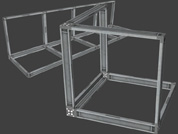
To avoid flickering of corners or edges with squarebeams you can use now these new models. They support all 3 skins for squarebeams. Edges: 64, 128 and 256 units long Corner: 64x64x64 Other formats: 64x48 and 48x48 squarebeam.