Portal 2 (Other files)
Miscellaneous Portal 2 mods, assets, tools, and non-map downloads.
Moth's Useful Instances
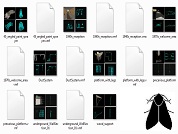
Some useful instances I made, that can serve two purposes: * Quickly add nice things to your map * Deconstruct, use bits, make new bits, gain UNDERSTANDING My plan is to expand this as I make more stuff. Each instance has an accompanying screenshot of all 4 Hammer views, so you can see what it looks like without launchiing any tools. Click 'show' below for a full list of contents: [spoiler]*** ApSigns (1 instance) aperture_1970s_gantry ----------------------------------- 1970s style Aperture logo, suspended from solid metal beams, with ambient spotlamps *** Destroyed (2 instances) DestroyedWall ----------------------------------- Off-grid deformed black tiled wall DestroyedWall2 ----------------------------------- Black tiled wall with missing pieces and bts back panels *** Dynamic (2 instances) glass_platform ----------------------------------- template for a telescopic moveable plat. supports players, turrets, cubes, etc Huge_Fan ----------------------------------- complete wall assembly that casts epic shadows. Starts on at map spawn. *** Factory (6 instances) dlc1_RoobotArms ----------------------------------- very small lab section with arms on a shelf, from dlc1 Freight_Boxes ----------------------------------- Motorized railed transport filled with metal containers glass_partition_01 ----------------------------------- A 3x3 detailed glass-panel wall section glass_partition_withDoor ----------------------------------- As above, with a doorway tubular_elevator ----------------------------------- Quick and dirty elevator. Scenery only but easily converted to a func_movelinear turret_storage ----------------------------------- Very tall storage area for turrets, with accompanying machinery. *** Gameplay (2 instances) RampArms_static ----------------------------------- Ramp made from panel arms. Some destroyed or missing. RampArms_static_collision ----------------------------------- Clip brush to exactly fit the above *** Lighting (6 instances) old_wall_light_300 ----------------------------------- underground-style lamp with sitably coloured light entity (300br) trussbox_curvedLights ----------------------------------- many very-wide underground-style floodlights, angled towards a central point underground_array_tower ----------------------------------- Used extensively throughout underground maps underground_array_towerLightArm ----------------------------------- Extra arms for the above underground_array_tower_leaning ----------------------------------- Alternative underground_array_tower with no arms *** Office (8 instances) big_empty_office_1970s ----------------------------------- complete 1970s style office building with one doorway. Just add furniture! chair_and_desk_1980s_XX ----------------------------------- 1980s style desk, chair, desk lamp, telephone, computer - 4 variations lab_furniture_01 ----------------------------------- Block of machines and a whiteboard observation_office ----------------------------------- Small 'control room' with glass windows, houseplant office_cube_3sided ----------------------------------- Template for making custom-sized offices/control rooms *** Spawns (1 instance) PlayerSpawn_in_DropTube ----------------------------------- Player spawn, with full portalgun-- falling intro, with a tube that auto-opens. *** Underground (8 instances) 45_angled_paint_sprayer ----------------------------------- Paint-pipe gusher, angled 45 degrees - as seen in a4_portal_intro map 1940s_reception ----------------------------------- Complete relaxation area in a 1940s style. 1970s_welcome_area ----------------------------------- underground-style elevator reception DuctSystem ----------------------------------- Miscellaneous hanging system of ducts platform_with_legs ----------------------------------- metal scaffolding with chipboard panels precarious_platform ----------------------------------- Hanging underground cube_dropper with suspended platform. underground_WallSection_01 ----------------------------------- Various brushes & models, stuck together to make an interesting underground wall[/spoiler] Feedback is welcome, please rate this and post your comments. I'll post when I update. --------------------------------------- New in r2: --------------------------------------- * Huge Fan that casts epic moving shadows * Tons of bts office stuff * Underground lighting * Factory stuff! File Name: Moth_instances_r2.rar File Size: 6.39?MiB Moth's Useful Instances

Departure Elevator with Debris
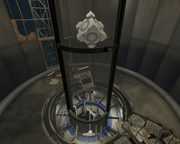
This is a departure turbine elevator with several options: The ability to toggle junk to fall down the elevator tube before the elevator arrives. The ability to trigger the lights in the bottom of the elevator tube to flicker on and off as seen in some official maps. The ability to toggle the PTI vote screen. The ability to toggle the game to go to the main menu. If you use this instance I would appreciate you crediting me for the use of it .
Prefabs (Ciirulean)
A collection of around 35 prefabricated .vmfs. These include improved versions of Valve instances as well as some other stuff.

PTI element: Vertical doors, Portal1-style doors
I edited Ben's popular door element, and added two more door options into it: The vertical door, seen in the BTS scenes throughout the single player campaign, and the Portal 1 style door, which unfortunately lacks some color details. Click to zoom. (The Portal 1 wall texture was added in between of those doors to illustrate it fitting that style; it is not part of the door.) Download it here: http://bisqwit.iki.fi/kala/ptal2/doors.zip The two new door types are simply added as ButtonType selections into Ben's existing door. All the three different doors use the same icons in the editor...
PTI element: Large (4x2x1 / 512x256x128) observation room
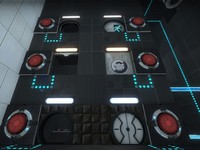
Seeing a screen shot here: http://theportalwiki.com/wiki/File:Port ... ent_02.jpg which has a different observation room from the one featured in the editor, it inspired me to clone the observation room and create a 4-block wide observation room. It is not identical to that screenshot, but it has similar principle: Ligher mood, things (having) happened. The ZIP file contains the observation room, a simplified observation room, and the snippet of text to insert in your editoritems.txt. The room instances will be put in sdk_content/maps/instances/p2editor/ .
Liquid Coloring Excision Field
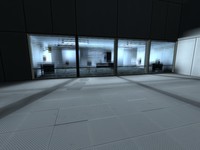
This pink field was designed to block portals and paint, but not fizzle portals or cubes. It is essentially a barrier that blocks paint. Credit goes to Josepezdj for taking the time to teach me the basics of retexturing a fizzler, so I'd like to thank him again. Creation: https://developer.valvesoftware.com/wik ... ler_Fields

Want You Gone Music and Lyrics
This will play "Want You Gone" (Portal 2 credits) and display the lyrics at the same time. Extract the zip folder and run "Want_You_Gone.bat" to start. See the ReadMe document for more info. Note: This will only work with a Windows computer.

Custom Coop Start+Platforms+Calibration Room
This is a Instance Pack with 3 things. -First Instance is Blue and Orange buttons for coop (Totally Custom) -Second is the full room Instance to start the coop map (using the blue and orange buttons). -And the final is a Start Coop with the Room instance full. Instructions: -Darkylight's Instances goes to sdk_content/maps/ You only need to create a func_instance with it and run the game Glados Language is your Portal Language. -Fixed The nodraw wall <-< -Video: http://www.youtube.com/watch?v=DuqFc37rOSU
Boxframe (Reflectorcube)
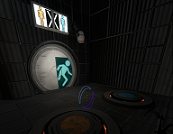
This was made by me after an request of lpfreaky90. I remodeled the whole boxframe of the reflector cube and made a new skin. If needed I got a 1024x1024 texture version and I can rescale the cube to whatever you want. This model has full concave physics.
arm64x64_interior with hitbox
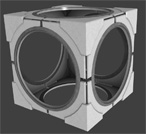
This is the normal arm64x64_interior with all it's animations and skins but additional physical hitboxes. Now prop_physics or players can collide with it without any clip-brush. Clean and rusty skins are in 1 model. Skin 0-2 is clean, 3-5 is rusty. (0 normal, 1 off, 2 error) I recommend to use this model just if necessary (avoiding possible mistakes made due decompiling).