Portal 2 (Other files)
Miscellaneous Portal 2 mods, assets, tools, and non-map downloads.

Underground styled test elements
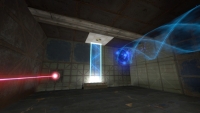
These are instances for underground themed versions of: * laser * light bridge * tractor beam all of which are FULLY underground themed, NOT just the modern stuff re-colored and surrounded with old styled textures, meaning that no modern aperture stuff is visible in any of these outside of hammer. Please give any feedback, and credit me if you use these! thanks. Caden wrote:Screenshots of these instances in action. pics [spoiler] [/spoiler]

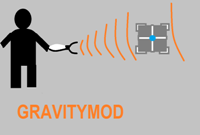
Gravitymod v.2
This version makes the gravity gun compatible with beemod1 Have fun Happy gravitying
PTI Portal 1 Improved Button Instance
Includes The Portal 1 button, and another instance to change turrets and buttons. If you have reepblue's betapack, don't install the model. I made this to make a more accurate button that fits portal 1 in BEE2 Portal 1 style, unlike the original one with the wrong textures and the Portal 2 button.
PTI element: Really cold lightstrip
The PTI editor normally comes with a neutral / cool fluorescent lightstrip. Ben's Extended Editor added the warm lightstrip, which casts a pinkish/orange warm light. This patch adds a really cold blue lightstrip, to complete the trio. (I actually wanted to make a stark yellow one instead, but there was no such model in the game that would have fit.) Comparison of the three lights: (All captured with forced constant HDR exposure settings in the game to make a fair comparison.) Three editoritems snippet files are provided, for each of these light panels individually (if you are interested in them), and one snippet that provides a combination element that gives all three in one palette entry (recommended to use instead of the three others). The latter uses the "Button type" to select the type of lightstrip. Weighted=regular, cube=warm, sphere=cold. Note that while the individual lightpanels do block antlines, the combined one does not. It is also immune to changes in level geometry, so you have to move the lightstrip manually when you move walls. As a plus side, the combined lightstrip can be placed in a "middle" position on the wall in addition to the four standard positions. Download here: http://bisqwit.iki.fi/kala/ptal2/bisqwi ... p_cold.zip
PTI element: Vertical doors, Portal1-style doors
I edited Ben's popular door element, and added two more door options into it: The vertical door, seen in the BTS scenes throughout the single player campaign, and the Portal 1 style door, which unfortunately lacks some color details. Click to zoom. (The Portal 1 wall texture was added in between of those doors to illustrate it fitting that style; it is not part of the door.) Download it here: http://bisqwit.iki.fi/kala/ptal2/doors.zip The two new door types are simply added as ButtonType selections into Ben's existing door. All the three different doors use the same icons in the editor...
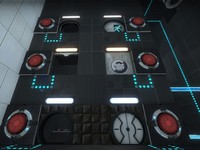
PTI element: Large (4x2x1 / 512x256x128) observation room
Seeing a screen shot here: http://theportalwiki.com/wiki/File:Port ... ent_02.jpg which has a different observation room from the one featured in the editor, it inspired me to clone the observation room and create a 4-block wide observation room. It is not identical to that screenshot, but it has similar principle: Ligher mood, things (having) happened. The ZIP file contains the observation room, a simplified observation room, and the snippet of text to insert in your editoritems.txt. The room instances will be put in sdk_content/maps/instances/p2editor/ .
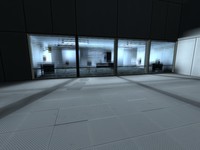
Re-colorable plasticwall002a psd
You know that nice yellow texture that valve uses in bts areas? well, now it can be any color! if you have photoshop, this psd makes it really easy to start making your own color variations of plasticwall002a for the shockingly low price of 1.00! (seriously. it'll show up on your electrical bill later, just you wait lol.) remember to read the readme file, and give credit to me if you use this template. thanks, and have fun! -tile
GLaDOS Monitors
Tired of having Wheatley staring at you thorough his big screens? What if that could be GLaDOS instead! Well here are some instances that i made from the wheatley_studio instance that could make that happen! Includes an example map. Plz give feedback so i can edit this further! Thanks! update 1.1 -deleted Wheatley's voice from coming up when screen was broken.Thanks Co-op!. -added a background instead of a bland black -added GLaDOS's voice when u break the screen
