Portal 2
Chamber 02
A clean-themed map featuring turrets, hard light bridges and funnels. Pretty much finished, just looking for some feedback, as this is the first completed map of my upcoming map-pack. Not the longest map, but pretty well polished and even a couple of almost easter eggs, just cause I wanted to. So yeah, enjoy! And please, feedback!
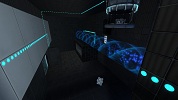

Up and Down V3
This is my first real my in portal 2. I know lighting sucks but I sure use some tips. Also feedback needed.If you find another way pls comment or better post a video as you can see my english it`s not really good. Any help will be appricieted.

Cube Dropper Example
The first thing i made in hammer, i started using hammer about 2 weeks ago and wanted to do something. This is my version of a cube dropper without instances, i combined the tutorial of portal cube droppers and some of my ideas for outputs. You can get a cube by pressing the button and then you can destroy it and get another one by pressing the button again or throwing the cube into the toxic slime. Pls give some feedback and rate. And remember, when life gives you lemons, burn someones house down.
DARKCHAMBER
I'm making a Map called Darkchamber where 5 gigachambers are together and you need to use the things of one in other and viceversa. So, Now I have only the initial spawn and the first full room. Good luck, any bug, tip or help will be welcome. Screenshots: http://puu.sh/4CvF http://puu.sh/4CvG http://puu.sh/4CvH
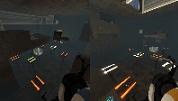
Ratman Drawings v.0
Hello Here's my Ratman Drawings pack for more info read the "readme" in side the file. ======Updates====== ======v.0====== +Releace

Frames prefabs
This file contains two prefabs: one for a doorframe, one for a funnel frame. To use these, place them in steam/steamapps/common/portal 2/bin/Prefabs. In hammer, click the entity tool and then select prefabs, and choose the one you want to use.
Panel models 32 & 64
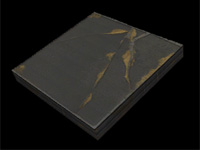
A request by ChickenMobile. She wanted 32322 and 64648 panels with ceiling/wall textures. The 32-panels have ceiling textures. Skin 0 - observation room ceiling Skin 1 to 8 - underground ceiling tiles, different variations Skin 9 to 16 - white dirty ceiling tiles, different variations The 64-panels have wall textures. Skin 0 - black metal wall Skin 1 to 16 - destroyed metal wall, different variations If you want to have other skins, ask me.
Custom "pedestal button" with 4 skins + Example Instances
This is a custom model based on the stock "pedestal button" but with 4 skins: I just decompiled the stock model and edited the .QC file to recompile it again with more textures. This was requested to me by Srs Bsnss and I thought somebody else in the community could be interested in it as well. This is a pack that includes the following: 1. A custom model based in the stock "pedestal button" (switch.MDL) with 4 skins instead of 2: - Skin 0 = Clean button OFF (blue lines) - Skin 1 = Dirty button OFF (blue lines) - Skin 2 = Clean button ON (yellow lines) - Skin 3 = Dirty button ON (yellow lines) 2. A custom animated texture with 4 frames to match the button type and state. These are: Clean ON and OFF, and Dirty ON and OFF. 3. An instance called "custom_prop_button.vmf" emulating the prop_button Portal2 entity, where you can select the value of the following variables: - Button_reset_delay = you can enter whatever float value (a number with decimals) or integers. This value determines the time for the button to reset and go back to the initial state. - Button_type = "0" is the clean one while "1" is the dirty model. Note that the pedestal skins will change as well accordingly in this instance - Play_timer_sound = "0" means not to play it, while "1" means to do. It will play or not the classical "tick-tack" sound. - Prevent_fast_reset = "0" means no, and "1" means yes. This will prevent the player from pressing the button again while it's still into the "reset_delay" time set before. 4. An example map in the case you need help with setting the button up into hammer. 5. The decompiled files (the .QC file and the .SMD files) for anyone interested in changing something in the model or adding even more skins and whatnot... INSTRUCTIONS - There's a folder inside the zipped file you downloaded called "portal 2", this folder and its structure inside is exactly as the one you have in your computer, so just copy the folder "portal 2" on the "Steam/SteamApps/Common" folder, and everything will go to its right place. - The custom button model is named "switch_4skins.mdl" and it is located under /models/props/ folder - The model's textures are located into /materials/models/props/ folder - The custom texture jose_button_frame_alpha(.VMT and .VTF) for the pedestal base goes into /materials/josepezdj/detail/ folder - The instance with the example button is into sdk_content/maps/instances/josepezdj/ folder - The example map (.VMF and .BSP) into sdk_content/maps/ folder NOTE Don't forget to give it a NAME to your func_instance into hammer when you use the custom instance "custom_prop_button.vmf" for its I/O to work properly Do not hesitate to ask me anything related to this content. Cheers! jose ChangeLog v1.1 - I improved the button textures tweaking a bit the alpha channel in order to get the right self-illumination - I added the corresponding (multi-framed) texture for the button's pedestal itself including the 4 skins/frames (clean-dirty / on-off) v1.2 - I added 2 more variables to the button instance: the "prevent fast reset" feature, and the possibility to play the timer sound.
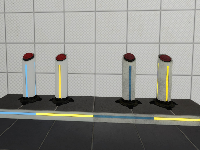
Name in Progress
Previously titled "Gozer Bane," but the title isn't really appropriate anymore. I've redesigned a good size of the puzzle, simplified a few things, and added indicator lights. I'm thinking about submitting this for the mapping competition. But I'd love some feedback first, so play and tell me what you think. Also any ideas for the name would be appreciated.
PORTAL IS AMAZING MY NEW MAP!!!!!
PLAY MY MAP AND RATE!!!