Portal 2
TSL_AutoDoor
This Autodoor Func_Instance as 4 optional Sises, extended with Windows, and 1 without winodws. UPDATE: New future build in, for Gameplay options: Lights On/Off IO_Proxy, and you can start in the dark. The Sises are : Only the door : 128x144x32 With Windows : 128x256x32, 128x384x32, 128x512x32 without Shoot Hole and 128x512x32 with Shoot Hole Read the document i included in the rar file for the paremeters and of settings and other explanations. Know Problem : Light indexing if you use my door and other light entities (not the Glass/Wall Lighting), but read the document i included. Issues: Non atm Fixed: - Lights by rotating the Func_Instace will be fail on 1 or both Window Sides its fixed as good as possible. If users still experians error on the lights please notify me. Requests: Door wide bringing to 128 instead of the 144 (by lpfreaky90) and will be looked in. (See the Topic for my Reaction) KEEP IN MIND TO REMOVE OLD FILES BEFORE YOU COPY THE NEW FILES! Regards Teddybeer

Super Laser Tester
This is not final version...
changelevel example + source
this is an example of how to make a changelevel. please read the readme file, it helps a lot. give feedback unfortunately i cannot create this into a instance as you have to change some of the values, then add it into the download (and no one want one thousand custom changelevels) so just stick to making one yourself.

[COOP] (WIP) Bridge Over Toxic Water
I'm having a few difficulties progressing with this map, so, really, this upload is also a cry for help. Firstly, I wanted to add a second area to the map, like most of the coop maps in game, but I can't find a instance for those half-way checkpoint rooms; or even a way to set a new spawn point. How do you go about doing this? As it is, this upload of the map does not have the second area at all, as I don't want to frustrate players if they die in the second half, with no access to it. What do you think? I still need to detail the tiles, but since this is now at a playable stage I decided to upload it to the WIP section. Thanks in advance for any feedback; it's greatly appreciated.
![[COOP] (WIP) Bridge Over Toxic Water](/downloads/screenshot/thumbnails/1227_2011-09-05_00002.jpg)
po2_edit
This is a map I redesigned from a previous po_edit map. Video of the po_edit map: http://www.youtube.com/watch?v=Vdubl_5K9c8
Linked Portal Testing
Right now, it's craziness with linked portal doors. I'm working on making it a co-op test, however. Right now, it works on co-op and single player. ...I'm in SPAAAAAAACE!
Portal 2 Timers example
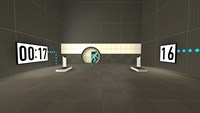
=================== Portal 2 timer examples =================== This is just an example map that includes the basics of 2 working timers (a countdown and a countup) that uses custom materials (numbers). The intention is to show the required entities and their inputs/outputs to understand the logic behind a timer made in the hammer editor. Also this method allows you the posibility to use your own custom typo/numbers to fit your map's aesthetics... For this example I used the typo "DIN Next LT Pro Condensed", because I think it's pretty much similar to the typo used by Valve for the signage lightboard; so if you are too lazy to make your own material and want to use it in a normal Portal2 map, it'll look good. So the purpose for this could be considered as merely didactic The basic idea under this method is to make an overlay with 10 frames (the ten numbers, from 0-9) and go changing its textureindex with the entity "env_texturetoggle". HOW TO MAKE YOUR OWN CUSTOM NUMBERS ---------------------------------------------------------------- 1. Open an image editor of your choice, take the font that you like and make 10 separate images, one per number (from 0 to 9), and REMEMBER to always give the image a size which values are a power of 2 (like 128x256 that I gave in this case). I prefer making .png files... you can do .tga as well... Whatever format that allows you recording an alpha channel (transparency) because this way, our numbers overlays would be stickable on whatever texture 2. Name each of them with a name followed by a suffix like "_0", "_1", "_2", and so on... Obviously, try to make that suffix coincides with the number into the image... lol. 3. Now open VTFEdit (http://nemesis.thewavelength.net/index.php?c=178) and go to File > Import. Now select at the same time (holding Ctrl or Shift keys down) all the ten image files. Do not resize the images. You can check into the "info" tab how the file contains 10 frames (each of them is a different number). I also made a cutie dots (":") to separate the seconds from the minutes and make them flicker: for this you need to make 2 textures, one with the dots and other completely empty but with the same size, then do the same as for the numbers, import them with VTFEdit selecting both at the same time. 4. Then save this file as .vtf into your "materials" folder (you can create whatever folder of your choice into /materials of course) giving it a whatever name. 5. Now you should create the .vmt file for the above .vtf file. Both names must be the same, only their extensions change... In this example, my .vmt file contains the following: UnlitGeneric { $baseTexture "josepezdj/numbers/black_numbers" $surfaceprop glass $translucent 1 "%keywords" portal $decal 1 Proxies { ToggleTexture { toggleTextureVar $baseTexture toggleTextureFrameNumVar $frame toggleTextureShouldWrap 0 } } } You can simply copy all that only replacing the path "josepezdj/numbers/black_numbers" by the one where your .vtf file is located and the name of your file. I guess it's clear. However, do not hesitate to ask whatever question or doubt Once created your custom texture for the ten numbers, check inside the attached .vmf in your hammer editor to see how you can set the timers up easily. Read the Readme.txt file for instructions info. A further post with an explanation in detail about how the timer system works is in the topic of this download, for those who doesn't really extract much info from the vmf file... josepezdj
Ascendence
This is my first real mapping attempt, but it's a pretty ambitious project. Version history will explain what I'm demonstrating and what I'm looking for, as far as feedback and such go. v 1_1, uploaded 5-20-11 This is the entrance (which I know is lame and cheap, haven't worried myself over instances and elevators yet), the test situation introduction, and a way of clearing the chamber between "player delivery" and testing. There is no puzzle here yet, nor will there be until v 1_2 or 1_3. What I'm mostly showcasing is the trap door and the glass removal process. I'm looking for feedback on the entire process. Again, I know there's no puzzle here. It's just a big pit. That's why it's here in the WIP section. v1_1_3, uploaded 5-25-2011 Moderate change from last version, adding another element to the simple puzzle leading to the exit. See latest forum post for details.
Lost chamber
A WIP testing the ability to bounce off of Hard Light Bridges. May never reach a finished state.
Kvalheim's Singleplayer: 01
Release version of the WIP uploaded the other day. Now has music, GLaDOS voices, active turrets, fixed vertex textures and implemented moving panels. Moved the button, but still fairly easy difficulty.