Portal 2
SinglePlayer P-Body Respawning Script
This is a script and few instances in order to mimick the way you die and respawn in multiplayer in singleplayer. P-Body robot only. This was made for TeamCitruz's unfinished mod "Catch 131" which was about an adventure of p-body. I thought it would be a waste to let it just sit there so I'm giving it to you community! Download comes with a script, a couple of instances and an example map you can copy from. I won't go too much into how it works because there is a in-depth ReadMe included in the download. But do include me in your credits if you are going to use this! Happy mapping TWP!


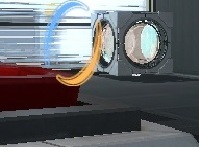
Thinking_ With_ My_ map
This is my 2nd map. enjoy map!
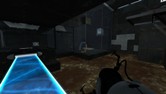
Deception
Currently working on my first map for Portal 2, and while I did a bit of dabbling with hammer when halflife 2 and then when Portal 1 came out nothing came of it. Anyway, this is the 2nd room from my larger map, that I like some feedback on You enter this test chamber through a broken door from the previous test chamber. So far: Puzzle done (might need tweaking - hence the testing haha) Texturing - in progress (50%+ done i'd say) Detailing - in progress The rest of the map isn't with this as yet, as i've been learning as I go so the first room and some other things I won't go into (spoiler for the map otherwise lol) are in the process of being redesigned/updated. Btw, this rooms puzzle will be part of a larger puzzle. Any comments about anything in it is helpful!
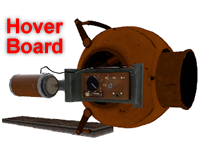
Hover Board V.9
This is my latest update to Blappeture Science Hover Board. The design is notably different as it features a core chasse instead of a beheaded Glados as before. The control setup has been modified from before to allow the user to carry the device without needing to use it. Unfortunately the machine gun was removed for this feature to work. The missile launcher however remains intact. The overall functionality has been stabilized and it can now actually float in water. This should make it less difficult to lose in a bog of ooze. Additionally it will not dissolve under normal Weighted Cube conventions. The New Control Interface goes as follows: Engage and disengage engine: (spacebar) Forward throttle: (W) Nitro Booster: (right Mouse button) Missile Launcher: (left Mouse button) Steering: (Mouse Movement)
(sp) Portal Era : Part 2 (Early Beta)
Second part of the Portal Era Adventure. This is a very early beta. Please notice every probleme or bug you find. Please record your blind test (it really helps). - 4 hidden trophies to find Here is the walkthrough : http://youtu.be/yC7OL0cZZhU

Customizable Box Droppers
These box droppers reduce all of the box dropper stuff in instances/gameplay into just a handful of instances. Place a dropper instance, give it the name of a special cube instance, and you're good to go! Note: there's a vscript involved, so using FudgePacker with this is a good idea. The Faith Cube also will glitch unless you have Skotty's Catapult Cube model.
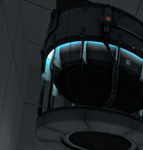
tractor beams_v2.5
this is the first part of my new level let me know what you think. V.12 updated with some lights, stopped people from skipping first room, more textures and fixed portal gun. v2.5 one more room textures in second room are not the same. let me know what you think i could improve on apart from it being to short im working on it. im not adding more rooms till this one is complete
ws_004_tyronis_v2
Re-worked map from the chain series Withdrawal Symptoms. NOW UPDATED V2 TO REMOVE SOME GLITCHES AND MAKE SLIGHTLY HARDER / EASIER DEPENDANT ON MIND SET. Wanted to attempt to modify the map in order to make tyronis not complete it within 30 seconds each time!!! So here is the official attempt. I will look into making the map harder and harder to complete. where eventually i hope to make it near on impossible unless you are mad and insanely talented at shooting quickly, or doing insane portal flips like this person has proven to be... Best of luck to all who try it. The first jump is a hard one, and careful of the few traps.

3mapstart
i just need some review. one chamber to solve. there is no signal light yet.
Gel Dropper instance
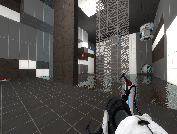
Instance of a gel dropper that comes from a standard cube dropper. ============================================== = GEL DROPPER INSTANCE MADE BY CHICKENMOBILE = ============================================== This instance covers every available, working gel in Portal2. It has presets for each gel when you specify the type. Please note: Options are CASE SENSITIVE therefore you will need to type 'Bounce' instead of bounce and 'BigBlob' instead of bigblob etc. Instructions: 1. Place an func_instance inside your map and point towards your gel dropper instance. 2. Name this instance 3. Select your Gel type for $PaintType. Options: 1. Bounce 2. Speed 3. Erase 4. Portal 4. Select if it will spawn as a BigBlob or a constant stream of gel for $BigBlobOrConstant Options: 1. BigBlob 2. Constant 5. If it is 'BigBlob', set $TimeBetweenBigBlobs as a number for time BigBlobs spawn after each other (2 seconds is a good time) Notes: 1. BigBlobs are treated like physics objects which can be catapulted by faith plates and explodes when in contact with other BigBlobs 2. BigBlobs cannot press buttons 6. If you set $DropperInitiallyDisabled to 1, you will need to manually turn the gel spawner on using an output. Create an output from your activator (i.e. a button etc.) and then point it towards your gel spawner, then select from the 'Target Input' drop down menu: 'instance:StartGel;Trigger'. If you want to stop the gel from spawning choose: 'instance:StopGel;Trigger' 7. Profit?!?! P.S. I cbf uploading a thumbnail its nearly 4am. Good day