Portal 2

Underground Timer
Uploaded by ChickenMobile · Aug 26, 2011
13 comments · 5.0 (3)

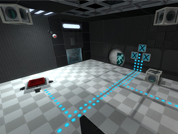
This is an instance of a robust underground timer. This timer can count up or down from 1 - 99 seconds. underground_timer_counter.vmf The $UnEvent_Relay parameter is the event that is fired when the timer has stopped counting. This event should be triggered in one of the clock instances. This instance is used for both buttons, however the buttons will determine whether it counts up, or down. underground_timer_but_countdown.vmf $time_units is the number of seconds of the unit column $time_tens is the value of the tens column (This is the only way I could figure this out for the countdown timer without adding some sort of script.) The $Event_Relay parameter is the event that is fired when the timer has started counting. This event should be untriggered in the clock instance. Please note: I have added entities that will work out the number of seconds the counter needs to count down from $time_units and $time_tens, hence the large amount of logic_cases underground_timer_but_countup.vmf The $Event_Relay parameter in the 'Timer instance' is the event that is fired when the timer has started counting. This event should be untriggered in the clock instance. The $time parameter should be set to how many seconds it should count up to Known Bugs: Putting both 0 and 0 for the left and right number icons will cause a rip in space, however this shouldn't happen as you wouldn't want a 0 - timed counter How to place in your map: Create a func_instance and change the vmf path to "underground_timer_counter.vmf" Name this instance Create another func_instance and then change the path to one of the button paths (either underground_timer_but_countup.vmf or underground_timer_but_countdown.vmf depending if you want it to count up or down) Set the button's fixup name value to the same of the counter instance If you are using the countup instance, put a number value for the replace value $time to how many seconds you want the counter to count up to If you are using the countdown instance, put the individual values with each a 1 digit number which will represent your double digit number. e.g. "$time_tens 1" and "$time_units 5" will make the timer count down from 15 Using the $Event_Relay replace value in your button, make it point towards a logic_relay which will trigger the event when the counter starts. This must include the name of the prefix PLUS the name of your relay otherwise it will not work. e.g. clock_1-TRIGGERNAME (This is the name of your relay outside the instance) Using the $UnEvent_Relay replace value in your counter instance, make it point towards a logic_relay which will un-trigger the event when the counter stops. Same as the button's relay this MUST INCLUDE the prefix fixupname as well as the name of your relay. e.g. clock_1-UNTRIGGERNAME (This is the name of your relay outside the instance) Enjoy the use of an underground timer... WOOOT If you are having trouble... Please do not hesitate to ask for any help either through a PM to myself or by posting a comment inside the instance thread.

Underground Timer
Advertisement
Registered users don’t see ads! Register now!
[Coop] Room Of Raco
Uploaded by JonVD · Aug 24, 2011
14 comments · 5.0 (17)

A challenging map that involves some things that require inventive ways of using familiar game mechanics, impossible to explain without spoiling the puzzle . I hope you enjoy my map! Please leave some feedback on the topic as well. The installation instructions are put in the rar file itself, but they are the same as the ones for most other co-op maps. Special thanks to NxSG for letting me use his awesome portal 2 themed music. This map features the track called 'Gravitation Field'. Be sure to check out his channel on youtube if you like it! //Composer & Producer: Alexander Linhart/NxSG //Track: Portal 2 Soundtrack (Gravitation Field) //YouTube: http://www.youtube.com/user/NxSGMusic ////Changes//// 1.1: PLEASE tell me if this version doesn't work o.0, doesn't let you hear the music or see the custom textures -Changed the test sign, it now shows the correct test icons -Added an exit sign at the exit -Added a moon sign at the 'moon door' -Prevented some unintended solutions -Prevented standing on some walls sticking out Videos featuring Room of Raco (and contailing some big spoilers, even in the thumbnails ): [spoiler]juSGsSAFhIo[/spoiler] [spoiler]QtxndpbrdOA[/spoiler] [spoiler]fcNEQxYbmR0[/spoiler] File Name: Room of Raco.zip File Size: 8.35 MiB Room Of Raco

[Coop] Room Of Raco
[SP] Linking Annex - The Proposal Project
Uploaded by MissStabby · Aug 23, 2011
116 comments · 5.0 (39)

On Monday August 21 Gary Hudston Proposed to his girlfriend using this map. It is made by MissStabby and TophattWaffle. It's a project we worked on for about 6 weeks. Other maps we created were: MissStabby - Angrybombs Tophattwaffle - Reconstruction TO PLAY THE MAP: Put the VPK in the addons folder put the bik files in your media folder. open console and type: map la_bringing_together IMPORTANT: When loading the mod, portal 2 loads modified scripts, needed for the mod. If you want to play other maps or the campains, restart portal2 first!! here is some more info as well as a playthrough of the entire game: iXACx_gz8tM Credits: Chamber 1: TophattWaffle Chamber 2: MissStabby Chamber 3: MissStabby Animations: MissStabby Scripting: TophattWaffle HammerQA: TophattWaffle Voice: Ellen McLain Dialog writing: Gary Hudston Recording: VALVe have fun playing it! p.s. She said yes!

[SP] Linking Annex - The Proposal Project
Portal2JAEP
Uploaded by Tyri · Aug 21, 2011
16 comments · 5.0 (4)

Portal2JAEP Portal2 - Just Another Extras Patcher Portal2JAEP is an easy-to-use Portal2 Extras-Manager with many features to manage your Portal2-Custommaps. Extras-Patcher, Map-Installer and Map-Downloader in one tool. Add Maps directly from bsp, vpk, zip, rar or 7z files, automatic extraxt and install, Maplist to manage new and alreday played maps, download and install maps directly from thinkingwithportals.com and many more. For more Informations, Feature-List, Help-Informations and Bug-Reports see the Thread of this Download, following this Link: topic4409.html # Changelog # * 2011-08-22, v1.00 - First Release

Portal2JAEP
portal map for fctbarnes
Uploaded by Ram64 · Aug 21, 2011
1 comments · (No ratings)

just a random map

portal map for fctbarnes
DARKCHAMBER
Uploaded by Darkylight · Aug 21, 2011
1 comments · (No ratings)

I'm making a Map called Darkchamber where 5 gigachambers are together and you need to use the things of one in other and viceversa. So, Now I have only the initial spawn and the first full room. Good luck, any bug, tip or help will be welcome. Screenshots: http://puu.sh/4CvF http://puu.sh/4CvG http://puu.sh/4CvH

DARKCHAMBER
The Bradd
Uploaded by LittleLui · Aug 21, 2011
18 comments · 5.0 (10)

A simple 'climb to the top' map. Movable Panels, a few buttons, a cube and a turret. And some flinging. The map starts with an elevator ride from the top down that gives you nice overview of the map. Screenshot

The Bradd
S_O_v1
Uploaded by Mangus Toyl · Aug 22, 2011
11 comments · 4.0 (5)

S_O_v1 is more fun than brussels sprouts! Star Oasis V1 map by Mangus Toyl A medium challenge map. Objective: Get to third tier. Must place the excursion funnel on a tile and a cube within the excursion funnel. The cube will pass upward until it hits a button. Some cubes need to be stacked. Companion cube needs to be placed in a specifc spot and deliberately respawned. Most cubes are used as a stepping device. In most cases, don't let cubes hit fizzler or it's game over. Special note: faith plates can be approached from two different angles - either by walking onto it from a backwards direction or a forwards one. This means that only one method will work correctly, so choose to walk onto a faith plate from the forward direction, as the fulcrum's leverage changes from one point to another. Always save right before making a big decision. There is only one shot at stringing together the correct sequence of moves, so you may need to save before making that 'leap of faith.' When you first approach this map, follow each indicator light and map out its corresponding trigger and symbol. Warning: I use normally open and normally closed buttons throughout. When you use a faith plate or fall from a light bridge into a portal, do not use directional keys to guide a path as this is done automatically using targets. Please read the directions on how to extract this file properly. I have special files that have to be in place. And finally, save before jumping into excursion funnel. TO USE THIS MAP FOLLOW THE INSTRUCTIONS BELOW Extract the .bsp file to your maps directory located in steam/steamapps/common/portal 2/portal2/maps. Extract the star_oasis folder to the materials folder located in steam/steamapps/common/portal 2/portal2/materials. Once in portal 2, go to your console by pressing the ~ key (enable it under keyboard options if you haven't) and type "map star_oasis_v1" without quotes. No respawn. Normal cubes will not respawn if lost; no box dropper for normal cubes. Save at various points. Indicator lights are a jumbled mess...sorry. When you arrive at the star oasis, you will notice only one star has a corresponding button. The other two stars open on a proximity trigger so don't waste time looking for two other buttons. This map has little detail. This is my first attempt at this. Solution: http://www.youtube.com/user/MangusToyl

S_O_v1
[SP] Eco Leaf and Eco Leaf Advanced
Uploaded by Another Bad Pun · Aug 20, 2011
29 comments · 5.0 (19)

Hey guys, after two months anticipation, I am finally releasing Eco Leaf Advanced! Eco Leaf Advanced is designed to challenge players' minds with innovative problem solving and clever thinking. Hopefully I have succeeded in doing so. It would have been released alot sooner if it weren't for a bizzare compiling error and another project I'm working on... The Standard Eco Leaf map is also included, and in all, has had significant atmospheric and detailing changes. (yay moving plants!) Screenshots! Screenshot 1 Screenshot 2 Screenshot 3! Portal2two was kind enough to make a video walkthrough of the advanced version! If you get stuck or want to see the solution, watch it! :thumbsup: http://www.youtube.com/watch?v=XapGj6wtI5k&feature=player_embedded#! XapGj6wtI5k

[SP] Eco Leaf and Eco Leaf Advanced
Advertisement
Registered users don’t see ads! Register now!
The Part Where Everything Goes to Hell REAL Map
Uploaded by MasterLagger · Aug 20, 2011
21 comments · 5.0 (9)

Ok, since some people didn't like the sample map I gave earlier because I edited some extra stuff out of it,(textures, rooms, etc.) I decided to stick up a different map that is not edited. That means that the observation room is added and accessible, all the textures should be align the way they should be, and an auto-save feature is included. Let me know if you have any issues with the map.

The Part Where Everything Goes to Hell REAL Map