Browse Downloads
Recently active files on the download database.
RB-TAM update 23
RADELITES BEE 2 ADDON MOD What is Rb-tam? Rb-tam is a mod made to add many of the more unique testing elements you might have seen over the past few years in custom maps. From paint guns to portal detectors and many more amazing elements that I have found created by fellow users like yourself I have collected them and worked with many awesome mappers to give you a mod that lets you use their amazing items in your very own peti editor(with quite a few of my own items of course. How do you use this mod you might ask? Its very simple, all you do is install bee 2(it can be found on this website) Then download this and follow the embedded instructions Have fun, also thanks to all you awesome people who were kind enough to share your creations to be incorporated in this mod. When you create an AWESOME map with this mod make sure to copy this hashtag inside your description of your map #RB-TAM link to a collection of simple maps made with my mod for bee2http://steamcommunity.com/sharedfiles/filedetails/?id=202463960 -planned updates- While I cannot update items in the mod at this time I do plan to make a webpage for the mod and maybe add an eh little treasure hunt eheh. Also plan to create new icon for mod.


Wall Projector Tut
VMF included. Tutorial on The hard light things! No pic, though. .RAR file - should open with WinRAR. put maps folder in portal2>portal2. DO NOT REPLACE OR DELETE ANYTHING ELSE. SDK folder has everything including VMF.

BEE2 Addons
My collection of items for the BEE2. These items mainly are rearranged or special versions of existing items. Some help is available in the right-click info panel, but consult the Readme for full instructions. All non-logic items are fully styled for all the default styles. It is compatible with Radelite's addons, providing styled versions for the Ratman Style. This includes my Refurbished Style, a hybrid of Clean and 1950s style similar to the Coop Course 5. I also have a modified version of 1980s style, with a damaged Enrichment Sphere showing the surrounding Test Shaft. I now have an Overgrown Style, replicating the dilapidated Aperture seen in the first few levels of the singleplayer campaign. There is also a debug Unlocked style to allow adding or deleting the mandatory entry/exits and observation rooms. Be careful with this! Thanks to Skotty (High Energy Pellets, Bumbleballs and Catapult Cubes), Moth(Bumbleballs), SoundLogic(Catapult Cubes) and PortalCombat (Sphere Cannon) for creating the original versions of some items, which I have made PTI compatible and restyled. You'll need 7-zip to extract the archive. See the GitHub repository for WIP items, styles and changes. I don't advise using these files unless you are willing to have your maps break. Styles: - Refurbished Style - Overgrown Style - Open 1980s Style - Unlocked Clean Style items [spoiler]- Retractable Pedestal button - Worldportal Door - Diagonal Laser and High Energy Pellet launcher - Quarter wall - Dropper version of PortalCombat's Sphere Cannon - Antline Router - Antline Magnet - Angled Block - Music - Laser Music - Conveyor Belt - Large Faith Plate - Global Cube Dropper - Paint Cleaner - Double Grated Panel - Futbol - Ditch - Caged Turret - Caged Reflection Cube - Wheatley Monitor - Portalable Stair - Portalable Piston Platform - Turret Dropper - Toggleable Faith Plate - Static Panel - Static Piston Platform - Half/Half Wall - Coop Checkpoints - Recessed Fizzlers - Crusher Plates - Sideways Light Bridges - Shredders - Static Glass Panels - Half Panels - BumbleBalls - Catapult Cubes - Bomb Droppers - Rotating Faith Plates - Glass With Hole - Glass Doors - Slow Crushers - Piston Relays - SR Latches - Angled Light Bridge - Separation Coop Checkpoint - Cube Transmuters - Ceiling Lights - Autoportal Pistons - Timeout Portals - Clamped Cubes - Global Cube Triggers - Override - Neurotoxin - Chamberlock - Retractable Floor Button[/spoiler] Changelog [spoiler]* v45: - Fix hovering debris in Overgrown Entrance Elevator - Prevent ball lines from playing in Clean - Quiet - Fix Warm Lights in Clean Style - Make Clean Fizzler models animate correctly - Remove the old documentation from the archive * v44: - Brand new Portal 1 Style Coop entrances and exits, using lifts to transport players to and from the level. - New P1 Style Angled and Clear Panels that use pistons instead of robot arms. - Change: Caged Turrets will no longer have the grating explode, this should make it less likely the turret will not be able to shoot through the grating. - New Caged Turret model. - Fixed Overgrown Quiet Style. - Retractable Pedestal Buttons use the correct Overgrown instances instead of Art Therapy ones. (Typo!) - Fixed crash in P1 Coop if cubes are present in the map. - Clean Style Fizzlers should now retract properly if they didn't before. - Black texture added behind fizzler, so they look nicer on white walls. * v43: - Improved Overgrown style observation rooms, the sound should be quieter and the flickering can be completely disabled by turning off "start enabled" in the large observation room. - The overgrown style elevator screens are less random, they match Cave's PTI dialogue (If you heard them all, the video screens will be random). - Overgrown Turrets are twitchy now. - Changed style of Refurbished lights. - Fixed bug with Overgrown track platform rails. * v42: - Fixed Overgrown reflection cube packing. - Fixed floating cubes on Overgrown piston platforms. - Added custom model for P1 styled storage cubes, companion cubes, spheres, pedestal buttons and laserfields. - New custom Overgrown style glass. - Better P1 style crusher, piston platform and buttons. - Custom indicator lights for P1 style, to make them appear smaller. * v41: - All Valve+BEE1+HMW items finished for Overgrown Style. - Coop exits done. * v40: - Added first version of Overgrown Style, featuring a heavily damaged Aperture overgrown with plants. This is not finished, some items remain clean styled, and Coop exit corridors haven't been styled yet. - A quote list has been added to describe how the extra quotes in the various styles are picked. - Neurotoxin vents have been modified to be cheaper; the activation radius is now only visible in the editor. - Neurotoxin will permanently shut off when players get inside the exit door. - Added update checker to the readme. When the next update is released, the readme will show a message (only when actually open). * v39: - Added files for some checkpoint instances. - Adjusted lighting in P1 Style Checkpoint, and changed droppers to use P1 style versions (both checkpoints). - Added the second door for P1 Style Chamberlocks (Whoops.) - Checkpoints will not close their front door if an object is placed between it and the fizzler. - Players will slide off of the camera in Refurbished Small Observation Rooms. (Prevents cheating puzzles). - Changed something with Companion Cubes[/spoiler] Earlier changelogs
Felix Griffin's Editor Mod (FGEMOD)
An editor for the editor, which allows you to choose your test elements. Includes at least as many new ones as there are originals. Includes HMW's mod and the BEEMOD elements. Note: There's currently an error unless you have this package installed: http://dl.dropbox.com/u/51831059/Portal ... _v5_src.7z . Sorry about that.
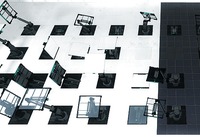
PTI element: Living panels, 64x64 and 128x128
Wacky panels that do stuff. 64x64 and 128x128 sizes are provided. Inputs: * Start deployed -- Inverts the direction of the panel's animation. * Timer & Autodrop & Start Open -- Choose which animation to play, see below. * Button type -- See below Button types (64x64 panel): * Weighted = White or black panel surface, depending on whether it's positioned on a portalable surface or not. * Cube = Glass surface. * Sphere = Intangible skeleton: Just the skeleton of the panel, without surface, also does not clip the player. Button types (128x128 panel): * Weighted = White or black panel surface, depending on whether it's positioned on a portalable surface or not. * Cube = Glass surface. * Sphere = Portal 1 style metal wall surface. Use signal inputs / connections to activate the element. The panels contain a built-in AND gate just like the standard elements do. Of course you don't need to activate the element at all. Just affix it in a particular pose to provide a platform of your choice. There are 68 different animations provided. The animation is selected using the Timer value, the Start Open checkbox and the Autodrop checkbox. The list of animations is detailed in the README file provided in the distribution package. It is rather difficult to try to video-document all the animations that this object can play, but here's a sample picture which should serve to at least pique some curiosity. Unless you choose the "skeleton" type of panel, this panel is fully blocking and can be even used as a lift / piston platform for objects and for the player. The arm of the panel is only partially tangible, and only in some animations. It is a bit difficult to generalise for the set of animations present here, so the tangibility is disabled for most animations where the heuristic method does not work nicely. The object also does not contain a crush kill trigger, a portal fizzler, an object fizzler, nor a portal bumper. This is intentional. But it may lack other things that are wise to have (hint brushes? shrug), because I just began learning to use Hammer a few days ago, and I wouldn't yet know anything about those. Note: These panels have the "adjustment gizmo" which allows them to be placed at an offset much like the laser components -- except that it does not work. Sorry about that! Just use always the center position. If anyone has good ideas of how to fix it, it would be welcome. (This comes from the 5 positions method. The 8 positions method does not work, because the embedding pit would not be relocated correctly together with the element.) However, you can use the adjustment gizmo to rotate the element around. Just point it towards some edge of the voxel, and then place it back to the center. The object will retain the new orientation. Note: The platform may move within the first second when the map loads. Sorry about that. This may be fixed in a future version. The panel contains from 21 to 25 entities depending on version. The skeleton version has the fewest entities, and the large non-glass ones have the most. And finally, the in-editor symbols for this object are currently the laser emitter for the small panel, and the piston top for the large panel. I have not yet developed the skills to change the in-editor graphics. Download here: http://bisqwit.iki.fi/kala/ptal2/livingpanels.zip
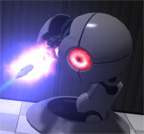
fixed Rocket Turret
Maybe you missed the Portal 1 rocket turrets, discovered them in your game but saw "Oh, they are bugged!". In this pack, there are the models, materials and sounds you need for the rocket turret. 2 instances are delivered for using it in Hammer. The missing sounds are just hearable if you put them in a VPK file in your addons folder. How to create a VPK: https://developer.valvesoftware.com/wik ... rtal_2_Map The $MissileSpeed has a default of 450. If you keep ??? it will use this speed. Never rotate the instance! Always keep it's angles 0 0 0! Make sure ALWAYS to place ONE "rocket_turret_missile.vmf" in the CENTER (coordinate 0 0 0) in your map! Extra missiles are needed because the original NPC fires missiles with a speed of 0 (thats the bug they have). Make sure to release the materials, models and sounds together with your map!
Portal 2 Pre-release/Beta Pack
It's finally here, after months and months of getting no where, I've got it at least started. The Portal 2 Pre-release/Beta Pack is a texture, and aesthetic pack that recreates the look and feel of Portal 2 we saw back at E3 2010 - PAX 2010. I've seen a lot of beta/pre-release maps that use the stock textures and looks and it does not do the justice! What is included? - New Metal Walls. - Shinier dirty walls. - Beta looking Observation rooms. - Portal 1 Observation Rooms. - Beta light strips. - Green Goo - Screenshot samples - Portal 1 Button Switch - Vscripts that swap out the Portal 2 turret and Portal 2 Button switch to the Portal 1 version. - 2 Example maps by Kyo and Me. - Whirls for the Portals. (Need VPK override) - Different glass texture for the Portal Door. (Need VPK override) (NOTE: I still need someone to find a way to get the sick figure to show on the portal door. He is in the model itself, but the glass texture needs to only show him.) Q & A Q: Why did you do this? There is a reason why Valve changed stuff. A: Because I'm one of those people who love what Valve does not release a tad more on what they do end up shipping. I'm sure there are mappers who feel the same way. Q: Is this an override? A: No, it's separate. All the textures are under the folder "betapack". To ship your map, just pakrat (or include) that folder, and the models and material/models folders included. Q: Does it include instances? A: Yes Q: Does it include the vmf of the sample maps? A: No Q: Can I help with anything? A: Sure, feel free to contribute to anything and I'll add it to this package. Special thanks to Kyo for testing the pack and allowing me to ship the map with this!
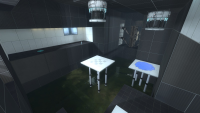
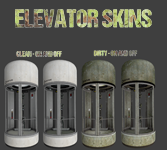
Elevator with Extra Skins
(As requested by Lonewolf) This is a default Portal 2 elevator model with 4 skins: Clean with light on, Clean with light off, Dirty with light on, and Dirty with light off. These correspond to skin0-skin3 in hammer respectively. High resolution preview: http://i.imgur.com/PqnpUqf.jpg To install, simply extract the zip to /steamapps/common/Portal 2/portal2/ (The readme basically says all this too) Please credit me for making this if used in a map, and also link me to the map on here because I'd love to see what you make of it
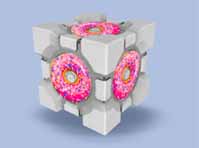
Brain Donuts
Donuts aren't good for your body, but this map is good for your brain. Actually, it's meant to mess with your head. Look around. Explore. Look behind you. Strange things happen. Unzip the file, put some sprinkles on it and stick it in your maps folder.
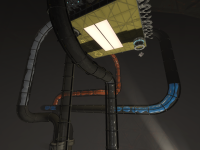
Odyssey
The BSP's have a different name, but I came up with this name after the fact. It's a journey through abandoned industrial upwards to BTS. I focused on making stunning aesthetics (or at least I think they should be). Most people know what to do with the files, but if you're not sure, place the BSP files in the games Maps folder. Steam/ steamapps/ common/ portal 2/ portal2/ maps.