Portal 2 (Other files)
Miscellaneous Portal 2 mods, assets, tools, and non-map downloads.
SP Custom Portalgun skins Update 2
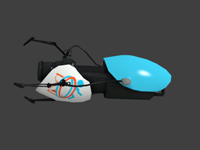
This has three new textures for the standard portal gun The textures are Paint spray texture Christmass texture MC Diamond texture MC stands for minecraft Rads gun(my custom gun I made for myself, might make another lol) Picture of guns and instructions included


Underground Themed Aerial Faith Plates
I put together a prefab for an underground themed aerial faith plate. Simply drop it in your map and name it whatever. Place a trigger_catapult over it and set it to "OnCatapult" "prefabname" "instance:catapult_relay;Trigger" and you're good to go. I included the .vmf for both the compiled map and the instance.
TWTM Textured Portalgun Skin
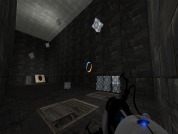
This is a portalgun skin based off the new thinking with time machine game Pic of gun http://steamcommunity.com/sharedfiles/f ... =255412240 (Note once installed for portal 2 it should also show up in Thinking With Time Machine) Have fun
panel_rotate prefib
Prefeb that might help you see how to rotate panels in Portal 2

Advanced Conveyor Belt (Portal2)
This is how Valve made proper conveyor belts in the game section 'turret manufacturing' It consists of eighteen func_tracktrains, with individually attached prop_dynamic belt sections which move the player and objects. VMF and BSP are included for you to examine and edit any way you see fit. Hopefully this will help to explain how it was done, and how you can do it for yourself

Elevator Videos Fixed - Brainstones Hardcoded Instances v1.1
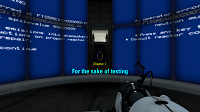
EDIT(IMPORTANT:) I have just discovered (thanks to sleter) that the elevator videos behave differently AGAIN when your map is uploaded to the workshop. (Damn VALVE) The Problem is now fixed. I have also merged the arrival logic and the arrival base as I have merged the departure logic and the departure base; that was unfortunately a must because of the nature of this very annoying problem. Currently you can have entry_elevator_UP and exit_elevator_UP in your map. Entry_elevator_DOWN and exit-elevator_DOWN will be added shortly. You MUST redownload this instance, because your elevator video screens will always play the default video as soon as they are uploaded to the workshop. (Unless you delete the entity "video_script" inside your logic elevator instance. In my custom logic elevators, this is already the case, so you will probably have this problem only in your arrival elevator.) Thank you for your understanding. ---------------------------------- Aren't you tired of VALVE destroying elevator videos with the new DLC? Aren't you tired of editing scripts for map transitions? And then packing them into bsp, what doesn't work? Do you really expect every under-age-12 downloader to be smart and not lazy enough to copy several of your scripts in the right location of his PC? Do you want to display chapter titles? Do you sometimes wish to have free choice over whether your Portal Gun can shoot the orange Portal and whether it carries PoTAToeS or not? Do you want a map transition that works, when the player si not in the PeTI? All this is now accesible to you, thanks to Brainstone's Hardcoded Instance Collection --------------------------------------- 1. BrainstoneEntryTransition Delete the standard arrival_departure_transition for this to work. Possibilities to choose: $canShootOrangePortal $PortalgunHasNoPotatoe $chapterTitle $chapterSubtitle $chapterTitleColour (e.g. 255 100 255) $chapterSubtitleColour $EnableChapterTitle $EnableChapterSubtitle 2. BSHC_entry_elevator_UP $video 100% functioning 3. BSHC_exit_elevator_UP $video $newmapname $disablePTIVoteDiag (If you are playing in the PeTI AND want to vote, there is no other option than let the player click the "next map" button to create a transition. However, this always transitions the player to $newmapname when he plays not in PETI)
VPK Extract in DLC Custom.
------------------------------------------------- VPK Extract in DLC Custom. (Original Project http://www.tarados.com) By CaRLyMx STEAM: http://steamcommunity.com/id/carlymx Current Version: v1.0 FINAL [UPDATE: 11-11-2011] ------------------------------------------------- Problems with VPKs since Update to 1 DLC "Portal 2"? Tired of messing lod directories "Portal 2" with the content of VPKs? You do not know what to be cleared? The solution while Valve does not fix the problem is to create a Custom DLC, and enter into the content of VPKs. Here you have what it takes. instructions: 1. Copy the contents of the RAR in the Root of the Game. 2. Extract the contained; of VPKs into the "portal2_dlc9" as if the directory "portal2" is involved. Use "GCFScape.exe" in TOols Directori. 3. Logging into the game, open the console and locate the map. 4. play * You can try a map made by me. xDD PSICODELIA Test One v1.3 ** This is not a solution, is a little trick, hopefully Valve the big problem resolved soon. -----------------------------------

[Tutorial]Portal2 SDK Customizable Spawn Map Options MOD by FusedCore(renaFUSED)
This mod is for people who are using the Portal 2 SDK tools. You must own Portal 2 on PC(Windows) for Steam and have the "Portal 2 Authoring tools" SDK installed to use this tutorial. This SDK mod allows you to chose whether to chose different options for spawning on your custom single player maps.
![[Tutorial]Portal2 SDK Customizable Spawn Map Options MOD by FusedCore(renaFUSED)](/downloads/screenshot/thumbnails/917_hammer-custom-blocks.jpg)
Coop Spawn and Respawn
I played a bit around with coop spawns and respawns so i'll upload a little testmap file for those who got problems with this. The new spawn will be activated as soon as both players touch the trigger at same time and only when they touch it at same time. I don't know if there is a nicer way than this but at least this way worked for me and a friend. Sorry that the testroom doesnt look nice but it really just was for fast testing and this is now just so people can look into it. Now let's go on make some nice big coop maps
Crushers Instance
For all the crusher lovers, here is an instance including two lovely crushers colliding together. You can control them and set the times between opened and closed positions. UPDATE 1: updated with func_instance_io_proxy for easier I/O. Replacable variables: $time_to_open