Portal 2 (Other files)
Miscellaneous Portal 2 mods, assets, tools, and non-map downloads.
Test Element - Animal King
This test element, for Hammer or the Editor, will throw bombs if it sees you. It needs to be activated by something to start. This also includes breakable walls for the Editor, which the bombs will shatter. Enjoy!

Infinite staircase with a few suprises
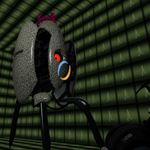
Testing out a way to re-use connecting areas in maps to save space. Video

Gel Flow Particle Systems
This is a map with a couple of example Gel-Flow Particle Systems. This is how Valve made Gel look like it is flowing through pipes (and curving in them). You can just copy and paste these into your maps, however keep the angles of the info_particle_system's the same to the info_target as this is how it tells which way to curve the Gel. I would suggest you to ignore the different "Control Points" as decompiling a Valve map shows that they only used 1 info_target for 1 particle control system. Searching through the Portal files I couldn't find the name of a water one but I am pretty sure that there is one. If you do find out the name of the particle system, then post a comment below and I will edit this thread.
generic_actor test: walking through world portals
Based off of this: NPC Walkting Through Portal Contains the VMF, a compiled version of the map and the models and textures for a male_06. Video of it in action: http://www.youtube.com/watch?v=5h9JlC_E1Fc
BLUEMOD version 2
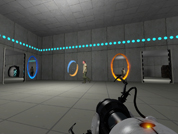
After many requests I did this This has the same paint gun as part one but part one could not be added to beemod 1 only bee2 and the normal pti editor this update fixes that and is only for beemod 1 users This is one o the demo maps I hve made with it http://steamcommunity.com/sharedfiles/f ... =175063521
PTI element: Living panels, 64x64 and 128x128
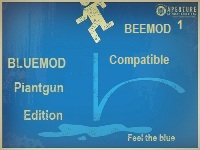
Wacky panels that do stuff. 64x64 and 128x128 sizes are provided. Inputs: * Start deployed -- Inverts the direction of the panel's animation. * Timer & Autodrop & Start Open -- Choose which animation to play, see below. * Button type -- See below Button types (64x64 panel): * Weighted = White or black panel surface, depending on whether it's positioned on a portalable surface or not. * Cube = Glass surface. * Sphere = Intangible skeleton: Just the skeleton of the panel, without surface, also does not clip the player. Button types (128x128 panel): * Weighted = White or black panel surface, depending on whether it's positioned on a portalable surface or not. * Cube = Glass surface. * Sphere = Portal 1 style metal wall surface. Use signal inputs / connections to activate the element. The panels contain a built-in AND gate just like the standard elements do. Of course you don't need to activate the element at all. Just affix it in a particular pose to provide a platform of your choice. There are 68 different animations provided. The animation is selected using the Timer value, the Start Open checkbox and the Autodrop checkbox. The list of animations is detailed in the README file provided in the distribution package. It is rather difficult to try to video-document all the animations that this object can play, but here's a sample picture which should serve to at least pique some curiosity. Unless you choose the "skeleton" type of panel, this panel is fully blocking and can be even used as a lift / piston platform for objects and for the player. The arm of the panel is only partially tangible, and only in some animations. It is a bit difficult to generalise for the set of animations present here, so the tangibility is disabled for most animations where the heuristic method does not work nicely. The object also does not contain a crush kill trigger, a portal fizzler, an object fizzler, nor a portal bumper. This is intentional. But it may lack other things that are wise to have (hint brushes? shrug), because I just began learning to use Hammer a few days ago, and I wouldn't yet know anything about those. Note: These panels have the "adjustment gizmo" which allows them to be placed at an offset much like the laser components -- except that it does not work. Sorry about that! Just use always the center position. If anyone has good ideas of how to fix it, it would be welcome. (This comes from the 5 positions method. The 8 positions method does not work, because the embedding pit would not be relocated correctly together with the element.) However, you can use the adjustment gizmo to rotate the element around. Just point it towards some edge of the voxel, and then place it back to the center. The object will retain the new orientation. Note: The platform may move within the first second when the map loads. Sorry about that. This may be fixed in a future version. The panel contains from 21 to 25 entities depending on version. The skeleton version has the fewest entities, and the large non-glass ones have the most. And finally, the in-editor symbols for this object are currently the laser emitter for the small panel, and the piston top for the large panel. I have not yet developed the skills to change the in-editor graphics. Download here: http://bisqwit.iki.fi/kala/ptal2/livingpanels.zip
Coop Transition Script and Level Choosers
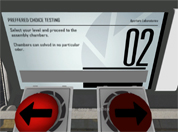
This Transition script and custom level choosers can be used to transition to different maps and courses through a hub map (like Valves). The level choosers can choose from any map in the course and it can display what map you are choosing with a message appearing on the screen. You can have 'infinite' courses inside your script, however both players need the same maps in order for the map to transition to it. If anyone wants to make a coop mass mack-pack (from everyone's coop maps), go ahead. It is definitely possible. Refer to the README.txt included with the download for installation instructions and common problems with fixes. If you have a problem and you cannot find an answer to it: put a post in this thread or PM me so we can get it working. One thing I don't know how to do (yet) is to save a player's progress and make the courses 'unlockable', even if the player has ended the game and then goes back to it (with the same or different partner). If anyone can tell me how to read and write to a file, I would gladly edit this and put this function in. If you are to use my instances/script/materials make sure you credit me within your map download or in your credits! Anyway, enjoy! ChickenMobile EDIT: From a very nice person I found out that there are a few errors with this: - The map doesn't transition without a point_servercommand called @command in your map - I forgot a major script that opens the chooser panel - Updated the Readme file to account for a new problem found - You don't have to use my coop spawner instance (your welcome to use your own) Guaranteed all things are now fixed! EDIT: Sorry guys for uploading the wrong file. Fixed in double time.
Logical Gate's: "OR" "AND" & "OR-Exclusive"
Logical Gate's: "OR" "AND" & "OR-Exclusive" By CaRLyMx STEAM: http://steamcommunity.com/id/carlymx ------------------------------------------------ DESCRIPTION: This little test shows two different ways to use the function "MATH_COUNTER." Logic gate "OR" having 2 buttons, using any of them will activate the door, the funnel or whatever you say. Logic gate "AND" exactly the same as above but have to press two buttons to activate. Logic Gate Or_Exclusive: system where 2 of 3 buttons must be pressed but it can be any 2 of them while pressing all 3 has a different purpose.
Time Machine Instances
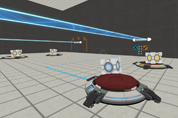
here are time Machines, two themes modern and antique.
Pneumatic Diversity Vent Trailer Fake
I reconstructed the Pneumatic Diversity Vent Trailer in Hammer and added a bonus level. I have a YouTube video faking the trailer ( http://www.youtube.com/watch?v=KzIyRTXT8Ow ). Hope you like this fake