Portal 2 (Other files)
Miscellaneous Portal 2 mods, assets, tools, and non-map downloads.
FudgePacker 0.4 - With Hammer Intergration.
FudgePacker lets you create a list (or several lists) of files to add to your map, and automatically packs the files you want for each map while it builds. You can now choose which lists to load from inside hammer itsself.

Light Beam Platform (from Portal 1)
Just because Portal 2 is a newer game there is no reason to waste old testing elements. A good example besides the Energy Balls (Working Energy Balls + Clean models + Instances) are the Light Beam Platforms. They can be used everywhere because they don't need any fixed points with walls like Portal 2's moving platforms. In this pack you have 5 instances: BeamPlatform_Beam: Here you have a preset env_beam where you have to set the start and endpoint of its beam. BeamPlatform_Corner: Thats the corner for a Light Beam Platform track. BeamPlatform_End: Thats the end platform for a Light Beam Platform track. BeamPlatform_Wall: This is a wall emitter for the Light Beam. For the first two instances the func_instance center is the point where you have to put your path_tracks to. The wall emitter needs to have the path_track on the same layer but of course a bit futher from the wall. BeamPlatform_Platform: Thats the platform itself with some settings. It's moving from MapSpawn on. Make sure to give all instances/parts that belong to the same Light Beam the same fixup name! For multiple platforms per track you have to use of course different ones. This just causes that the toggle won't work. In this pack there are also the missing models and textures for all the parts of the Light Beam Track. I recompiled the corner model and made it to a static prop. Please make sure to use the light_rail_endcap2.mdl and not the light_rail_endcap.mdl. I hexed that model because Valve made some texture tries on the original one in Portal 2's VPKs and it looks unfinished.

GLaDOS Monitors
Tired of having Wheatley staring at you thorough his big screens? What if that could be GLaDOS instead! Well here are some instances that i made from the wheatley_studio instance that could make that happen! Includes an example map. Plz give feedback so i can edit this further! Thanks! update 1.1 -deleted Wheatley's voice from coming up when screen was broken.Thanks Co-op!. -added a background instead of a bland black -added GLaDOS's voice when u break the screen

Faith-Plate-Cube
This is a Faith Plate in a Aperture Cube, requested by Soundlogic. In this pack you got the model (uses already existing materials) and an instance for good use. The model itself has 4 animations and normal physics (I recommend to use the instance/use it as parent to a normal cube). The animations are: idle sprung (jump, up and down in one animation) -> sound included hoch (up) -> sound included runter (down) The instance itself allows you to set the distance of the target point from the cube center (because it uses a trigger_catapult), the physics and player speed. Inputs are Autofire enable and disable, means autocatapult enable and disable. You can use, while being disabled, the Fire input to let it catapult.

Test Map Pack Instances
This is a vmf with some of the instances I used to make various levels in my map packs. In it, you'll find how I made the moving button, portal sensitive panels, colored cubes, assembling room, and circuits. There are comments spread throughout the map in info_nulls or the entities themselves (cubes, buttons, etc). You can find the video for this here: http://www.youtube.com/watch?v=_gVYzo6_d8Y
Portal 1 Door Instance
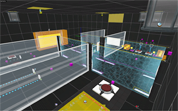
Well, for anyone who wants a door like those from portal 1, HERE IT IS!!! It opens! It closes! It can be used to seperate areas without using the normal door and confusing idiots! NEW!!! Now it even sounds like a door!! Just chuck it in the map and send it an input, like any instance. Feel free to open it up and stuff round with it, I don't care. Oh and before you start whigning YES it is a portal 2 frame, the portal 1 frame doesnt have the correct skin. And quite frankly I couldnt be bothered getting it from the portal 1 files.

Hammer Addons
Various modifications to the game's files to improve mapmaking in general. FGD Changes: - Skotty's FGD stuff (With some tweaks) - New icons for point_templates, point_server/clientcommands, point_teleport, etc - Credit to :The TF2 Ultimate Mapping Resource Pack, ZPS: Supplemental Hammer Icons and ts2do's HL2 FGDs for the various icons. - Fake keyvalues for turrets, cubes and funnels that let you choose the model that will be displayed in hammer. - Rendermode, EnableDraw/DisableDraw commands, Parenting properties etc added to many items if they can use them. - Custom editor model for prop_indicator_panel, making it easy to ensure perfect alignment and correct orientation for both modes. - Custom model for prop_portals and placement_helpers to show the orientation easier (arrow points upward) - More Auto Visgroups to categorise basically everything (test element only visgroup, antlines, buttons, instances visgroup, basically anything I could think of) Vscript changes: - Choose a random elevator video in unpublished maps (video_splitter.nut) - In unpublished maps, play a random Cave DLC2 quote. (dlc2_vo.nut) - Onscreen notification when the vote screen is triggered (voting_dialog.nut) - Script to change models to custom versions for prop_buttons, prop_weighted_cube (ts_model_change.nut) Models: (these are mostly reskins/recompiles of Valve models and originally made for PTI styles, but they could be useful for pure Hammer maps.) They're all in props_ingame/, excluding the underground companion cube which is in props_underground/. - [p1_button()] P1 button modified to work correctly with prop_buttons - [under_ccube()] Old Aperture Companion Cube (set the cube to the antique type) - [rusty_reflect()] Rusty reflection cube with correct gel skins (Use on a cube that was set to the clean variant) - [rusty_box()] Version of the normal cube with rusty skins in place of the normal one (Allows having a rusty cube show gel skins) - [p1_cube()] P1 Storage/Companion cube (with additional skins to match the P2 metal_box model) - [p1_ball()] P1 sphere (with gel skins) - P1-inspired laserfield emitter (Black exterior with red "lights") - Variations of the PeTI arm_4panel, arm_4panel_glass and arm_8panel models with the other arm64 skins (dirty, red lights, etc) To use the cubes or button, set "ts_change_model.nut" as the entity script and RunScriptCode the appropriate function. For the other models set as prop_dynamic. Instances: - A P1 pedestal button which uses the custom model as well as the more mechanical P1 tick-tock sound (tspen/p1_button). - A nodraw room to precache the custom cubes, and p1 pedestal button.
Portal 2 Faith Plates Example
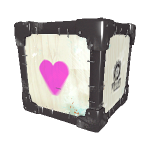
Example map demonstrating the basics of faith plates in Portal 2. Includes both source vmf and compiled bsp.

Basic mod for playing .vpk files
You can play games distributed as .vpk files by installing them in the addons folder of a mod. This is a bare bones mod you can install if you don't know how to make your own. You can't use the in-game menu to start a remote coop game. Apparently, the Steam servers have a problem connecting mods. You can do it from the console, using the following commands: On the host machine: map

Old Aperture portal gun reskin
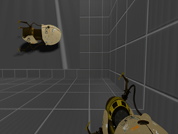
A re Skin of the portal gun with the Old aperture portal gun!!!!