Portal 2 (Other files)
Miscellaneous Portal 2 mods, assets, tools, and non-map downloads.
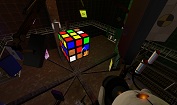
Portal 2 - Rubik's Cube
I stopped to wonder one day, "Can I make a Rubik's Cube in Portal 2?". I soon decided that yes, yes I could, and after a great deal of logic work, here I am. The level's a bit crude but after all this isn't about the level, it's a about a fully functioning, fully solvable Rubik's Cube in Portal 2. Let me know what you think!
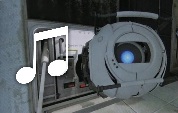
Scientific Precision
This file contains a number of loops of music in the style of Portal 2, for people to use with the game's "dynamic music" system.
PTI element: Living panels, 64x64 and 128x128
Wacky panels that do stuff. 64x64 and 128x128 sizes are provided. Inputs: * Start deployed -- Inverts the direction of the panel's animation. * Timer & Autodrop & Start Open -- Choose which animation to play, see below. * Button type -- See below Button types (64x64 panel): * Weighted = White or black panel surface, depending on whether it's positioned on a portalable surface or not. * Cube = Glass surface. * Sphere = Intangible skeleton: Just the skeleton of the panel, without surface, also does not clip the player. Button types (128x128 panel): * Weighted = White or black panel surface, depending on whether it's positioned on a portalable surface or not. * Cube = Glass surface. * Sphere = Portal 1 style metal wall surface. Use signal inputs / connections to activate the element. The panels contain a built-in AND gate just like the standard elements do. Of course you don't need to activate the element at all. Just affix it in a particular pose to provide a platform of your choice. There are 68 different animations provided. The animation is selected using the Timer value, the Start Open checkbox and the Autodrop checkbox. The list of animations is detailed in the README file provided in the distribution package. It is rather difficult to try to video-document all the animations that this object can play, but here's a sample picture which should serve to at least pique some curiosity. Unless you choose the "skeleton" type of panel, this panel is fully blocking and can be even used as a lift / piston platform for objects and for the player. The arm of the panel is only partially tangible, and only in some animations. It is a bit difficult to generalise for the set of animations present here, so the tangibility is disabled for most animations where the heuristic method does not work nicely. The object also does not contain a crush kill trigger, a portal fizzler, an object fizzler, nor a portal bumper. This is intentional. But it may lack other things that are wise to have (hint brushes? shrug), because I just began learning to use Hammer a few days ago, and I wouldn't yet know anything about those. Note: These panels have the "adjustment gizmo" which allows them to be placed at an offset much like the laser components -- except that it does not work. Sorry about that! Just use always the center position. If anyone has good ideas of how to fix it, it would be welcome. (This comes from the 5 positions method. The 8 positions method does not work, because the embedding pit would not be relocated correctly together with the element.) However, you can use the adjustment gizmo to rotate the element around. Just point it towards some edge of the voxel, and then place it back to the center. The object will retain the new orientation. Note: The platform may move within the first second when the map loads. Sorry about that. This may be fixed in a future version. The panel contains from 21 to 25 entities depending on version. The skeleton version has the fewest entities, and the large non-glass ones have the most. And finally, the in-editor symbols for this object are currently the laser emitter for the small panel, and the piston top for the large panel. I have not yet developed the skills to change the in-editor graphics. Download here: http://bisqwit.iki.fi/kala/ptal2/livingpanels.zip
Door Frame Instances
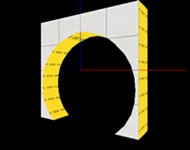
Thought people might appreciate these, in case you ever want a frame for the test chamber doors. They align nice and on-grid, and are 128x128x32. Includes clean and dirty variants of black, white and both (black one side, white on the other). They are func_details so don't forget to seal them. Some are cut down the center in case you want half-black and half-white on each side, in which case Edit Instance > Save As. Just plonk 'door frames' in your instances folder or wherever and you're set.
Reconstructing Panels
Just add a func_instance and your good to go with reconstructing panels. Includes an example map. Easily can be retextured by opening the instance with hammer. Please rate! Enjoy!
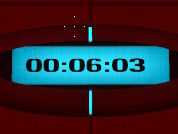
Portal2 Neurotoxin map-example renaFUSED
I made this to show how to use the deadly neurotoxin with the use of Logic_timer, env_smokestack, trigger_hurt and vgui_neurotoxin_countdown This download comes with both the bsp and vmf files so you can learn how to make your own. Enjoy -FusedCore
Singing Turrets PTI Instance
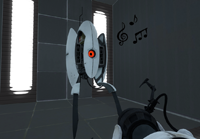
These instances replace the PTI turrets so when they deploy, they will sing to you! This can be ideal if you want to put a little easter egg into a PTI map, or just for fun. The turrets can be repositioned from behind, but once they see you, they cannot be moved. Readme included for installation help. Anyway, I originally made this as a fun little thing to mess around with, but a few friends requested a download, so I decide to upload it here if any of you guys want to use it.
TWP Advertisements
These are a number of advertisements which have been made by TWP members for the advertisement of our site in game! Well done to everyone who made some awesome stuff. Files included are: Ratman TWP scrawl by zivi7 TWP logo model by Skotty Elevator Animation by PixeledFace http://www.youtube.com/watch?v=SKUdo14NXZM&feature=player_embedded Elevator Animation by Habzs http://www.youtube.com/watch?feature=player_embedded&v=WlIJv7eUie0 Lab monitors by greyKarel Aperture Posters by Brainstone Elevator instance and script by ChickenMobile For further instructions on how to use these advertisements and place it in your map, look at the relevant ReadMe.txt included inside the download. Make us proud TWP, advertise us!

Wall Tile Randomizer
Ever get tired of cutting up your walls to create tile variation? Wish there was a way to automatically generate randomized walls? Now there is! Just extract the 7z, run WallRandomizer.exe, and either copy the contents of the output vmf or use it as an instance. --NOTICE-- You WILL need to install Python 3.3, available at http://www.python.org. The WTR will NOT work without the dlls from it, which I cannot distribute. Features: -Customizable size -Either white or black wall -Clean or dirty variants -Enable/disable of certain tile sizes -Automatic texture alignment Please note that this is in very early testing - just something I whipped up in an afternoon. The algorithm is also a tad slow and can lead to some odd results. Please leave feedback about any bugs you may encounter. Changelog: v1.1 -Fixed texture alignment -Added clean/dirty variants -Added input checks (no more putting "fish" as the width ) -Improved and optimized randomizer algorithm -Added texture arrays, making it possible in future versions to add a text file to change textures -Other miscellaneous bugfixes v1.1.1 -Fixed clean wall bug (thanks protoborg and tile) v1.2 (A day late and a dollar short, sorry) -Fixed side alignment issues -Upgraded from Python 2.7 to Python 3.3 -Replaced crappy 15-minute-implemented brush writer with PyVMF
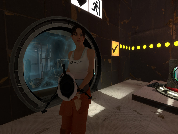
Character Selection Room
A Character Select instance to allow the player to pick which character they play with