Portal 2
CG_GelPuzles PRE FINAL release! Title needed!
Alright here's the third release and ninth incarnation of CrazyGuy's Untitled Gel Puzzles. Chapter 8, Three chambers centered around the physics paint, and using the gel in ways that the original valve maps did not. Difficulty medium to hard. in area 1, the way OUT of the top to the next area is just above the three panels that fall down; you must bounce out. This is not a spoiler, I intend to have Wheately lines to hint at it. I have ADDED the much anticipated transition sequence between areas 2 and 3. I really want some Wheately lines to go with it, but for now just rememeber AFTER COMPLETING AREA 2 LOOK UP AND OUT. Also, a strange bug but for some reason the window on the top of the third chamber does not always open. If that happens for you, part of the exterior of area 3 is meant to see into the interior after the sequence ends, but sometimes that portal closes off for no aparrent reason. I KNOW THERE ARE FRAMERATE ISSUES IN THE TOP OF THE FIRST CHAMBER. I'm sorry about this but I've already done as much optimization as I can for that area. If anyone has the time they could look at the included .vmf and see if they have any suggestions. Please let me know what you think, and especially if any cheat solutions can be found. If you get stuck on area 3, [spoiler]did you know that painting the UNDERSIDE of a lightbridge paints BOTH sides? yes, the blue paint does bleed through lightbridges.[/spoiler]
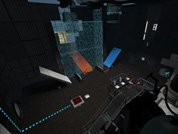

Gel training
Walkthrough at my channel: http://www.youtube.com/user/cakeyfied?feature=mhee

[CO-OP]Illumination
A series of maps with varying difficulty that I am working on. This is my 1st major project with Hammer. To-DO list: Re-make that godawful spawn room Fix His voice Make a more logical exit from the map Optimize
Underground Walkway 128 Caged
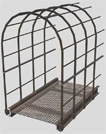
This is a caged walkway used for underground areas with a length of 128 units. You can use it for different purposes. It has full physics. Additional there is a end-model to close its open end if necessary. Requested by Moth.
sp_companion
I wanted to try to make a mini story where you need to get your beloved companion cube. I need to change a lot of things and add sound effects, more lighting and animations also need to change some of the textures and decals. I tried to have some dirty aperture as well as clean aperture and I need to add game text. It is not a hard map but hopefully people enjoy it anyway
Testchamber 14 Remake
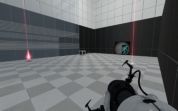
A level inspired by the level originally in Portal 1, but with a new twist! Additional Screenshots: Hallway Cube Room Laser Room
Underground Timer
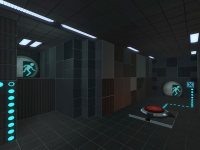
This is an instance of a robust underground timer. This timer can count up or down from 1 - 99 seconds. underground_timer_counter.vmf The $UnEvent_Relay parameter is the event that is fired when the timer has stopped counting. This event should be triggered in one of the clock instances. This instance is used for both buttons, however the buttons will determine whether it counts up, or down. underground_timer_but_countdown.vmf $time_units is the number of seconds of the unit column $time_tens is the value of the tens column (This is the only way I could figure this out for the countdown timer without adding some sort of script.) The $Event_Relay parameter is the event that is fired when the timer has started counting. This event should be untriggered in the clock instance. Please note: I have added entities that will work out the number of seconds the counter needs to count down from $time_units and $time_tens, hence the large amount of logic_cases underground_timer_but_countup.vmf The $Event_Relay parameter in the 'Timer instance' is the event that is fired when the timer has started counting. This event should be untriggered in the clock instance. The $time parameter should be set to how many seconds it should count up to Known Bugs: Putting both 0 and 0 for the left and right number icons will cause a rip in space, however this shouldn't happen as you wouldn't want a 0 - timed counter How to place in your map: Create a func_instance and change the vmf path to "underground_timer_counter.vmf" Name this instance Create another func_instance and then change the path to one of the button paths (either underground_timer_but_countup.vmf or underground_timer_but_countdown.vmf depending if you want it to count up or down) Set the button's fixup name value to the same of the counter instance If you are using the countup instance, put a number value for the replace value $time to how many seconds you want the counter to count up to If you are using the countdown instance, put the individual values with each a 1 digit number which will represent your double digit number. e.g. "$time_tens 1" and "$time_units 5" will make the timer count down from 15 Using the $Event_Relay replace value in your button, make it point towards a logic_relay which will trigger the event when the counter starts. This must include the name of the prefix PLUS the name of your relay otherwise it will not work. e.g. clock_1-TRIGGERNAME (This is the name of your relay outside the instance) Using the $UnEvent_Relay replace value in your counter instance, make it point towards a logic_relay which will un-trigger the event when the counter stops. Same as the button's relay this MUST INCLUDE the prefix fixupname as well as the name of your relay. e.g. clock_1-UNTRIGGERNAME (This is the name of your relay outside the instance) Enjoy the use of an underground timer... WOOOT If you are having trouble... Please do not hesitate to ask for any help either through a PM to myself or by posting a comment inside the instance thread.
Interlink
A small, challenging map. Thanks to grayarea for playtesting Workshop link: http://steamcommunity.com/sharedfiles/f ... =235438315 The Wheatley dialog mish-mash was inspired by CoolDudeClem's Crazy Chambers: http://steamcommunity.com/sharedfiles/f ... =194726504
DaMaGepy's P2 map #4 (WIP: 29%)
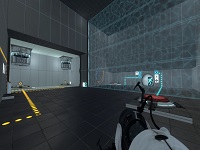
Hi there. This is the very WIP version of my map (there will be 5 room) of my next 4th Portal 2 singleplayer map, for popular demand, a harder one (compared to my previous ones) This map will have 4+1 test. Since I'm afraid to make hard maps (but there is a big demand from "pros"), I will make it a hub, so if someone got stuck on a puzzle, can just skip it and move to the next room and still have fun. From a central half-outdoor area, you can go 4 different direction and complete the rooms in any order. Each will give you an uniquely shaped indicator piece (the concept that I introduced in my latest #3 map) and using those to fix an indicator that will unlock the final puzzle on the surface. I need some feedback about the difficulty. It's still a WIP, so havent done any detailing or light-finetuning yet, however everything works fine, and the intended solution does not need any ninja skill, hard jumps, cube flipping etc. I have this room (and the other 4) on paper almost since Portal2 launch, but if its too hard, I'll reduce difficulty. Also if you stuck, or finished it and you feel may not solved it the intended way, check out the walkthrough video: SPOILER! Room1: http://www.youtube.com/watch?v=X7WXeAapEqM Room2: http://www.youtube.com/watch?v=C7tMT7_AcWE Also send feedbacks and errors/bugs, but nothing about the texture style or alignment or the rest. As soon I fixed this room and gave its final look, I'll continue working on the rest of the map, and will not post it till fully finished. Updates: - Added "smart" autosaves - A very WIP version of the second room. One portal bug: the redircube becomes ethereal after been near the end of the funnel, dont know why (and only that cube). Destroy it to fix it, the new one will be solid again. - take the door behind your spawnpoint to get back to the first room
Moth's Useful Instances
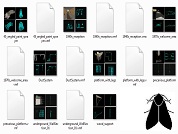
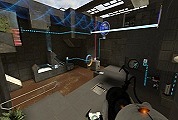
Some useful instances I made, that can serve two purposes: * Quickly add nice things to your map * Deconstruct, use bits, make new bits, gain UNDERSTANDING My plan is to expand this as I make more stuff. Each instance has an accompanying screenshot of all 4 Hammer views, so you can see what it looks like without launchiing any tools. Click 'show' below for a full list of contents: [spoiler]*** ApSigns (1 instance) aperture_1970s_gantry ----------------------------------- 1970s style Aperture logo, suspended from solid metal beams, with ambient spotlamps *** Destroyed (2 instances) DestroyedWall ----------------------------------- Off-grid deformed black tiled wall DestroyedWall2 ----------------------------------- Black tiled wall with missing pieces and bts back panels *** Dynamic (2 instances) glass_platform ----------------------------------- template for a telescopic moveable plat. supports players, turrets, cubes, etc Huge_Fan ----------------------------------- complete wall assembly that casts epic shadows. Starts on at map spawn. *** Factory (6 instances) dlc1_RoobotArms ----------------------------------- very small lab section with arms on a shelf, from dlc1 Freight_Boxes ----------------------------------- Motorized railed transport filled with metal containers glass_partition_01 ----------------------------------- A 3x3 detailed glass-panel wall section glass_partition_withDoor ----------------------------------- As above, with a doorway tubular_elevator ----------------------------------- Quick and dirty elevator. Scenery only but easily converted to a func_movelinear turret_storage ----------------------------------- Very tall storage area for turrets, with accompanying machinery. *** Gameplay (2 instances) RampArms_static ----------------------------------- Ramp made from panel arms. Some destroyed or missing. RampArms_static_collision ----------------------------------- Clip brush to exactly fit the above *** Lighting (6 instances) old_wall_light_300 ----------------------------------- underground-style lamp with sitably coloured light entity (300br) trussbox_curvedLights ----------------------------------- many very-wide underground-style floodlights, angled towards a central point underground_array_tower ----------------------------------- Used extensively throughout underground maps underground_array_towerLightArm ----------------------------------- Extra arms for the above underground_array_tower_leaning ----------------------------------- Alternative underground_array_tower with no arms *** Office (8 instances) big_empty_office_1970s ----------------------------------- complete 1970s style office building with one doorway. Just add furniture! chair_and_desk_1980s_XX ----------------------------------- 1980s style desk, chair, desk lamp, telephone, computer - 4 variations lab_furniture_01 ----------------------------------- Block of machines and a whiteboard observation_office ----------------------------------- Small 'control room' with glass windows, houseplant office_cube_3sided ----------------------------------- Template for making custom-sized offices/control rooms *** Spawns (1 instance) PlayerSpawn_in_DropTube ----------------------------------- Player spawn, with full portalgun-- falling intro, with a tube that auto-opens. *** Underground (8 instances) 45_angled_paint_sprayer ----------------------------------- Paint-pipe gusher, angled 45 degrees - as seen in a4_portal_intro map 1940s_reception ----------------------------------- Complete relaxation area in a 1940s style. 1970s_welcome_area ----------------------------------- underground-style elevator reception DuctSystem ----------------------------------- Miscellaneous hanging system of ducts platform_with_legs ----------------------------------- metal scaffolding with chipboard panels precarious_platform ----------------------------------- Hanging underground cube_dropper with suspended platform. underground_WallSection_01 ----------------------------------- Various brushes & models, stuck together to make an interesting underground wall[/spoiler] Feedback is welcome, please rate this and post your comments. I'll post when I update. --------------------------------------- New in r2: --------------------------------------- * Huge Fan that casts epic moving shadows * Tons of bts office stuff * Underground lighting * Factory stuff! File Name: Moth_instances_r2.rar File Size: 6.39?MiB Moth's Useful Instances